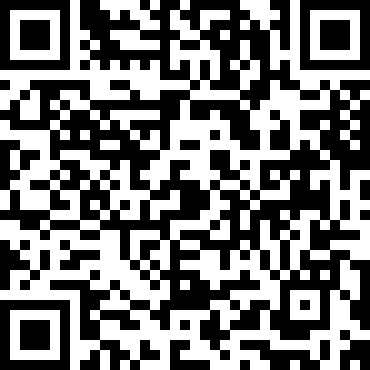
@technotramp, The QR code has an error and does not give a correct URL.
The address has your nickname and followed, without a space after the address
technotramphttps://mastodon.social/invite/......
instead of
https://mastodon.social/invite/...... which already points to your account
This naturally does not work as is by clicking the QR


@Catweazle

Hello, #friend!

#Thank you very much for the #warning! So, where you think there is a missing #space, there should be a line #break. The strange thing is that it works fine in my #reader. Anyway, I will investigate and possibly make a #correction. Thanks again very much for the #feedback.

@technotramp, a linebreak in a URL don't work either, anyway I am not very convinced by QR codes, nor by shortened links, since the original URL is not visible, which can lead to unpleasant surprises, as often happens to end up on an "unexpected" page.
In Mastodon don't matter the lenght of an url, it count by default as 23 signs.

@Catweazle

That's very #strange. To me the #links are complete after #loading and the #indentation works for me too. Can I have a #personal #question? Can you please tell me what #reader you are using? Ideally and operating #system or at least one of the above. I'd be happy to #fix it, but I can't bring up the #errors. I've tried two readers at the same #time and it's #always been ok..

@technotramp, I use the Vivaldi Browser and the extension QR Code Scanner (https://github.com/max-muoto/google-chrome-qr-code-scanner) in Windows 10.
Maybe it don't cut the entry before the Linebreak, which in an URL anyway don't make sense, and add it to the Url, which naturally don't work. Anyway for linking with QR adding your Nick before isn't needed, the rest of the URL is correct, but it make more sense to put the URL of your web, for other Fediinstance it's redundant, it is below your Nick itself, as you can see in mine.
GitHub - max-muoto/google-chrome-qr-code-scanner: QR Code Scanner Extension for Google Chrome built in JavaScript. Allows you to pull up the link for a QR code on a webpage or PDF.

QR Code Scanner Extension for Google Chrome built in JavaScript. Allows you to pull up the link for a QR code on a webpage or PDF. - GitHub - max-muoto/google-chrome-qr-code-scanner: QR Code Scanne...

GitHub

@Catweazle

The #QR #code is of type "#TEXT". Definitely no #HTML, #Markdown or anything like that. The #links are probably shortened by your QR reading #software. And it probably has #problems with #line breaks as well. That's why I'd be interested to know what you're using. 😉

@technotramp, it's possible, using the Vivaldi QR generator for your instance I got this, which lead to your profile in your instance. Your QR show this content, which for sharing an URL don't make much sense

(It open in a new tab)
https://file.coffee/u/Rm7UnnNxs3DHfVDUgmvT_.pdf

@Catweazle

#Ironically, I had a #problem #loading your #QR #code from #Vivaldi. It was due to the #missing #contrast #frame. There needs to be at least a #little #bit of #white around the #perimeter. The QR you are posting, which is already #missing #everything at first glance, is of a different type. Not "#TEXT", but "#URI".

@technotramp, in this QR reader I can read the URL from the Vivaldi QR imediatly, anyway, the QR code is to share a Link, the added text, or anyway is cutted by the reader, depending which you use, or if not link your page with this can be problematic, depending the reader which is used. The sense is to transmitt an URL with QR, not an text.
https://qreader.online
Qreader | Online QR Code Reader

Online QR Code Reader & Generator

@Catweazle

I have a #different #opinion on #what should be transmitted by #QR #code. A QR code can carry up to 4kB of code and there are many types for this purpose. For #example, the #text type. For me, the #fault is clearly on the side of the #Vivaldi #reader #software. It is not the fault of the QR code that it cannot read it #correctly. I mean that in a #good #way, of course. 😉

@technotramp, naturally, the Vivaldi QR it's to share an link and this in my opinion is what it shall do, for sharing text or any other file (images, video, multimedia, documents, text of any type) I use File Coffee, as you have seen in my toot above.
(free, private (EU product), encryted, 15 Mb without account, with account (to access your uploads) 30Mb max per file)
https://file.coffee
file.coffee

File sharing, simplified. Start uploading today, no account needed. All for free.

coffee

@Catweazle

I #understand. On the #other #hand, a printed #QR #code offers the #possibility to conveniently #copy #text or #data. That's the #point of a QR code for me. No #cloud will naturally offer such an #option.

@technotramp, the mencioned online QR scan read the full content of your QR, which you also can copy and print it out, not so easy for someone using his inbuild QR reader of his mobile, which can have the mencioned problems.
But for tastes are colors, as they say in Spain, it means, the needs of each one are different. For me personally, QR to share text isn't the best option.
Qreader | Online QR Code Reader

Online QR Code Reader & Generator

@Catweazle

It looks like #Vivaldi doesn't count too much on the #fact that there might be #something other than a #link in the #QR. In that case, I'll take the #liberty, quite #immodestly, of using a better #reader.

@technotramp, addng that the QR reader I used isn't from Vivaldi, it's an extension, only the Generator is inbuild in the adressbar of the browser by default

@Catweazle

In that case, it probably makes sense that the #extension assumes a #URI #type, but it should at least say that it is a #QR of a different type. Instead, it tries to #read the QR code as a URI type, which I think is the extension's #issue.

@technotramp, yes, because of this I have also the online reader in my bookmaks, it reads every type of QR
https://qreader.online
Qreader | Online QR Code Reader

Online QR Code Reader & Generator

@Catweazle

The #online #QR #reader #you sent me #works #fine. It just doesn't like the #double #line #breaks. That's #fine with me, as #long as the QR can be #read relatively #well using the #software.

@Catweazle

Anyway, #thank you again for your #feedback. I'm very #glad for it. It is an #experience for me. 🙂