 Sydney
 Mastodon
Did you know you can verify your account on Mastodon? It's free, privacy-friendly, based on open web standards, and available to everyone!

 baccusbee
@Mastodon this is why I love you guys!
 xyfly
xyfly 
 Al-khalipha
 Dieu
Dieu@Mastodon you're still free to donate $8a month for any cause you care about.
 Tanquist
@Mastodon
Crap. I don't have a website. You'll just have to take my word for it. I'm me.
Crap. I don't have a website. You'll just have to take my word for it. I'm me.
 Wohao_Gaster
@Mastodon what does it do?
 Colin Cogle 🔵
@Mastodon You can also add a checkmark emoji, blue circle emoji, or something like that to your name, if you really want a little icon.
 Steve8282
@Mastodon I thrive on being a mystery.
 Caf ☕
Caf ☕@Mastodon it’s not working on one of my site it’s sooo weird ;)
 Odin
Odin Wendy Lady
@Mastodon maybe @gailsimone can finally be verified here! I don't believe she exists otherwise. 😌
@Mastodon @gailsimone damn. That's not even the real Gail.
 RossS
RossS@Mastodon Not quite everyone...one needs a website first...
 Robert von Burg

@satchmo35 @Mastodon or an account somewhere, like github, where you can set a profile field.
 Sean
Sean@Mastodon I would like to see more flexibility for #Mastodon #verification. There should be an option to use a #DNS entry as an alternative as is typically done on other #Internet platforms, including #Apple and #Proton and #Google. While individuals may own domain names, for various reasons they may choose not to pay for website hosting. The current system disenfranchises these people. For example I own https://seanbray.ca and have it configured for e-mail and domain forwarding.
 MattCaff
 Dave Kirk
 Sumocat 🐈⬛
@Alkhalipha
I started a new blog on my Google account just to get the verification check. Each post is a web page, and this post is where I added the link.
https://sumocatstodon.blogspot.com/2022/12/verified.html
I started a new blog on my Google account just to get the verification check. Each post is a web page, and this post is where I added the link.
https://sumocatstodon.blogspot.com/2022/12/verified.html
 Loop
Loop@Mastodon ...but do I get a BLUE CHECKMARK?! ;)
 Malcolm Bastien
@Mastodon This is great!
@Mastodon Don't have, or need, a web site. Oh well. 🙁
 PHX Rail Food
@Mastodon I have tried numerous times to do this without success. Is there any more detailed documentation or troubleshooting available anywhere?
@phxrailfood @Mastodon One thing that isn’t immediately obvious is that you need to set up the link on your site first, and then add the link to your profile here. Additional info:
https://docs.joinmastodon.org/user/profile/#verification
https://docs.joinmastodon.org/user/profile/#verification
 Yavuz Selim
I assume the verification will happen on phxrailfood.com. It seems to be a WordPress-based website, so you would need to edit the header.php in the Editor (via Dashboard -> Appearance). Or try to find a plugin that makes it easier.
In any case, add the following in/between <head> ... </head>:
<link rel="me" href="https://epicure.social/@phxrailfood">
And if I remember correctly, edits to the template (in this case header.php) can/might (?) be reset after update/upgrade of WordPress is installed. So keep that in mind; of you 'lose' the verification you will need to add it again.
@yavuz Thanks. If I ever figure out now to edit the header without wrecking something else, I might try that.
Step 1: Install and activate the plugin "Header Footer Code Manager" using the 'Add new' functionality in the Plugins menu in your WP Dashboard.
Step 2: Go to the plugin page ("HFCM" in the left menu) and click on the "Add new snippet" button.
Step 3: Give the snippet a name, make sure the location is "Header". Add your personal verification code.
@yavuz Thanks. Using plugins would require upgrading to a WordPress business plan. I'm not inclined to do that just for Mastodon verification, but if I ever upgrade for other reasons, I'll keep your advice in mind.
Ah, your using WordPress via WordPress.com, it's not a WordPress installation hosted on your domain?
But indeed, what you've said makes sense.
@yavuz Correct. I don't host. If I did, I'd have more flexiblity, but so far it hasn't been a move I've needed to make.
 Daniel Nawu
@Mastodon I knew. But I didn't know you use #DarkPatterns to trick people into signing up on mastodon.social https://mastodon.ar.al/@aral/110236405361940166

Aral Balkan (@[email protected])
Attached: 1 image Dear @[email protected], Please reevaluate your decision to incentivise centralisation on mastodon.social in the official app. This is the sort of design a VC-funded startup would implement, not a non-profit acting in the interests of a healthy commons. I’m sure you don’t want mastodon.social to become mini-Twitter and you don’t want to become mini-Musk. That’s not how we win this. More instances, not larger instances is the key. https://mastodon.ar.al/@[email protected]/110233282943673558 #decentralisation #fediverse #staySmall
 FeralRobots
@tempus_fuckit
It's definitionally not a #DarkPattern because it's very clearly signaled in the UI.
For it to be a dark pattern, you'd want to be able to propose some benefit that accrues to mastodon.social specifically from people signing up on mastodon.social.
 Ted M. Young
@Mastodon Hah, wow, those "instructions" are **terrible**.
"Put a link to your Mastodon profile on your website or webpage. The important part is that the link has to have a `rel="me"` attribute on it. Then edit your Mastodon profile and put the address of your website or web page in one of your four profile fields. Save your profile, that's it!"
What now? Website or webpage (is there a difference)? Where do I put the `rel="me"`? Does it matter? What if I'm using Markdown to generate the link, then what? Oh, and "website or web page", wait, is it "webpage" or "web page"?
Can you maybe provide an example or two? Or a link to where this is already documented? I know what you're trying to do, but a bit more hand-holding here would do a world of good for those less technically inclined.
 Steven Sandoval
I put the `rel=` key=value pair into an anchor tag with an `href=` of a hyperlink. Example: the sidebar markdown file of my ikiwiki blog at reboil.com :
https://reboil.com/gitweb/BK-2020-08-1.git/blob/5dc54d944d24710cc0833eb9a15a0c3e3e35c35f:/sidebar.mdwn#l1
@jitterted @Mastodon I can get away with this because Ikiwiki passes simple HTML tags like the following from the markdown to the rendered HTML unchanged.
```
<a rel="me" href="https://twit.social/@baltakatei">Mastodon</a>
```

Steven Sandoval (@[email protected])
296 Posts, 54 Following, 18 Followers · /ˈbɑːltəkʊteɪ/. Knows some chemistry and piping stuff. TeXmacs user. Twitter refugee.
 Andre_601
@Mastodon it's nice, but sadly can people still fake it using the classic typo domains like f.e jolnmastodon(dot)org.
Not a foolproof thing.
Not a foolproof thing.
 Sean
Sean@andre_601 nothing is foolproof.
@Craktok That is true. Tho for me, in terms of building trust is this system not that much better than a verification system that had people behind it to check.
In a time like now where scams and phishings are as high as they can be and with a system like Mastodon where everyone would be able to create an account with the exact same name as someone else, just on a different instance, is such a simple verification (I honestly can't even call it that) not a good or at least safe way to avoid scams and alike.
Of course a verification involving people to do the checks would have a chance of bias, corruption, etc. and would also go against Mastodon's core principle of de-centralization, so it's not the best option either...
Like you said. Nothing is foolproof.
But that's just my opinion here.
@andre_601 then I’d say that as with every other thing on the internet be wary of giving someone information you wouldn’t want the world to know and don’t give money to people on the internet. Then live your life.
 maddie (MOVED!)

 victor tsaran
@Mastodon Free, you say? I am not interested′ :) :) :)
 Konstantin Weddige
 dugite-code
@Mastodon Did I know? No I did not!
 ♧小卫♧
♧小卫♧@Mastodon a lot of us dont have website
 Rick McCharles ✅
@Mastodon
Verification is not clearly explained. Could that be edited with a full example?
Verification is not clearly explained. Could that be edited with a full example?
@RickMc @Mastodon Somehow, you need to get the following into the HTML source of the webpage pointed to by your website URL:
```
<a rel="me" href="https://mastodon.social/@RickMc">Mastodon</a>
```
@RickMc @Mastodon I don't use WordPress, but if I did, I would probably start with this video instruction to add the "Link Rel" that talks to Mastodon: https://g13g.blog/2022/11/09/how-to-verify-your-wordpress-site-on-mastodon/
 Danial Zandi
@Mastodon until you sell it to Elon lol
 Zee
Zee Matt Edgar
@Mastodon Great to see this feature being promoted. Mastodon link verification is a simple, elegant, and web-native solution to a complex problem
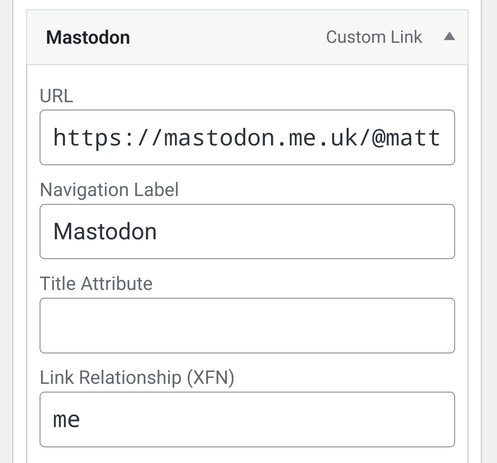
I wonder if the guide could be enhanced with step-by-step help for people using popular personal website hosting such as #WordpressDotCom?
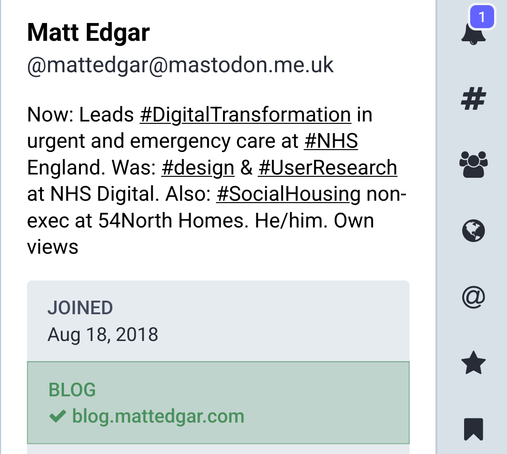
I figured out how to verify with a custom menu link but it took me a while