Hi, meet HiDock!

It's a free Mac app that lets you set different Dock settings for different display configurations

https://hidock.app

HiDock, for Mac

Custom Dock settings for different displays

HiDock, for Mac
@rafa there’s a little typo here.
@rafa ooh that’s awesome. Gonna give it a try
@arpit let me know if it works at all! 😂
@rafa can’t wait to get home and try it
@MuseumShuffle let me know if it works!
@rafa I will! Be home soon.
@rafa Working great! I also love the little touch of how it keeps bouncing back and forth a little when you go in/out of "meet the developer" mode.

@rafa looks great! Thank you!

(Ps. What if when you clicked on the handmirror icon, it popped up a little fake app window with a quick selfie video like handmirror does?. Or if there was some clever interaction with the other virtual menubar icons 🤪)

@exkclamation sounds like a v2 haha, the hand mirror icon links to its website!

I wrote the landing page in an hour or so 😂

@rafa oh yes… not meaning to put a ton of work on your plate at all. 🤣 Just given your other playful design work, I saw the handmirror icon in the virtual menubar and thought “I bet he did a fancy trick to pop up a window that turns on my laptop camera and actually show it in action…”
@exkclamation it could (like it does on handmirror.app) but it asks for camera permissions and I’m scared people have no context and think I’m creepy haha
@rafa oh right, good thinking. 🤔 What if it popped up a mini ‘preview’ version of the handmirror website on mouseover instead?
@rafa don’t even need it but will be downloading it for the Rafa Experience™️
@pmarques patent pending. Thanks boo 😚
@rafa I thought I was the only one who had this problem.
@paul thanks for checking it out Paul, means a lot to me 🥰
@rafa Nice! Congrats on this new launch! I love your work as always 😊 - By curiosity, you're not on the App Sandbox with this app? This is why you're not on the App Store?
@julienlacr0ix I’m running scripts that call “System Events” to control the Dock, and Apple wouldn’t let me do that even with Sandbox.
@rafa Oh! I see 😊 - Thx for your answer.
@rafa whoohoo! Congratulations on releasing it! Exciting :)
@tomk thank you Tom! This one a very small little one.

@rafa OMG I NEED THIS

Edit: Can I set autohide only on one screen?
@mstankiewicz unfortunately macOS doesn’t allow to make that distinction, it’s so frustrating.
@rafa That’s bad, but still a great job! I will use!
@rafa I made a small donation for going full Aqua on this download button alone.
@birchtree aww thank you so much Matt (I’m a big fan of your work!)
@rafa Likewise! I was seeing so many people boosting your posts I thought I already followed you, but apparently not. Fixed!
@rafa This is the exact app I was looking for a couple months ago. I’m installing it as soon as I get home.
@rafa nice little tool!
@rafa Hi! Thanks for this — love the concept — but it's not working for me. It doesn't hide, show or reposition the dock on my internal or external displays. Any ideas?
@funwithstuff @rafa Hi. It's a great idea but I have the same issue. It's not working with Multiple Displays (the Dock is displayed on only one display). I have a MacBook Air M1 on macOS Ventura (13.1).
@funwithstuff @rafa I just got it. The Multiple Displays configuration is not to display the Dock on multiple displays at the same time. The presentation of this option can mislead.
@Stephmouss @rafa Ah yes, I see now; we both fell into the same trap. I really had hoped that different dock setups on different displays was possible. :)
@rafa such a great idea. Does MacOS let you change which apps are in the dock? Bafflingly, Apple hasn’t made the ability to tie different docks to Focus Modes (work icons vs life icons etc…) — feel like there is opportunity there if it’s technically possible
@rafa thank you for this awesome app! I’ve wanted something like this for years.
@rafa This is a great idea. Thanks for making it available. @mark
@rafa This is an amazing utility!!
@rafa Omg I’ve been wanting this for years!
@rafa @mark I wish  would let us set custom docks for every screen on iOS.

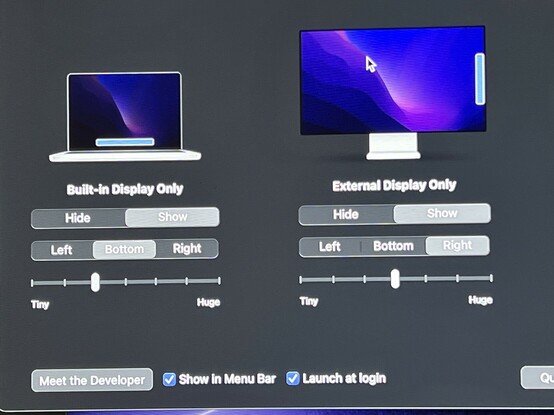
@rafa Installed the app, having a hard time figuring out how it works.

M1 Mac Mini with 2 displays. It doesn’t turn the dock to the right on the right display.

Can I have both docks always open?
@rafa yes! Excited for this one.

Also: If you ever make a Pro version please make the feature be a toggle to switch the app’s name to “UpDock”

Add HiDock 1.0.1,629 by mjgardner · Pull Request #139858 · Homebrew/homebrew-cask

Important: Do not tick a checkbox if you haven’t performed its action. Honesty is indispensable for a smooth review process. In the following questions <cask> is the token of the cask you're submit...

GitHub

@rafa And #HiDock is live in #Homebrew already: https://github.com/Homebrew/homebrew-cask/blob/master/Casks/hidock.rb

You can install it from the terminal now:

```
brew install hidock
```

Why? So you can quickly download, install, and update the #macOS software you need without having to individually download and run through different install processes from a bunch of different websites. (Yours is really nice, though!)

Plus it makes setting up a new #Mac with all your favorites a snap, as @caseyliss wrote here: https://www.caseyliss.com/2019/10/8/brew-bundle

homebrew-cask/hidock.rb at master · Homebrew/homebrew-cask

🍻 A CLI workflow for the administration of macOS applications distributed as binaries - homebrew-cask/hidock.rb at master · Homebrew/homebrew-cask

GitHub
@mjgardner @caseyliss this is awesome, thanks Mark for setting it up! (And hi Casey 👋)

@[email protected] @rafa @caseyliss That is super awesome! Is there a public directory of all apps (without installing)? Couldn't find it on the github page.

Also, my biggest request for setting up my machines is always to save and restore settings of my apps as well. Do you know of a solution for something like that?

Edit: mis-@'ed Mark

@rafa @caseyliss @mjgardner I was just thinking: it should be relatively "easy" to save/store app support files because uninstaller apps will find all those files and then delete them. Instead of deleting, an app (or Cask?) could save the app support files instead. Or am I thinking too far ahead?
@tomk @rafa @caseyliss #macOS installer packages only record receipts for the files they install. You can read and uninstall those with the pkgutil command. But not every #Mac app comes in a package—some are app bundles inside of disk images or archive files (e.g. ZIP, tar.gz), others have more complicated processes. That’s why #Homebrew casks can get complicated and are ultimately full #Ruby scripts. https://docs.brew.sh/Cask-Cookbook
Cask Cookbook

Documentation for the missing package manager for macOS (or Linux).

Homebrew Documentation

@tomk @rafa @caseyliss
• All #Homebrew formulae: https://formulae.brew.sh/formula/
• All #macOS Homebrew casks: https://formulae.brew.sh/cask/

In theory, an app should save your settings in ~/Library/Preferences for you to back up. In practice, some apps also have things in other places, which is why a cask author might customize its `zap` stanza to remove them when requesting a full uninstall: https://docs.brew.sh/Cask-Cookbook#stanza-zap

homebrew-core

Homebrew’s package index

Homebrew Formulae
@mjgardner @rafa @caseyliss I’m getting a hash mismatch with `brew —cask hidock`

@CallMeAl There was probably an issue with your download. First, run `brew update` twice and `brew doctor` and fix any warnings per the #Homebrew troubleshooting document: https://docs.brew.sh/Troubleshooting

Then follow the instructions under Homebrew’s Common Issues document and delete the download before trying again: https://docs.brew.sh/Common-Issues#cask—checksum-does-not-match

The cask’s SHA256 does match the file downloaded from @steve’s website: 874095f3eb1281a1ed4822d4875723daa5cfbb5a248e2c84102bfc58f2b4453e

Troubleshooting

Documentation for the missing package manager for macOS (or Linux).

Homebrew Documentation
@rafa Hola Rafa! Si estás buscando nuevo proyecto para después de este (la acabo de instalar, va fina, me irá bien para los continuos cambios de ubicación) El desarrollador de Spectacle https://www.spectacleapp.com/ Ya no lo mantiene y ha abierto el código del proyecto. Just in case. 🙂
Spectacle

@rafa I don’t connect my laptop to a display, but I want to download this purely for the app icon alone. It’s very nice looking. Nice work on the app!