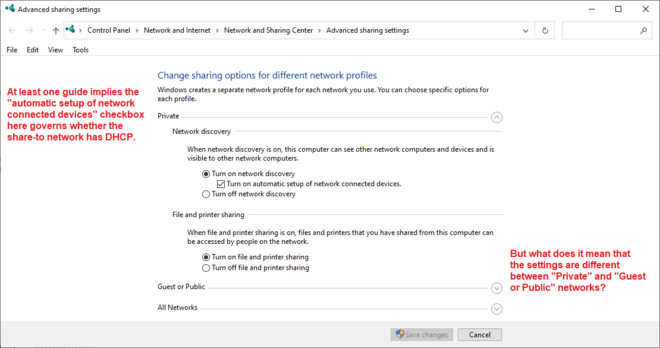
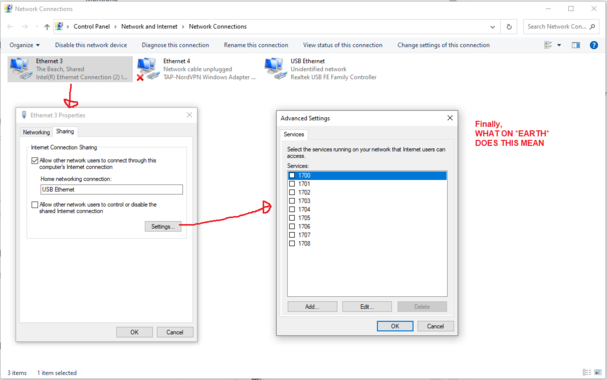
I have a Windows 10 machine with two Ethernet interfaces. For Important Reasons I want to share internet from interface A to interface B. I cannot figure out how to do this. There are multiple control panels governing this, showing non-overlapping sets of information. There are multiple guides on the Internet, some of which I have followed the steps in to no avail.

What I'd love is a list somewhere of what's being shared from, what's being shared to, and on which connections DHCP is active.
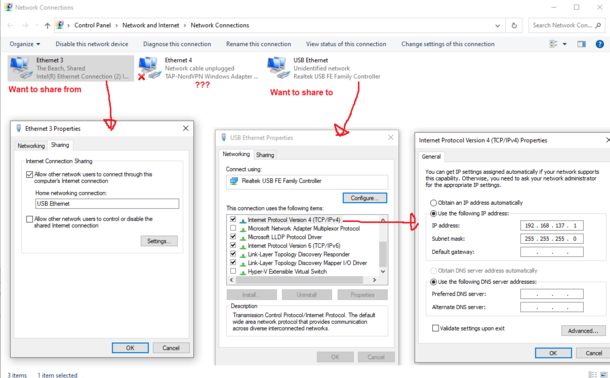
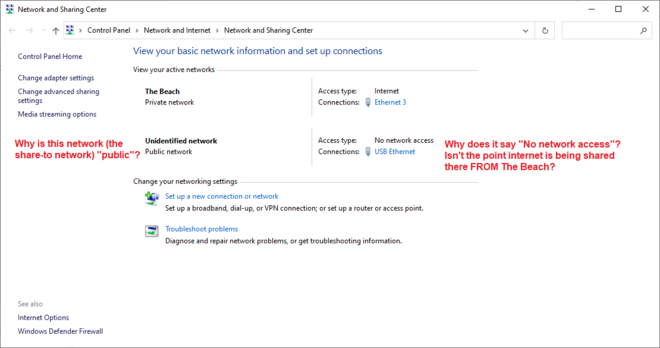
My network topology is
[Windows 10 machine] -> usb ethernet adapter -> crossover cable -> usb ethernet adapter -> test mac [will later be replaced with an important internet appliance]. On the test mac, DHCP doesn't seem to work [I'd prefer DHCP if it were an option] so I've manually assigned the test mac IP 192.168.137.2 and given 192.168.137.1 as gateway. It claims the LAN is active on the test mac, but apps cannot route to the Internet.

I do not know how to proceed.

Update: I realized I actually have a bit of an A-B problem here since what I'm REALLY trying to do is share my NordVPN connection to the Ethernet adapter. I then found there's a guide for this on NordVPN's site!

https://support.nordvpn.com/Connectivity/Windows/1047409882/Sharing-a-VPN-connection-through-an-Ethernet-cable.htm

I followed the instructions and it doesn't work.

UPDATE: I HAVE DISCOVERED THE PROBLEM. AS ANYONE WHO HAS USED A COMPUTER BEFORE WILL BE ENTIRELY UNSURPRISED TO LEARN, THE PROBLEM WAS A BAD FUCKING ETHERNET CABLE
I bought this ethernet cable off Amazon specifically to use for this purpose. I was like damn I better make sure I have a crossover cable. Surprisingly, the usb adapters talk to each other fine with a normal, non-crossover cable? Afraid this won't be the case with the internet appliance that I am *really* intending to hook up once I verify connection works with the mac.

Another update: Although the mac talks fine over a normal cable, the internet appliance *cannot* talk over the normal cable. At least, it doesn't pick up DHCP where the mac DHCP'd fine.

So now I'm ... stuck, I guess. Does it actually *need* a crossover cable but the crossover cable I bought is broken? Is something altogether other wrong? Mysteries abound and everything sucks.

Nightmare updates continue: In fact, the internet appliance DOES WORK, and IS getting Internet, it's just the DHCP doesn't work and I had to manually assign an IP.

...whatever!!! Good enough!!!

@mcc Do you know if the appliance is 100base-TX or older and is expected to be used normally with a switch/hub (so is MDI and would require a crossover)? https://en.wikipedia.org/wiki/Medium-dependent_interface#Ethernet

@mcc yeah, crossover cables haven't been necessary in a while, thanks to autonegotiation

but that's a detail that's slipped under the radar for most people

@mcc The gigabit spec requires auto-crossover-detection, but embedded devices might only have 100mbit, which might or might not
@mcc I've also noticed a lot of ethernet devices have been more permissive about working with patch vs crossover cables, and I similarly dread the day I find myself with a strict port and the wrong cable.
@mcc Modern devices shouldn't need a crossover cable anymore, they'll just detect whether you need one and do the switch themselves.
@mcc You shouldn't (!) need a cross-over cable even with an appliance, as long as at least one side is gigabit ethernet. Gigabit adapters *must* have Auto-MDI/MDI-X.
@mcc True crossover cables haven't been needed since when Gigabit ethernet was introduced. So about 20 years. The spec requires auto crossover negotiation πŸ₯³
@mcc I think crossover being an option on the network card itself got common in the late 90s or early 2000s. I remember it being noted when I was taking my networking course in high school, but they still insisted that we make crossover cables anyway so we didn't get lazy I guess
@mcc
Many if not most adapters and ethernet interfaces switch internally and automatically from cross to non cross so it usually does not matter what cable you have.
@mcc honestly I'm kind of surprised you even found a crossover cable for sale since most people who actually need one these days probably just roll their own.
@megmac What are the chances that this isn't a crossover cable and Amazon simply mislabeled something
@mcc I would say very high chance it's just a normally wired cable (or wired the "alternative" order on both ends) and crossover is just in the listing for keyword spam.
@megmac That's very possible. However, in any case, the cable literally does not work.
@mcc I honestly don't understand how I can have 15 year old usb cables that still work but a network cable can just wake up in the morning and decide to go bad.
@mcc A bad ethernet cable almost delayed the Artemis launch the other day, no joke.
@mcc πŸ˜‚ I definitely feel you. Friends dont let friends (or small children) bend Ethernet cables lol.
@mcc @adrienne this happened to me a few months ago when my dog dug through two Ethernet cables shallowly buried next to the house.
@mcc Do the blinkenlights on both ends of the connector blink? If you ping from .2 to .1? The other way? The "no connection" implies to me the physical layer isnt working. That should operate without network sharing enabled at all. Try different cables? (Most modern Ethernet devices autoswitch and dont need a specific "loopback" cable). Once you can ping each way, then look at network sharing.

@hendric Huh, okay, wow.

So I replaced the crossover cable with a "normal" cable and instantly the mac worked, including DHCP.

That's terrifying! However I'm not sure if it will work with the internet appliance, which is Weird. I guess I'll test...

Thanks for the help.