Patrick Stuart (@pstuart)

버전 2.1.23에서 상태 표시줄(status bar)과 관련된 문제가 발생해 오른쪽 영역이 왼쪽 줄바꿈을 강제하지 않아 긴 상태표시줄을 가진 프로젝트(예: pstuart/barista)에 이상한 터미널 상황을 초래한다는 보고입니다. @claudeai, @trq212, @bcherny에게 원인·의도 여부 확인을 요청하고 있습니다.

https://x.com/pstuart/status/2016716046682439784

#claude #bug #statusbar #barista #anthropic

Patrick Stuart (@pstuart) on X

Something broke in 2.1.23 @claudeai @trq212 @bcherny with the status bar, looks like the right side no longer forces the left side to wrap causing some odd terminal situations, effecting https://t.co/ZrVSYS8ST5 or any long statusbar. Not sure if this was intentional?

X (formerly Twitter)
GitHub - adi1090x/polybar-themes: A huge collection of polybar themes with different styles, colors and variants.

A huge collection of polybar themes with different styles, colors and variants. - adi1090x/polybar-themes

GitHub

Tip #732

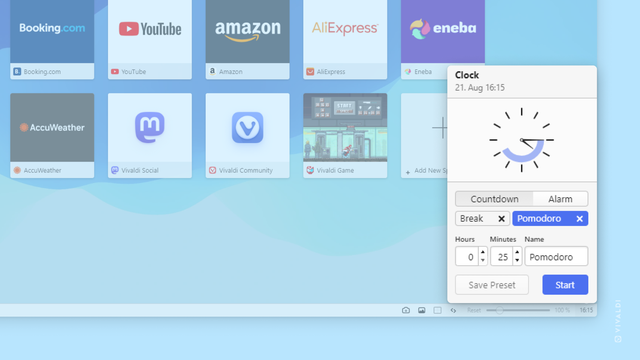
Display the full date and time on the Status Bar.

The clock on Vivaldi’s Status Bar lets you take a quick glance at the time while you’re browsing as well as set alarms and timers for yourself. By default, only the hours and minutes are displayed, but you can add the current date and seconds to it as well.

To display the full date and time:

  • Right-click on the clock.
  • Select “Show date” and “Show Seconds” from the menu.
  • #clock #statusBar #Time #Vivaldi #VivaldiBrowser

    https://vivaldi.com/blog/tips/tip-732/

    #rustlang #tui #daw #wip

    getting somewhere. after noodling with random inessential features all day, i finally remembered that the sequencer view is backed by a BigBuffer which i need to manually redraw after editing...

    cursor, sequence notes, and everything else completely out of sync, what happened there?

    decided to implement a #statusbar to have some more visibility into the internal state, and also to display #keybindings

    Tip #329

    Stay focused on your work with the help of the Pomodoro timer.

    The Pomodoro technique is a popular time management technique where you divide bigger tasks into 25-minute increments with a 5-minute break in between. Vivaldi Browser has the Pomodoro timer included with the Clock you’ll find on the Status Bar.

    To start the timer:

  • Click on the Clock in the bottom right corner of the browser window.
  • In the Countdown section, select “Pomodoro”.
  • Click on Start to start the timer.
  • If you’ve deleted the Pomodoro timer, create a new timer by setting the countdown time to 25 minutes and giving the new timer a name.

    #clock #pomodoro #statusBar

    https://tips.vivaldi.net/tip-329/

    Clock on the Toolbar | Vivaldi Browser Help

    In the bottom right corner of the browser on the Status Bar is a clock, telling you the current time and allowing you to set reminders. Learn how to use it here.

    Vivaldi Browser Help

    Tip #306

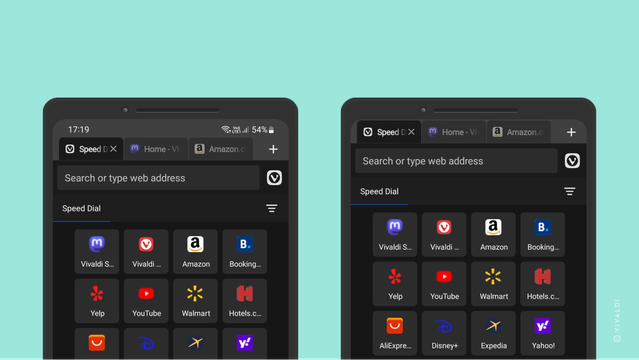
    Hide the Status Bar to give more space for page content in Vivaldi on Android.

    You can gain a few pixels for displaying more web content and/or hide distracting notification icons from view, by hiding Android’s Status Bar. It’s especially useful when you tend to browse more with Vivaldi in landscape mode.

    To hide your mobile devices Status Bar while using the app:

  • Go to Settings > Appearance > Status Bar Visibility.
  • Select, whether to show or hide the Status Bar, or to show it in portrait mode, but hide it in landscape mode.
  • #android #statusBar

    https://tips.vivaldi.net/tip-306/

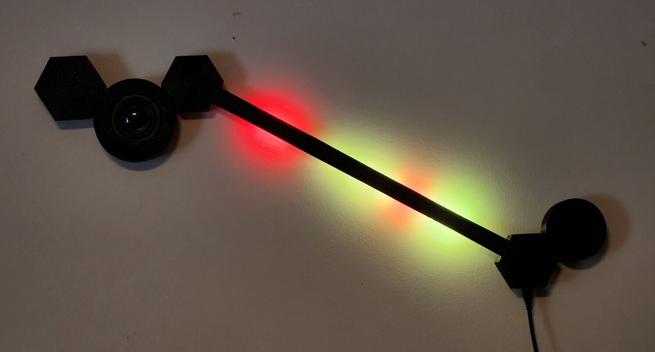
    The #BigEar status bar has ears! (Actually just a speaker for now, but room for a microphone if we want.) Featuring the newest part of my fancy #openscad lamp system.

    #esphome #esp32 #wled #lamp #statusbar #snarkhome #homeassistant #5v

    I spent the morning on #openscad trying to remember my #geometry homework from several decades ago, and it worked! I have all my core #wled #statusbar #lamp features basically appearing where and how I want! I'm not ready to send it to the #3dprinter again because I have some features to add, but now I can confidently direct them to any part of the object at any scale.

    As a reward I'm going to spend the afternoon flying #fpv next to an #AirForce transmitter site.
    #whatcouldgowrong #suddenlyhelicopter
    #videoblackout #los #lineofsight #lossofsignal
    #suddenlylake

    One of these days I should get around to building a #warflyer module out of an #esp32 and a #whoop battery. Lots of cool neighbors on that site.

    I want to install #DWM next to #i3wm on my old #Thinkpad but need advice for simple #statusbar options. Next to the clock, a few #system information will suffice. I'm open to suggestions from DWM users. #linux #archlinux