 Luke MacNeil
Hehehe. Mooooooove.
In Boulder, Utah.
#cows #cowstodon #corvette #cars #boulder #utah #rt12 #midlifecrisis #moo #moove #sunday #silentsunday #skyreplacement #luminar #smokeweedeveryday #photography #photos #photoshop #cowstodon #move
Hehehe. Mooooooove.
In Boulder, Utah.
#cows #cowstodon #corvette #cars #boulder #utah #rt12 #midlifecrisis #moo #moove #sunday #silentsunday #skyreplacement #luminar #smokeweedeveryday #photography #photos #photoshop #cowstodon #move
Cyberlink Launches PhotoDirector 13, Super-Charges its AI-Powered Tools
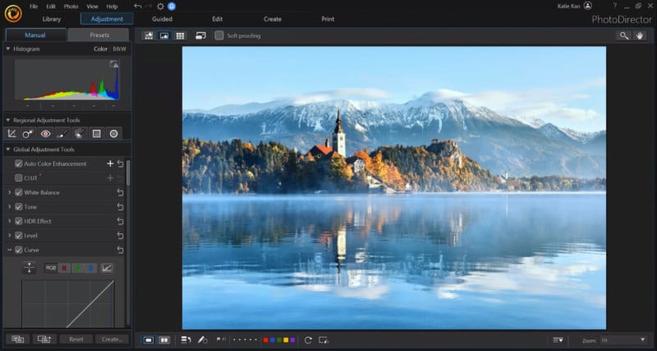
Cyberlink has announced PhotoDirector 13, which promises improved AI-editing tools, integration of Getty and Shutterstock libraries, and adds new lighting effects and color adjustment features.
Founded in Taiwan, Cyberlink has developed and owns over 200 patented technologies across multimedia software and AI facial recognition.
The Director 365 editing suite is one of the company's products and consists of four apps -- PowerDirector for AI-powered video editing, ColorDirector for color grading, AudioDirector for editing audio files, and PhotoDirector for image post-processing -- all of which have been updated today.
PhotoDirector 13 -- the latest version of the photo editing software -- is a multi-layer editor that blends image post-processing with graphics and animation.
It has a complete set of image adjustment tools such as white balance, tone, HSL, color wheels, and more. It also offers users a choice of mask tools, photo effects, LUTs, layer templates, Sky Replacement, brushes, light rays, and other creative tools.
The software previously utilized AI-powered tools for editing, and the latest version of PhotoDirector has made UI enhancements and added new light effects and color adjustment features.
The update also brings improved AI-powered Sky Replacement and Photo Animation effects and introduces new Dispersion, Glitch Art, and Object Segmentation tools. Edited images can also be turned into a music video by adding bounces and shakes with the Audio Beat effect.
The ease of use is of great importance for the company and as such, the editor has Guided tools. These can be applied in a few clicks and can appeal to beginners as well as business owners who want to create effective marketing visuals without having to perform complex tasks.
PhotoDirector 13 is available to both Windows and macOS users. A subscription-based model -- titled PhotoDirector 365 on Cyberlink's pricing guide -- can be paid monthly or annually. At the time of publication, the annual plan subscription costs $41 with an introductory 25% off offer and is originally priced at $55.
This subscription also includes 50GB of cloud storage and other perks, like access to royalty-free use of Getty and Shutterstock libraries, plugins, and other assets which the company says are regularly added.
The lifetime license, titled PhotoDirector 13 Ultra, costs $100 and includes 25GB of cloud storage for one year but doesn't include unlimited access to premium plugins, effects, stock imagery, and other assets.
The software can also be tested on a 30-day trial basos. System requirements, features, and pricing options including bundles can be found on Cyberlink's website. A mobile version of the software can be downloaded on Google Play Store for Android and on the Apple App Store for iOS.
#news #postprocessing #software #ai #aiediting #animation #cyberlink #neweditor #photodirector #photoeditingapp #photoeditingsoftware #skyreplacement


On1 Photo RAW 2022 takes on Luminar AI and Photoshop with new sky replacement tool
#news #editingsoftware #imageediting #on1photoraw #on1photoraw2022 #skyreplacement

The one that definitely caught my attention the most is Sky Swap AI: an AI-powered feature that lets you replace dull skies in your images. But there are other new features too, and it seems that On1 is serious about competing with Adobe and Skylum. Replace skies in an instant with Sky Swap AI Okay, […]
On1 Photo RAW 2022 Adds Sky Replacement, Integrates NoNoise AI
ON1 has announced the latest version of ON1 Photo RAW 2022 which includes several new features including Sky Swap AI, full integration of NoNoise AI, and more.
The company claims that the new 2022 version of ON1 Photo RAW will be an ultimate all-in-one system with the addition of these new features, full support for Apple's M1 systems, and aims to be a proper alternative to Skylum's Luminar AI thanks to the newly integrated AI Sky Swap tool.
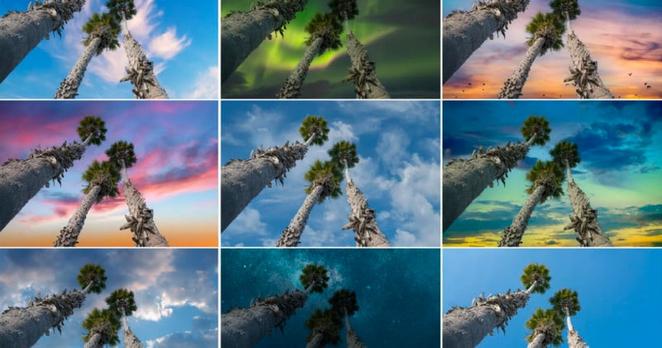
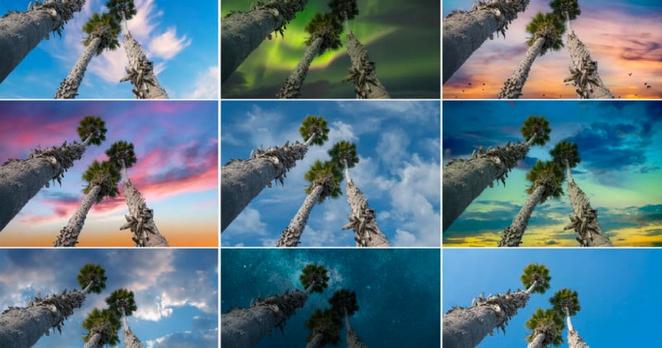
Competing against Skylum and Adobe's own Sky Replacement plugin in Photoshop, AI Sky Swap will automatically detect the skylines in a photograph and create a mask (that can be customized) which allows users to choose from more than 100 included sky files, or import their own, to enhance the image. According to the company, the software will automatically adjust the foreground lighting and color to attempt to match the overall scene to the newly replaced sky. This tool also includes the ability to add reflections onto water or glass and reflective surfaces as well.
The company has also added timelapse creation tools that will allow users to quickly create timelapse videos from still files without the need for third-party plugins or external applications. The new tool will help align the images, reduce flicker, and smooth exposures should any fluctuations occur with the design of making night transitions easier to manage. The timelapse tool also features a preview dialog for quick-proofing before finishing and rendering the full high-quality video.
Also updated in the 2022 release is an improved Export tool that has incorporated over 100 suggestions from existing users to create an enhanced and improved export workflow. This includes better presets, file naming and renaming, additional export options (including DNG), metadata control, and even adding watermarks. On top of this, the new version will also let users run Adobe Photoshop plugins directly through the ON1 software which should improve the workflow of many users who have been juggling between the two platforms.
The previously launched stand-alone NoNoise noise reduction software will now be directly integrated into ON1 Photo RAW 2022 so it can be used as part of a normal non-destructive editing workflow, saving the need for exporting and importing back and forth between multiple applications.
Additionally, the updated application will also feature a new Line Mask tool that works like a simplified pen tool, improvements to the Browse module making it faster and smoother to use, as well as free updates for Photo RAW 2022 users that will include integrated ON1 Resize, Liquify, improved search and filtering capabilities, content-aware cropping and fill tools, as well as enhancements for ON1 Photo RAW for mobile devices.
ON1 Photo RAW 2022 will be available at the end of September for $99.99 (or $79.99 as an upgrade for existing users). Additionally, users can opt-in for a subscription model at $7.99 per month or $89.99 per year that includes the software for desktop and mobile, as well as cloud storage.
#news #software #2022 #ai #announcement #artificialintelligence #noisereduction #nonoiseai #on1 #photoshoppluginhost #skyreplacement #skyswapai #timelapsecreator #update
Major Photoshop Update: Sky Replacement, Healing Brush, and More
Adobe has announced what it is describing as a "major" feature update to Photoshop on desktop and iPad available today. Healing Brush and Magic Wand are now available on iPad, and Sky Replacement has the ability to import up to 5,000 skies at once on desktop.
Photoshop on iPad
Adobe has finally added Healing Brush to the iPad version of Photoshop with the same capabilities that photographers are used to seeing on desktop. Texture, lighting, transparency, and shading of sampled pixels are matches seamlessly and new pixels lend into the rest of the image for retouching with precision. All settings and controls -- including diffusion, blend modes, and brush angles -- are also present.
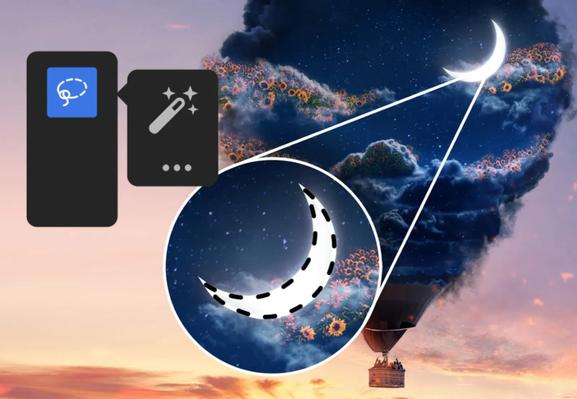
Additionally, Magic Wand has been brought to the iPad experience. As is the case on desktop, Magic Wand makes selections based on tone and color and tolerance and other characteristics can be tuned to specific use cases.
Adobe has also added Canvas Projection to the iPad, which allows users to share or collaborate on a larger screen by connecting an iPad to an external monitor or TV display with an HDMI or USB-C cable. When connected, the canvas is displayed full screen without the Photoshop UI which allows for a clean display of a live edit.
Photoshop on Desktop
Adobe says that it has expanded Sky Replacement to have many new skies to choose from by default and now also allows users to import up to 5,000 skies at once. The actual functionality of Sky Replacement remains the same, but the company has added "Get More Skies" as an option from within the app. That link will take users to Adobe's Discover site where they will be able to download groups of what it describes as "professional, high quality sky presets."
Transform Warp was given independent Bezier handle movement, controllable from a keyboard shortcut which is available for edges and Split Warp Points. The addition gives users who need to stretch and bend images onto bottle, boxes, or other objects the ability to create "previously-impossible" transformations.
Adobe has also addressed a list of over 500 bugs, all which are fixed today. Of those, Adobe pointed to the following as those having the biggest impact on performance and the "feel" of the application:
Across the application:
Neural Filters:
Photoshop Beta
Finally, adobe announced a new beta program for Photoshop. Photoshop Beta is a new way for users to give feedback about the application to the Photoshop Team. To get it, Creative Cloud members can find it in the install section of the Creative Cloud Desktop App. To provide feedback, head over to the Photoshop Ecosystem Adobe Community and create a new post using the “Beta” topic.
#news #software #adobe #adobecreativecloud #adobephotoshop #creativecloud #editing #featureupdate #majorupdate #photoediting #photoeditingsoftware #photoshop #photoshopondesktop #photoshoponipad #release #skyreplacement #transform #warp
 petapixel (unofficial)
 diyphotography (unofficial)

 the phoblographer (unofficial)