 ResearchBuzz: Firehose
Abduzeedo: Recordly: Free Open-Source Screen Recorder with Auto-Zoom. “Most screen recording tools dump raw footage and leave the rest to you. Recordly, an open-source screen recorder built by developer webadderall, takes a different approach. It handles the visual polish automatically, so the gap between recording and shipping is much smaller.”
https://rbfirehose.com/2026/03/22/recordly-free-open-source-screen-recorder-with-auto-zoom-abduzeedo/
 Danny Wilkerson
Step-by-step detailed guide for MacBook users who are looking for professional screen recording tools capable of HD screen and audio recording, and quick sharing features. Most useful tips about QuickTime, ScreenRec, OBS Studio and various other screen recorders have also been shared in this guide. I am pretty sure, this guide will be helpful for you. https://screenrec.com/screen-recorder/how-to-screen-record-on-macbook-pro/
#ScreenRecorders #ScreenRec #OBS #QuickTime #MacTools
#ScreenRecorders #ScreenRec #OBS #QuickTime #MacTools

 Peter Ramer
Learn all of the tips and tricks that I have learned along the way for how to create a YouTube video and increase your views.
#ContentCreation #CreateYouTubeVideo #Microphone #WebCam #ScreenRecorders #StreamLabsOBS #VideoEditors #Canva #IntoVideo #EndScreen #YouTubeStudio #YouTubeChannel #ChapterTimestamps #Playlists #TubeBuddy #Subscribe #SEO
https://dynamics365musings.com/create-a-youtube-video
#ContentCreation #CreateYouTubeVideo #Microphone #WebCam #ScreenRecorders #StreamLabsOBS #VideoEditors #Canva #IntoVideo #EndScreen #YouTubeStudio #YouTubeChannel #ChapterTimestamps #Playlists #TubeBuddy #Subscribe #SEO
https://dynamics365musings.com/create-a-youtube-video


 Krutonium://
Anyone know any good #screenrecorders for the #SteamDeck ? The #deckyrecorder plugin records half the frames as green for some reason.
Alternatively if you happen to know how to fix it, that would be great too!
 OMG! Ubuntu!
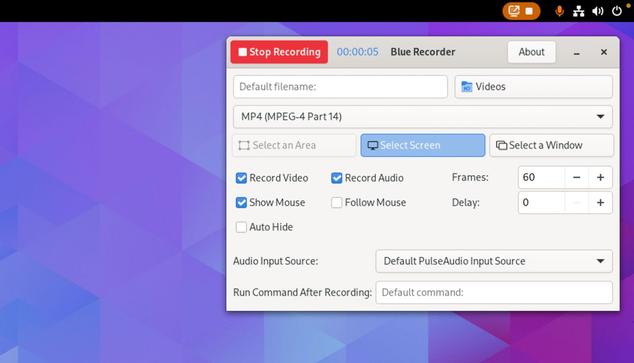
Blue Recorder, Linux Screencast App, Ported to GTK4
GNOME Shell’s built-in screen recording feature is perfect at capturing short clips but when you need to record longer sessions you should use a dedicated screen recording app. Such tools give you greater control over video quality, output format, sound capture, frame rate, and so on — all vitally important if you’re looking to create high-quality screencast content for videos, social media, or really helpful bug reports. Amongst the surfeit of Linux screen recording software that’s readily available is Blue Recorder. Blue Recorder is an improved, Rust-based rewrite of Green Recorder, which was an open-source screen recording tool popular circa 
#News #AppUpdates #ScreenRecorders
 https://www.omgubuntu.co.uk/2023/11/blue-recorder-linux-app-ported-to-gtk4

 Fisher Root
Si quieres grabar lo que ocurre en la pantalla de tu Ubuntu y derivados, RecApp es un programa para dicha tarea, sencillo y sin complicaciones.
https://ubunlog.com/recapp-aplicacion-sencilla-para-grabar-la-pantalla/
#RecApp #screenrecorders #Gnu #Linux #SoftwareLibre #opensource

 It's FOSS
Meet RecApp, a New Screen Recording App for Linux Desktop
