📢 Zotero 8 est désormais disponible !
✔️redesign de la fenêtre de citations
✔️annotations PDF sous les items
✔️thèmes pour le visualiseur
✔️notes en onglets
etc.
🔗 https://www.zotero.org/blog/zotero-8/
#zotero #citations #referencemanager #tools #digitalscholarship #writing #academictools #researchworkflow
Zotero Blog » Blog Archive » Zotero 8

Zotero is a free, easy-to-use tool to help you collect, organize, cite, and share research.

A clear, step-by-step guide by Naveed Rehman on how to write a scientific paper, including recommended software and AI tools for each phase of the process.

https://www.linkedin.com/posts/drnaveedurrehman_use-this-4-week-planner-to-write-a-research-activity-7416807045783326722-Dt6o

#AcademicWriting #ScientificWriting #ResearchWorkflow #PhDLife #OpenScience #AIinResearch

📄🤖✍️

Use this 4-week planner to write a research article. Spend 2-5 hrs/day, use AI tools, and submit the paper like a pro! How to use the 4-week planner? 1/ Start on a Monday, which is Day 1. 2/ Work… | Naveed Rehman | 17 comments

Use this 4-week planner to write a research article. Spend 2-5 hrs/day, use AI tools, and submit the paper like a pro! How to use the 4-week planner? 1/ Start on a Monday, which is Day 1. 2/ Work consistently for 5 days each week (Mon-Fri). 3/ Complete the assigned tasks for each day as follow: Day 1: Mon ➡️ Finalise research question, target journal, and paper outline. ⏰ 3 hrs ✨ ChatGPT; Elicit; Scite Day 2: Tue ➡️ Collect and skim 20–30 key papers and organise references. ⏰ 4 hrs ✨ Research Rabbit; Connected Papers; Zotero Day 3: Wed ➡️ Read core papers deeply and extract gaps, methods, and insights. ⏰ 5 hrs ✨ ChatGPT; SciSpace Copilot; Explainpaper Day 4: Thu ➡️ Draft the Methods section completely. ⏰ 4 hrs ✨ ChatGPT; SciSpace Copilot; Grammarly Day 5: Fri ➡️ Finalise analysis and prepare all tables and figures. ⏰ 5 hrs ✨ ChatGPT; Julius AI; Datawrapper Day 6: Mon ➡️ Write the Results section without any interpretation. ⏰ 4 hrs ✨ ChatGPT; SciSpace Copilot; Grammarly Day 7: Tue ➡️ Draft the logical structure of the Introduction. ⏰ 3 hrs ✨ ChatGPT; Elicit; Scite Day 8: Wed ➡️ Polish the Introduction with clear arguments and citations. ⏰ 4 hrs ✨ ChatGPT; Grammarly; Scite Day 9: Thu ➡️ Write the literature review or the theory section thematically. ⏰ 4 hrs ✨ ChatGPT; Elicit; Research Rabbit Day 10: Fri ➡️ Draft the first half of the Discussion. ⏰ 4 hrs ✨ ChatGPT; Scite; SciSpace Copilot Day 11: Mon ➡️ Complete the Discussion section with implications, limitations, and future work. ⏰ 4 hrs ✨ ChatGPT; Elicit; Grammarly Day 12: Tue ➡️ Write a concise and strong Conclusion. ⏰ 2 hrs ✨ ChatGPT; Grammarly; SciSpace Copilot Day 13: Wed ➡️ Draft the Abstract covering aim, methods, results, and contribution. ⏰ 2 hrs ✨ ChatGPT; SciSpace Copilot; Grammarly Day 14: Thu ➡️ Create and refine the title and keywords. ⏰ 2 hrs ✨ ChatGPT; Elicit; Semrush Day 15: Fri ➡️ Read the full paper once and fix coherence issues. ⏰ 4 hrs ✨ ChatGPT; Grammarly; Hemingway Editor Day 16: Mon ➡️ Edit for clarity, concision, and UK English style. ⏰ 4 hrs ✨ Grammarly; ChatGPT; Wordtune Day 17: Tue ➡️ Check references, formatting, tables, and figures. ⏰ 3 hrs ✨ Zotero; SciSpace Copilot; ChatGPT Day 18: Wed ➡️ Get feedback from a colleague or supervisor. ⏰ 2 hrs ✨ ChatGPT; Grammarly; Google Docs AI Day 19: Thu ➡️ Revise thoroughly based on feedback. ⏰ 4 hrs ✨ ChatGPT; Grammarly; SciSpace Copilot Day 20: Fri ➡️ Final checks, write the cover letter, and submit. ⏰ 2 hrs ✨ ChatGPT; Grammarly; SciSpace Copilot I’m curious: how many days does it take you to write your article? Follow 👋 Dr. Naveed ur Rehman for neuro-backed research strategies you can use this week. | 17 comments on LinkedIn

🗂️ My computer stores everything I work with: drafts, notes, datasets, scripts, models, simulations results, old archives — and, of course, a ridiculous amount of literature. 😅

Recently I discovered something that felt like unlocking a hidden level: local full-text search.

I’d used basic search tools before, but then I tried Recoll — an open-source search engine for UNIX-like systems — and it completely changed how I navigate my research files.

It honestly feels like I found a new kind of “computer game,” and I’ll probably keep playing with it for months. 🤣

#ResearchWorkflow #IndependentResearch #DataManagement #OpenSource #KnowledgeOrganization #UNIX #DigitalResearch #ResearchTools #Recoll #KnowledgeManagement #Linux #FOSS

💾 From Duplicity to Borg — a backup journey

After more than a decade with Duplicity, I finally switched to BorgBackup — and wow, that difference.

📂 Source data: 719 GB in my /home
📦 Packed size: 419 GB
📉 Actual storage: 390 GB after compression

That’s more than a 45% reduction, and the upload to remote storage is much faster now.
For someone who handles geospatial and scientific data daily, this is huge.

It’s not just about saving space — it’s about making the workflow lighter, faster, and more sustainable.

🧠 Curious — what backup tools do you trust most?

#Linux #BorgBackup #OpenSource #DataManagement #Backups #DigitalResearch #IndependentResearch #DataScience #CyberSecurity #ResearchWorkflow #Geodata #Automation

Is Google Notebook LM a replacement for Obsidian? In my latest post, I explore why it's not a direct replacement but a powerful complement for specific research tasks. Discover the nuances of this AI tool.

Read more: https://www.ctnet.co.uk/using-google-notebook-lm-for-research-a-personal-workflow-experiment/ #AItools #ResearchWorkflow #PKM

Using Google Notebook LM for Research: A Personal Workflow Experiment

Learn about a Google Notebook LM research workflow. My personal experiment integrating it with Obsidian PKM, highlighting its unique benefits for complex subjects.

The Computer & Technology Network

Hi everyone, I’m looking for an open-source tool suitable for academic research project management in psychology/education. Ideally, the tool itself or via plugins should support:

- Markdown
- Project progress / task management
- Knowledge graph (visualization would be a plus)
- Literature management (with Zotero integration)
- AI integration for summaries, suggestions, or writing assistance
- Version control
- Open-source

If you have any experience with such tools or can recommend alternatives, I’d greatly appreciate your suggestions!

btw: not NOTION (I don't like it)

#AcademicTools #OpenSource #KnowledgeManagement #Zotero #ResearchWorkflow #EdTech #PsychologyResearch #EducationResearch #AI #Markdown #ProjectManagement

Zettlr
0%
Logseq
66.7%
Other_please reply and recommend
33.3%
Poll ended at .

8/ This workflow allows you to have only the papers you’re currently reading on your tablet while ensuring all your annotations are easily extracted and organized in Zotero.

#Zotero #ResearchWorkflow #AcademicTools #PaperManagement #Attanger

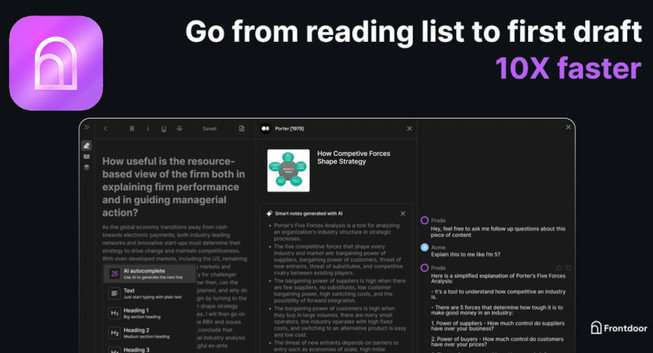
Frontdoor AI Research Assistant: Elevate Research Workflow with Smart Insights and AI-Powered Writing

Capture, Organize, Summarize, and Write Faster With AI

Review Space

Ok, so I have a Remarkable. I use Zotero a lot, and have started experimenting with Obsidian. I also have used Matter, but never really grew to love it and am considering Readwise, although I suppose I could go back to Pocket.

Anyone have good workflows that centre around Remarkable / Zotero, but include Obsidian and / or Readwise?

#ResearchWorkflow #ToolsOfAcademia #WritingTools

A number of recent posts about #Obsidian - combined with me starting a handful of new projects in the last month or two - has me considering falling down the inevitable rabbit hole of reorganizing my #Notetaking and #ResearchWorkflow

#PrayForMe