Something I love about modern #technology is that it allows us to enjoy and know the beauty of life and the world, without the need to be phisically present in a specific time and place.

It has its risks, but It is something beautiful that we should appreciate more

#Beauty #ReflectNotes

Well, I've tossed a few hours into researching Obsidian Plugins and weird enough I fail at the simplest requirement:

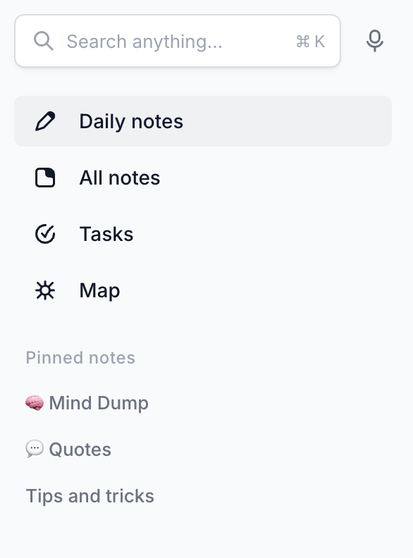
I want a sidebar that I can fully customise.

Obsidion's Ribbon bar doesn't work as it's icons-only and bookmarks doesn't allow you to add plugin-views as bookmarks.

All I really want is a clean bar like the one in the following image - a set of fixed topics on top and a list of pinned notes on the bottom (and it should work that way on mobile too)

#ReflectNotes #obsidianmd #reflectApp #pkm #diypkm

I’ve also been entirely too deep into looking around self-hosted stuff and #pkm / note systems.

For a while I had a self-hosted AnyType server and I honestly was pretty happy with the app (think #Capacities but offline first and e2e encrypted) but I dropped AnyType because of the horrible / almost non existent user experience when trying to add new content on the go..

Why the heck does almost any pkm/note system have a browser extension but pretty much none of them has a clean sharing sheet or shortcuts integration to do the same on mobile?

I was actually even considering to give Capacities a go because even if no one says it out loud they’re just AnyType with a slightly more polished UI and cloud focus (and they’re made in Germany!!) but their privacy policy just doesn’t feel right.. “we could access your data if we put the effort into it (it’s not encrypted) but we won’t!”.

So on I went and tried #TwosApp which is a really nice concept but in the end felt just ever so slightly too cluttered after putting productive content into it.

So now I’m sitting on #ReflectNotes in my free trial (as per my previous toot) and I’m also eyeing #CraftApp because I could use it for free as part of my SetApp but they - while really pretty - feel a little to UI oriented to make for a good notes system/pkm and Inhavent found a lot of details on how to share content into Craft or things like automation/shortcuts.. (also once again: privacy policy is meh)

Seems like I’m rolling in a limbo again  

Thank you for sitting through my PKM rambles.

#healsRants

So..

I’ve been trying out #ReflectNotes recently and they seem like the almost perfect cross between #obsidianmd and #logseq with the weird bit of actually usable AI features sprinkled in (the kind that lets you summarise or transform your notes or do audio transcription).

While I really like Reflect I’m still in their free trail and I’m not sure I would be wanting to pay a billed-annually subscription for it even though it’s the only income for the company apparently.

So I’ve been wondering if I could gently hammer Obsidian to behave as close to Reflect, getting rid of UI clutter, etc.

So far I’m missing plugins that work together to provide these features (all need to work on desktop, iOS and iPad):

  • a “Calendar” to integrate with iCloud Calendar and pull events / allow me to add Tasks/Todos as events (Reflect doesn’t do the later yet either)

  • a good “Task” view that collects from all of my notes and lets me interact with them as well as seeing if a task is current/due/overdue

  • detailed Backlinks l, in Reflect Inliterally have empty Notes that are referenced all throughout my Daily Notes and their content is pretty much just everything pulled together from backlinks (I guess that could be done with data queries)

  • “the AI stuff”:

    • apply a prompt to the currently selected text and replace it
    • “chat with your search results”
  • in-app recording and transcription of audio notes

#reflectApp #pkm #diypkm

So, I have been using reflect.app for the past six days. I have posted a mini-review of the app on Medium.
The Reflect notes app is a serious contender against Obsidian.

https://medium.com/@codemaclife/reflect-note-app-a-mini-review-30f75e5495a3

#reflectnotes #reflectapp #notetaking #productivity #blog #obsidian #macOS #iOS #iPadOS

@spinningthoughts @ednico @tana_inc @capacities @logseq So basically, my inner 8 year old self strikes again? 🤦🏾‍♀️ That's basically it. There are some really neat aspects to it, but I never even thought there was a way to import anything (maybe Roam files?) & I have never used Roam, so maybe I just ignored that part? There are some really compelling online capable apps like @reflectnotes @craftdocsapp @capacities and I think only #ReflectNotes and #CraftDocs have bulk markdown importing.
@Cevilia Sounds like you might like #AI integration. Two apps come to mind, #ReflectNotes https://reflect.app/ https://nitter.net/reflectnotes which has AI integration, very focused workspace with #Markdown, but still lots of functions like backlinks. The other is #CraftDocsApp https://www.craft.do/ https://nitter.net/craftdocsapp @[email protected] @[email protected] it also has markdown, backlinks, and an AI integration. It has a very broad workspace and lots of templates.
Reflect

A beautifully minimalist note-taking app designed to mirror the way you think. Now with a native AI integration.

Does anyone use Reflect Notes?  

https://reflect.app/

#ReflectNotes
#NoteApp

Reflect

A beautifully minimalist note-taking app designed to mirror the way you think. Now with a native AI integration.