Сегодня наконец-то добрался до этого и сел снова настраивать японский ввод с Fcitx5+Mozc.

И в этот раз настроил.

В прошлый раз делал заметно по-другому: старый fcitx, ibus, Plasma 5, X.
В этот раз Fcitx5, Wayland Launcher, Plasma 6.

И на этот раз всё завелось и изменений каких-то в системе понадобилось меньше.

Радует, что и в таких нишевых штуках линуксы становятся дружелюбнее.

Но да, надо сказать, что это всё ещё достаточно далеко от того как это работает в Windows, где просто добавляешь ещё один язык и выставляешь для него настройки ввода.
Здесь же вырубается дефолтное переключение раскладок в DE и управление ими передаётся отдельному виртуальному менеджеру ввода.
Понятно, что и в Windows под капотом скорее всего происходит что-то похожее. Но для юзера это происходит в одной точке входа. А этих наших линуксах - не так. Если нужна обычная дубовая раскладка физической клавиатуры - можно использовать обычное xkb-like переключение. А вот если нужна раскладка с вводом ромадзи и заменой по словарю - это вообще другое и пользователю об этом нужно откуда-то узнать.

Такие дела.

#Linux #language #Japanese #Wayland #Fcitx #Mozc #UX #UI #log #input

Writing in Japanese on GNU\Linux is like this, by using #mozc as input system.
There's also a video on fcitx and mozc installation
Consider the same input mode is useful for other ideogram languages such as Chinese, Korean and others. #linux
Mozc: How To Start Typing With Japanese Input

YouTube
Ooo, I like elementary OS. Now if only I could figure out how to type Japanese in it, I could actually use this old MacBook Air. Without Japanese, it's useless to me. #elementaryOS #mozc #日本語 #Japanese #linux

How interesting.

I have the #mozc keyboard installed on my phone, and I just noticed another use for it, going back and forth in the text by using the left/right arrow keys, no need to aim with touchscreen and hope to get the position right:

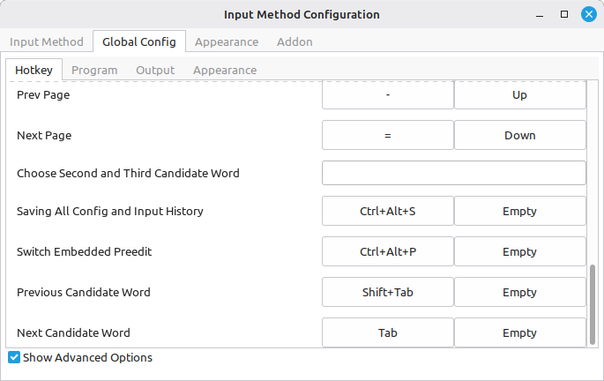
Fcitx default keybinds also interfere with games, Ctrl+Space is the switch method hotkey, but is a pretty common thing to press in games, noticed while trying to crouch then jump in Overwatch.

Setting an environment variable to disable the IME for the game does seem to have done the trick (at least if you don't need to type with the IME in the game for chat) https://fcitx-im.org/wiki/FAQ/en#Minecraft

Also tried setting the switch hotkey to Super+Space as on Windows, but then IME switching just doesn't work at all anywhere.

#linux #LinuxMint #fcitx #mozc #YearOfTheLinuxDesktop

FAQ - Fcitx

Thought perhaps my keyboard was hexed today when I suddenly can't use the Ctrl-Alt-P hotkey in Sublime to switch projects.

After investigation: I installed the Japanese IME yesterday (Mozc) following the instructions to switch to the Fcitx input framework, and it looks like Fcitx overrides Ctrl-Alt-P globally for it's own use. Guess I can just rebind that, but at what cost...  

Side note, these projects have the worst names.

#linux #LinuxMint #fcitx #mozc #YearOfTheLinuxDesktop

事理弁識能力は容易に出ない。
#ibus #mozc #ffmpeg

日本語漢字変換のAnthyは、いろいろあってDebianとFedoraで別々にフォークしてメンテされているのだけど、それを再統合しようとしている人がいるそう。Linuxの日本語漢字変換がMozcに依存している状況は良くないので、なんとか別の道も探りたいところ #linux #japanese #anthy #mozc

netsphere-labs/anthy: Anthy is a kana-kanji conversion engine for Japanese. It converts roma-ji to kana, and the kana text to a mixed kana and kanji. Merge Debian https://salsa.debian.org/debian/anthy/ and Fedora anthy-unicode https://github.com/fujiwarat/anthy-unicode/: https://github.com/netsphere-labs/anthy

Debian / anthy · GitLab

Anthy is kana-kanji conversion engine for Japanese. It converts hiragana text to mixed kana and kanji.

GitLab
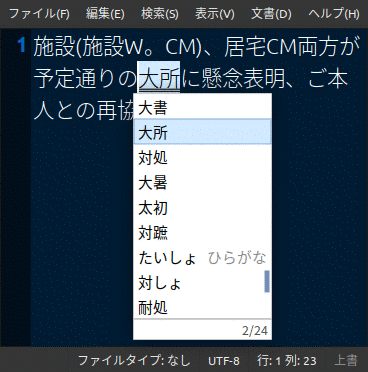
3回キーするとイラッとしちゃいます。#IBus 1.5.27 , ibus-#mozc 2.28.4715.102+dfsg , #xfce4 4.18 , #debian 12.12 , 2025-10-29
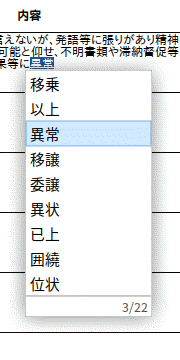
Debian 12 + IBus Mozc で「退所(たいしょ)」が変換候補に出ない。
ibus-mozc / mozc-server / mozc-data 使用中。
#Debian12 #Mozc #JapaneseInput #ibus