Usually i am pretty amazed how much time i save while configuring my systems with NixOS/HomeManager. But this time i am trying to set up mbsync/mu/mu4e stack and i think some options are scattered all over.

I got a basic setup running now, but where do i put for example the inbox path if it differs from defaults?

#NixOS #HomeManager #Emacs #mu4e #MBSync

OK, I'm going to give it another try to make #emacs, #msmtp, #mbsync, #notmuch work for taming email. I'm looking (sternly 😡 ) at you, gmail forced down my throat by my <insert-employer-entity-here>...

My ideal setup would likely be simple: edit messages from emacs, store messages locally, fuzzy search available, viewing email threads, and completion for filling *to* and *from* fields.

How hard could it be? -- Wish me luck.

from ‘A couple of Mu4e improvements’ | Baty.net

Another snag I’ve run into while using Mu4e was that sometimes I also use Apple’s Mail on macOS and iOS and any messages I delete there would only be flagged as “trashed” in Mu4e, so they would show up in the inbox, cluttering things considerably. The fix for this was to set Expunge Both in my .mbsyncrc file. Also much better! That one has been bugging me for a long time.

Source: A couple of Mu4e improvements | Baty.net

A couple of Mu4e improvements

I usually prefer reading my email using Mu4e in Emacs, but the Vim (“Evil”) keybindings have been broken since upgrading to 1.10.x. (See this PR for background). This added so much friction that I went back to Mail.app and Notmuch. Recent changes in evil-collection have fixed the issue but weren’t available yet when updating Doom. The fix for now was to (unpin! evil-collection) in packages.el. Much better! Another snag I’ve run into while using Mu4e was that sometimes I also use Apple’s Mail on macOS and iOS and any messages I delete there would only be flagged as “trashed” in Mu4e, so they would show up in the inbox, cluttering things considerably. The fix for this was to set Expunge Both in my .mbsyncrc file. Also much better! That one has been bugging me for a long time.

Baty.net

Me and my new #yubikey5 part 2:

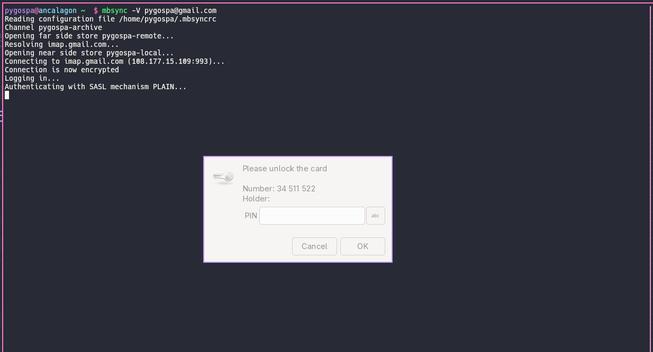
Now we get to the nitty-gritty parts. I'm using #mbsync to sync multiple #imap accounts to local #maildir and I am automating this via #systemd : a timer calls a service very 5 minutes, that will call mbsync on all mail accounts if connected to the internet.

Providing the passwords via #pass that is encrypted with #yubikey will need that yubikey to be unlocked (i.e. a pin needs to be provided). When providing this pin (e.g. by manually calling mbsync on one of my mail accounts), it will be stored for at least 12h, and up to 24h (on my home pc; mobile and remote devices will of course hav different settings).

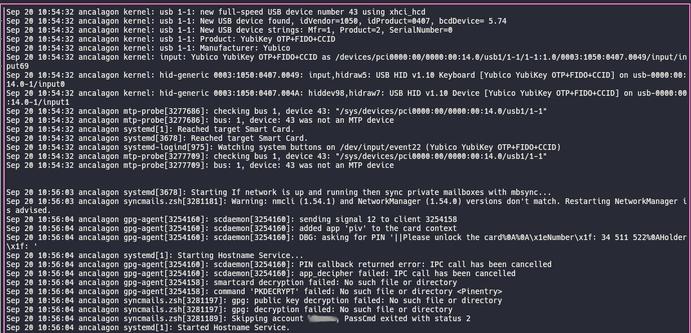
However, if I never manually provide the PIN, the systemd automated scripts will fail. E.g. I just connected the key, but not used it.

First I thought, this was due to me using the `curses` version #pinentry . But that's not the whole truth. Even with `pinentry-gtk` the systemd script will not trigger a PIN entry. I didn't quite understand why, and therefore ran a different direction:

Could I just auto-unlock the yubikey if I connected it? I wrote a #udev rule that would recognize the yubikey. Learning that I need to put scripts for udev in certain dirs, and being unhappy with it, I then wrote a systemd service for the udev to call instead, and with that I maanged to finally get a PIN entry request using the gtk version.

And then it got me thinking. Why did that work, but my mailsync that basically has the same things involved (script instead of udev that triggers systemd that wants to decrypt something using yubikey triggering PIN entry). And then it hit me: My mailsync systemd service was missing the `DISPLAY=:0` environment variable, thus the script can't trigger the GUI. Half a days worth of work, all for nothing  

But hey, the weekend is young. Next up: If triggered via CLI i want gpg to trigger `pinentry-curses` instead of `pinentry-gtk`. Sounds easy: have a `pinentry-auto` script figuring out where it has been called from. Well... not really #wip

Migrate #EMail from server A, to server B.
- #Thunderbird and drag them.
- #isync #mbsync, and read docs
- #imapsync, setup an Arch VM, because it's packaged there (as opposed to Debian/Ubuntu).

New post on how to filter out email using GNU Mailutils sieve command. It's great for organising email so that you can focus on the important ones!

Sieve's actually a standard. I thought you had to run a full Dovecot IMAP server to use it - overkill for filtering email! Turns out that Mailutils has a command line Sieve that can run after mbsync!

https://www.futurile.net/2025/06/07/neomutt-mailutils-sieve/

Also, a detailed page on Sieve:

https://www.futurile.net/resources/mailutils-sieve/

#sieve #filter #email #neomutt #guix #mbsync

NeoMutt: filtering email with Sieve

@riff Le pire, c'est que je fetche déjà automatiquement les mails de toutes mois plusieurs fois par jours avec #mbsync, à des fins de sauvegarde.

Mais c'est que le quart du boulot, quoi.

I wrote a new blog post about how to setup #neomutt #email with Office 365, using #mbsync #msmtp and #notmuch, along with how to make it work with multiple accounts:

https://cosroe.com/2025/04/neomutt-notmuch-mbsync.html

@florine I just created a free trial account, and don't have much to add apart from that receiving mail works just fine, and I was able to get IMAP access to it setup and working with #mbsync and #notmuch without any trouble at all. As others have said, can't test sending mail from it as trial only allows you to send to mailbox.org accounts. I doubt that'll be an issue though.

Will explore Android clients tomorrow...

#degoogle

For quite some time I have sporadically run #mbsync configured to pull several IMAP accounts and it indeed brings in emails. BUT:

- #maildir format is weird. What's with the cur/new/tmp structure?
- why the heck is the hostname in the filenames?
- Feels like it doesn't like to be migrated and be continued from somewhere else.
- two-way sync seems to be kinda broken (not needed anyway)
- Holy cow is the configuration unnecessarily verbose and complicated 🤯 (should be well #nix-able though)