I should really document this setup.
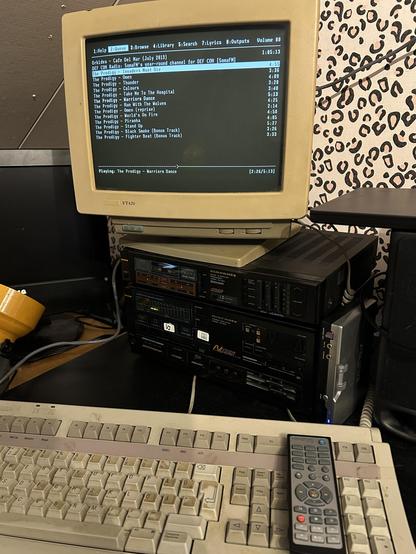
Playing music with #MusicPlayerDaemon on my #Marantz controlled through a #VT420, both from around 1990.
Software is #MPD on #Debian on an #RPi 2. Soundcard is some cheap old usb Soundblaster, but using #lirc I can control MPD using its controller.
This all took some effort. 😌
#retroComputing #somaFM

I got a dumpster-rescued obscure remote working with #rpi #aarm64 #lirc #wayland yesterday. And it was way harder than it should be - cause I'm a noob is why.

The pitfalls:
dtoverlay wouldn't load on boot
lirc apends additional 32 bits to scancodes - just edit them out in config file
Wayland being Wayland - while irexec config is cool, wtype is a neat utility and your friend here

The yay:
Come on, srsly? Dumpster peripheral. How cool is that :D .

#HiveMind:

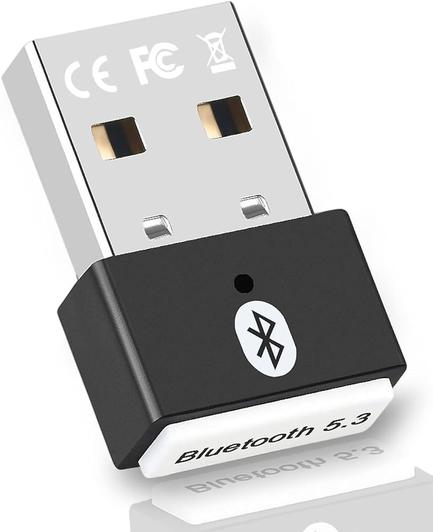
I'm looking for suggestions for a #USB #infrared receiver compatible with #LIRC. Everything I can find seems to be a big clunky box on the end of a long cable, but I'm looking for something tiny with the sort of form-factor of the bluetooth dongle in this picture (but obviously IR rather than BT!)

Any recommendations gratefully received! Thank you!

#MythTV #PVR #SetTopBox #Video

I've managed to get my #raspberrypi to receive IR codes and teach it to associate IR codes with "names" in #LIRC, but now it's not listening properly and the socket connection is refused.

[Перевод] Делаем кондиционер умным с помощью Elixir и Nerves

С каждым днём всё ближе обжигающее японское лето, поэтому я всё больше думал о своей давней идее: дистанционном управлении кондиционером воздуха в моей спальне через Интернет. Простым нажатием кнопки за десять минут до отправления ко сну я мог бы включить кондиционер, который бы превращал спальню в прохладный комфортный оазис к тому моменту, как я почищу зубы и поднимусь на второй этаж. В прошлом году это так и осталось идеей; в этом году я довёл её до реализации.

https://habr.com/ru/companies/ruvds/articles/818021/

#кондиционеры #умные_устройства #iot #raspberry_pi_zero #lirc #пульт_дистанционного_управления #ruvds_перевод

Делаем кондиционер умным с помощью Elixir и Nerves

С каждым днём всё ближе обжигающее японское лето, поэтому я всё больше думал о своей давней идее: дистанционном управлении кондиционером воздуха в моей спальне через Интернет. Простым нажатием кнопки...

Хабр

Okay in a bit of a midlife crisis mode, and in part to celebrate 20 years of blogging, I ended up buying the domain that hosted my website 20 years ago, and have it redirect to my current site.

Some of you old school #Gentoo users may remember http://flameeyes.web.ctonet.it/ as it was where I published my additional ebuilds (before we had the concept of overlays) in tarballs (before experimenting with bzr, hg, and git.)

Others might remember the #LIRC patches for Linux 2.6.

Flameeyes's Weblog

This Time Self-Hosted

Flameeyes's Weblog

@starlily @c0nac @thelinuxexperiment Only if you are a #Linux geek that 1) knows it's POSSIBLE to do those things, and 2) knows HOW to do them.

The problem with excluding or pinning a package is that often you don't know you should have done that until the new version (that breaks things) gets installed during a normal update run. And then it's too late. That was certainly the case with #lirc, the old version worked great and then one day the new version got install during a normal apt update/upgrade run and suddenly buttons on infrared remotes stopped working as they should. It went from "working great" to "dumpster fire" with one update, but of course no one knew that update was coming so no one bothered to exclude or pin it. Fortunately people started finding ways to install the old version (on #Ubuntu / #Debian based systems) and how to pin that old version once installed, but then you still have the problem that if your hard drive goes kaput or you do a clean install to a new version of the OS you won't have that pinned or excluded package anymore, so you have to hope the process for installing the old version still works. Whereas with something that installs from a Windows .exe file or a MacOS .dmg file or similar, you might have taken the two seconds necessary to save it to an external drive just in case a future version was totally screwed up (and even if you didn't, someone else on the Internet probably did).

This is just another case where Linux people want to pretend they have equivalent (or even better) functionality, or "flexibility" as you call it, without taking into account that people won't do something if it is significantly more difficult than on those other systems. There is still a significant number of #Linux devotees that seem to thing that harder is good, or at least that it's okay, and that's probably a big reason why #MacOS in particular continues to hold onto such a big market share. A primary goal of #Apple (at least while Steve Jobs was still alive) was to make things as easy as possible for users, and doing that is a big reason they could charge the "Apple tax". Meanwhile Linux types were like "It's perfectly fine if things are hard and you have to spend hours trying to make something work that would take you five minutes in Windows - Linux is supposed to be a challenge and a puzzle, that's how you 'learn' Linux." But the vast majority of computer users don't WANT to "learn" an operating system, they just want the damned thing to work with the least amount of pain!

@thelinuxexperiment And then you go into the difference in installing programs on #Linux vs. #Windows. What you are leaving out is that when you install a program from an app store, you lose control over it. If the developer wants to push an update that breaks functionality or just doesn't work, you are stuck with that version of the program. There is no way to roll back to the previous version (unless you are very proficient in Linux, perhaps).

A good example of this is the #lirc software for infrared remote devices. The 0.9x versions were dead simple to install and use. Then they came out with the 1.x versions and that completely broke everyone's remotes. The new version is a nightmare to set up and configure and requires skills far beyond the capability of many users (partly because the developers failed to provide simple instructions). Even though this happend over five years ago, people are still using various hacks to install the older version of lirc, or they are putting up with double clicks and some keys not working, or they are switching to distros that have already taken care of the issue for them such as LibreELEC which basically doesn't let you do anything in Linux other than run Kodi, or if they are true Linux geeks then they have somehow figured out how to make the new version work (and then kept it to themselves, apparently). If it had been a Windows driver installed using an .exe file, you could just install from your old .exe (assuming you saved it, or could find it online) and you'd be back in business.

This is actually one of the things I have hated about #Linux for a very long time, that you can't just download a package and after installing set it aside in case a future upgrade breaks something. It's actually an app store problem; you have the same issue in #MacOS if you get a program from their app store. And yes, I know in theory you can probably save snap and/or flatpak packages for future re-use, but are users really given the option to do that? Point is it's not nearly as easy as just re-running a Windows .exe file to re-install an older version that worked the way you wanted it to.

Most popular article at Two "Sort Of" Tech Guys:

Make LIRC work in Ubuntu 18.04, 20.04, or 22.04, so that you can use your infrared remote in Kodi

https://twosortoftechguys.wordpress.com/2018/07/24/make-lirc-work-in-ubuntu-18-04/

#lirc #kodi #ubuntu

Make LIRC work in Ubuntu 18.04, 20.04, or 22.04, so that you can use your infrared remote in Kodi

If you are a Kodi user and have recently tried to upgrade your system to Ubuntu 18.04, and then tried to install and use LIRC to make your infrared remote control work the way it should, you may ha…

Two "Sort Of" Tech Guys

Fürs debuggen läuft auf der #t0nybox jetzt eine Shell im Browser. :-)

———
💡 Infos:
https://wiki.lemue.org/t0nybox

#xmms2 #mp3player #qrcode #toniebox #t0nybox #zbarcam #lirc #flirc #sekislim #selfmade #wiki @fedieltern

t0nybox [wiki.lemue.org]