 𝗣𝗠𝗝 ⚫
𝗣𝗠𝗝 ⚫oh cool, mein #flirc ist auf dem weg 😎
sobald das teil da ist, kann ich die 2. gpu permanent in #linux nutzen und bis auf music production komplett auf linux umsteigen und die windows VM vom internet nehmen - hopefully 🤞
 Gemma ⭐️🔰🇺🇸 🇵🇭 🎐
My trials and tribulations with Internet #security, #privacy, and #ContentBlocking have led me to begin assembling a portable travel #network that will consist of a cheap 45 W max Intel notebook running #LinuxMint, a GL.inet travel WiFi router, and a #RaspberryPi 4B in a #Flirc case (4B for lower power consumption and lower cost than the 5) to run #Pihole.
I just upgraded my travel kit to include the Anker 733 (A1651) GaNPrime hybrid 2-in-1 #charger 10Ah #powerbank to power them. (more)
The just-announced #RaspberryPi5 looks very impressive. I'd like to upgrade my Pi-hole system from the 3B it's running on right now. My biggest question is, "When will #Flirc have a case for it?"
I wonder if the #Pi5 will actually be fast enough for me to run basic productivity/entertainment tasks.
I built a new Z690/Core i5-12600K silent media/game system last year, but I actually wouldn't mind off-loading my email/media library/general browsing to a Pi 5 with a PCIe SSD, if it can handle it.
Took the time this morning to make sure my NAS, WiFi Router, and Raspberry #Pihole were all updated to the latest software releases, and installed uBlock Origin on all my browsers.
One of these days, I'd like to upgrade to a Pi 4 with 8 GB RAM, but my old 3B is still running fine, despite the Ethernet port having been taken out by a storm.
Reviving it to run Pi-hole was the best thing I've done for my sanity. I put it in a #Flirc case, highly recommended.
 Clayton
The app is for configuring some fancy remote control from #flirc, the "skip 1s". It requires this proprietary app, of course. They release a "Linux" version in an appimage. It doesn't work.
I even stooped as low as I'm willing to go and installed Windows 10 in a VM without inet access. Their app won't install without having inet access to download more stuff.
I have never tried so hard in all of my life to configure a universal remote.
 Artanux - Simon Lefort
J'ai acheté un #raspberrypi4 et dans la foulée, j'ai acheté un boitier #flirc pour le rpi4 mais aussi pour un pour un rpi3 que j'utilise depuis longtemps mais qui n'a jamais eu de boitier.
La commande est arrivée lundi mais j'ai à peine eu le temps de la regarder. Cette nuit, j'ai rêvé qu'ils avaient envoyé un boitier pour rpi4 et pour rpi2.
Ce matin, je vérifie. Il y a bien une erreur... J'ai reçu deux boitiers pour rpi4.😫
 The Peter Pan of Nerdery™️
 bls
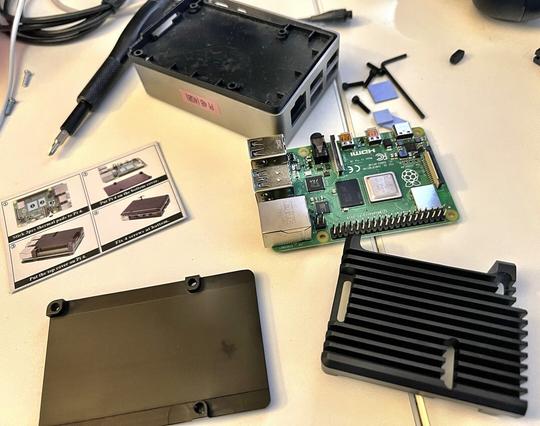
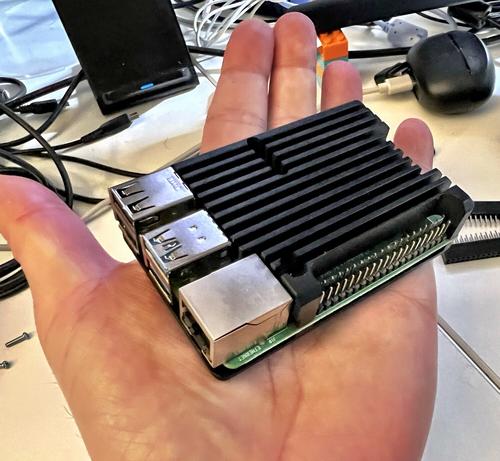
bls@dhrystone Interesting, since I just did the same with one of my Pis (#Flirc to #geekworm). Did it so I could have a Pi4 with GPIO pins exposed
Switched out the #RaspberryPi #FLIRC passive cooling case for a #Geekworm armor case, also passive. Wow. Difference in temp is impressive. Running overclocked (overvoltage 4, arm_freq 1900) and idle at ~53°C right now, other case had it at high 60’s. Will be interesting to see how it performs at load. And yes I know active cooling is better. It’s also mechanical, and louder. 🤷🏻♂️