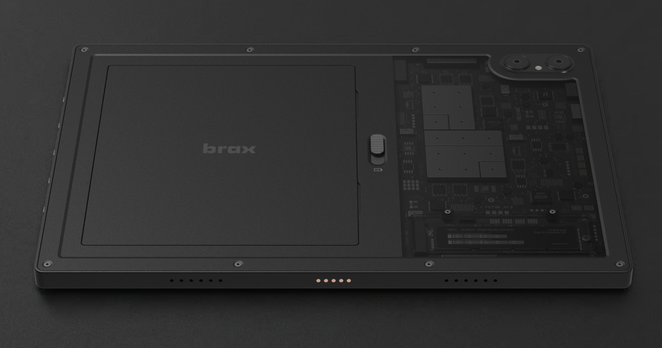
Chat, thoughts on this? https://www.indiegogo.com/en/projects/braxtechnologies/open_slate

Looks decent for tablet specs, but no clue at how the Linux ARM experience would be, nor if the person backing it is cringe


#LinuxTablet #openslate #LinuxHardware
open_slate: A Powerful and Private 2-in-1 Tablet by Brax Technologies PBC - Indiegogo

Meet open_slate: a poweful 2-in-1 tablet with modular design, native Linux and Android support and hardware killswitches.

System76 prepara un Thelio completamente ridisegnato dopo dieci mesi di sviluppo, oltre 16.000 test di durabilità e 250 ore di ottimizzazioni termiche. #System76 #Thelio #LinuxHardware #Workstation #OpenHardware

https://www.linuxeasy.org/system76-rinnova-la-linea-thelio-ecco-il-nuovo-volto-del-desktop-linux/?utm_source=mastodon&utm_medium=jetpack_social

System76 rinnova la linea Thelio: ecco il nuovo volto del desktop Linux

System76 prepara un Thelio completamente ridisegnato dopo dieci mesi di sviluppo, oltre 16.000 test di durabilità e 250 ore di ottimizzazioni termiche.

Linux Easy - News da Mondo Linux

How Linux Saved My Hardware - 5 stories from recent years

https://lemmy.ml/post/42299124

How Linux Saved My Hardware - 5 stories from recent years - Lemmy

#1 my most recent example is a Macbook Air 13 that I chimera’d out of three different machines; awesome that 2012-2017 models have interchangeable parts. was lucky and one of the boards had 8 GB RAM, a rarity back then. alas, the only battery I got has barely 60% capacity and zillions of charge cycles and I ain’t too keen on spending money on a replacement. ok, so shit autonomy, be happy you got a workstation for like $15 in total and run it thusly. except, this one shuts off even if there’s like 70% remaining and subsequently won’t power on without a charger - kinda big deal for a laptop. I imagine not all its cells are up to spec so when it reaches a threshold it cuts out. under macOS, the SMC lets it sip power and when you attach a charger it just wakes as you left it. linux ain’t that cool, when you connect power - all your unsaved work is gone. what linux does have is intel-undervolt. just a smidge of -50mV was enough to remedy the issue. after a coupla days, moved it to -75mV, still perfectly stable; at -100mV it occasionally KPs. so a thing that was unusable away from a charger is again a mobile device, netting me 4+ hours of light use and almost a week of standby! #2 eons ago I had a Thinkpad W520; at least I think that was the model - a 15.6" with the chunky, 7-row keyboard sans numpad. lenovo stabbed me in the heart when they decided that all subsequent models must rock the annoying numeric pad, making you type off-center and… anyhoo, the one I got, had a partially damaged screen, about 100ish pixels wide and super irritating, flashing constantly. replacing it wasn’t in the budget and relying on an external monitor was a no-go… hello xrander! that thing allowed you to cut off a part of the screen and that’s what I did - converted the 16:10 to something more like 4:3. not only that, a friend taped over the busted part with some carbon-like decal making it look super sick! I’m still trying to find a picture from way back when but no luck so far… not only did I get a super usable machine, it was the coolest workstation by far - maxed out RAM, three SSD/HD in there… well, as cool as those things can be, anyways… #3 a few years back, I got a 13" Yoga, forgot the model, for pocket change. dual-core i5 and soldered 8 GB RAM, gorgeous screen, awesome battery - but it constantly blue-screened. break out the mint USB with memtest, and yepp - errors. dogdamn, no way can I afford to fix this thing and if I try desoldering those things, Imma burn the house down. and break the thing even further… enter GRUB and its BADRAM feature! you can exclude arbitrary region(s) of RAM and the OS that boots after it will be none the wiser - it just uses the rest. and verily, it worked without issues, used it for years and I believe it still works to this day with his current owner. #4 got a kernel-panicking Macbook Pro 15 Mid2010 for next to nothing. those things died en masse, the issue was a capacitor that drove the Nvidia chip. any strain or excess power consumption and the thing gave out and the OS crashed. the fix was/is simple - disable the Nvidia chip via EFI variable and use just the Intel HD graphics. you lose display out but gain a cooler machine, longer battery life, and you get zero issues with linux. having fixed it, I installed linux and wanted to upgrade the RAM to 8 GB. alas, no sticks I found would work in the thing. turns out, the fucker only takes 1066 MHz RAM. I totally lived with the conviction that if you stick faster RAM into slower hardware, it’ll run it slower, but apparently that ain’t so. so tried bartering with junkers, I’ll give you my 1333 RAM, you gimme yours - no takers. buying stuff for something that cost me less than $10 was out of the question… turns out, you can use linux to reprogram the SPD data on the RAM module! you change its identifier to 1066 and the macbook recognized it as such. furthermore, you don’t need to patch both sticks, if one is 1066 it can run the other at 1066 as well - so you cat run 'em slower! no idea if this is an apple thing or its widely present, but I got a functioning workstation for free! #5 finally, the Dell Latitude 5285. that’s a 2-in-1 tablet with detachable keyboard that I got without the battery. it had okayish specs, the i5-7300u is nothing to get excited about but it had 16 GB LPDDR3 soldered on. the touch display is beyond gorgeous - 400-nit 1920x1280 IPS and the intel graphics shipped the full 4K @ 60 Hz to my monitor via DP-Alt. the only problem - the fucker won’t boost past 400 MHz without the battery! buying the thing is out of the question (y’all notice a pattern here, right?) so what are we to do… thankfully, we got msr-tools. the thing can patch CPU’s registers and en/disable some things, and one of them is BD_PROCHOT. that signal makes the CPU throttle on account the heat, it’s also triggered if anything is amiss - touchpads disconnected, battery not present, etc. what’s needed is read out rdmsr 0x1fc if memory serves correctly, and then you add one bit to the read out state and write it back with wrmsr 0x1fc 0x1xxxxx et voila - speedsteps up to 2.7 GHz, a quick systemd script to make it permanent. it won’t turbo, to 3.3 GHz or sumsuch, but this was more than enough for everyday use. thanks for reading! y’all got any stories how linux can save your ass without spending money? share it with the class!

I've figured out why Logitech G603 can't Right-click resize in Gnome

https://sopuli.xyz/post/40199921

I've figured out why Logitech G603 can't Right-click resize in Gnome - Sopuli

Gnome tweaks and dconf say right-click resizing should work. It does, but only with the touchpad buttons. If I use my Logitech G603, it refuses to cooperate. Took a while to figure out why, so I’m sharing in case someone else is banging their head against the same brick wall. Turns out, the Logitech G603’s right click triggers both BTN_RIGHT (273) and BTN_EXTRA (276) at the same time. A normal mouse would just use BTN_RIGHT, with BTN_EXTRA reserved for a separate physical button. Gnome, apparently, can’t handle this kind of messy double-input and blocks right-click resizing, which is mildly infuriating. Side note: I absolutely love that sort of smooth resizing. If you haven’t used it yet, I highly recommend trying it out. I can’t believe how Windows users live without it. Imagine trying to aim for the 1 pixel wide edge of a window every time. Anyway, if you’re running into the same issue, check what your mouse is actually sending when you right-click. Install libinput-tools and run: bash sudo libinput debug-events My output looks like this: event7 POINTER_BUTTON +1.688s BTN_RIGHT (273) pressed, seat count: 1 event7 POINTER_BUTTON +1.688s BTN_EXTRA (276) pressed, seat count: 1 event7 POINTER_BUTTON +1.935s BTN_RIGHT (273) released, seat count: 0 event7 POINTER_BUTTON +1.935s BTN_EXTRA (276) released, seat count: 0 As you can see, a single right click produces four lines corresponding to pressing and releasing two buttons. If I can disable the BTN_EXTRA (276) input, I’ll stick with my Logitech. If not, I’ll probably switch to one of my backup mice. I’m planning to test those later this week. Hopefully, they know how to behave. Next time I’m buying a (used) mouse, I’ll definitely test it this way before paying. I don’t want my hardware to require extra troubleshooting just to do basic things. I’ll be looking into that tweaking side later as well, now that I know what to look for. If you have any tips, tricks, and sources to check, feel free to drop them in them here.

Schenker Element 16 is a "semi-modular" laptop with a repairable, customizable design - Liliputing

https://lemmy.blahaj.zone/post/36835831

Blåhaj Lemmy - Choose Your Interface

Standalone scanners with ethernet jack?

https://sh.itjust.works/post/53089308

Standalone scanners with ethernet jack? - sh.itjust.works

Does this even exist? I have a brother mfc but trying to print anything at all will spitout a blank page and partway feed 2 more and call it a jam, exact same way every time and this also prevents scanning until it is cleared and the drum is jiggled before closing the front panel. I also have a standalone colour laser printer. I’m not super excited about the idea of getting another mfc when I have a working printer so I’m looking for recommendations on standalone linux compatible scanners that have wired network capability, ideally with document feeder. So far I’ve looked at a few but I have low confidence on the linux functionality and network jack isn’t even mentioned in spec sheets where I can see it in the picture.

TUXEDO Gemini 17 Intel delivers big screen Linux power without the desktop clutter

https://fed.brid.gy/r/https://nerds.xyz/2025/12/tuxedo-gemini-17-intel-linux-laptop/

Building the Perfect Linux PC with Linus Torvalds

https://slrpnk.net/post/30882884

Building the Perfect Linux PC with Linus Torvalds - SLRPNK

Lemmy

Slimbook launch the KDE Slimbook VII with AMD Ryzen AI 9 365 / Radeon 880M

https://lemmy.world/post/39382218

Slimbook launch the KDE Slimbook VII with AMD Ryzen AI 9 365 / Radeon 880M - Lemmy.World

Lemmy