@tusharhero @django I actually started noodling around writing a function that calls #ImageMagic to caption memes. And before I got too far I was like WAAAAAAIT A MINUTE

And of course @larsmagne23 (and @sacha and a couple other contributors) already made meme.el

https://github.com/larsmagne/meme

#emacs #meme

GitHub - larsmagne/meme: An Emacs meme generator

An Emacs meme generator. Contribute to larsmagne/meme development by creating an account on GitHub.

GitHub

Kleiner Tipp:

Fotos von z.B. Apple Geräten im *.heic Format lassen sich unter SUSE wie folgt in *.jpg umwandeln:

- Es muss das Paket ImageMagic installiert sein.
- zusätzlich ist noch die Library libheif-ffmpeg nachzuinstallieren.

Dann auf der Konsole 'convert input.heic output.jpg' ausführen.

Fertig.

#linux #heic #imagemagic #nürnberg

Ich habe #JXL Master Files die ich gerne als #Avif in der Webgalerie nutzen möchte …

Aber
#ImageMagic kann keine JXL lesen
Und #GraphicsMagick kann zwar JXL lesen aber keine Avif schreiben…

Ich will doch nicht immer alles selber machen müssen …

@passthejoe

Ok, that's funny. I instructed #ImageMagic convert to convert it to a 4-color PNG, but it actually only used 3 colors: orange, white, and black.

It's kind of amazing what #dithering can do!!

🍌🤖 "Welcome to the wacky world of Nano Banana—where your prompts can create #AI #art so nuanced even Picasso would be confused. Meanwhile, tech giants are busy playing 'who-can-make-the-most-forgettable-AI-model,' while #ChatGPT swoops in to steal the spotlight with its free-for-all image magic. 🤯✨"
https://minimaxir.com/2025/11/nano-banana-prompts/ #NanoBanana #TechGiants #CreativePrompts #ImageMagic #HackerNews #ngated
Nano Banana can be prompt engineered for extremely nuanced AI image generation

Nano Banana allows 32,768 input tokens and I’m going to try to use them all dammit.

@theo_stern
Der Befehl setzt eine randabfallende(!) Grafik.
Diese muss also exakte Breite/Höhe-Relation wie die unbeschnittene(!) Seite haben.

Exakte Pixelangaben zeigt #SPBuchsatz zu Beginn des Textsatzlaufs auf der Konsole an.

Mit anderen Worten: Passt das Bild, soll aber kleiner sein, so ergänze ringsum weißen Rand (z.B. mit #ImageMagic oder ähnlichem Werkzeug).

Alternative-Befehl:
\Geschichte

Dann halt vorher:
\neueSeite
\FaktorLeerzeileOben
\BildBreiteFix

je mit passenden Parametern.

This is going to make so much bounty money.

As far as I understand, #imagemagic just like #ffmpeg is just not designed with adversarial input in mind and should never be used to accept user provided data.
https://mastodon.social/@hrbrmstr/112722412968709759

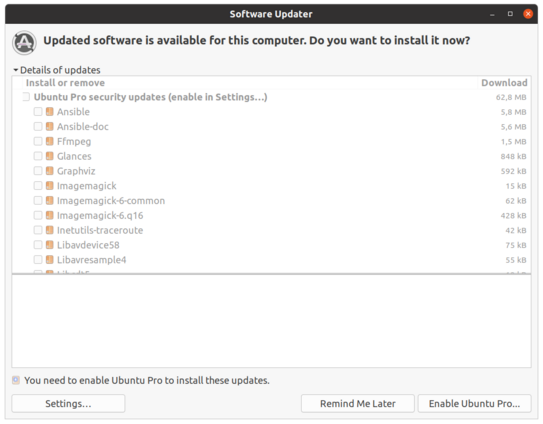
Hey! Hey #UBUNTU #CANONICAL ! ARE YOU GONE NUTS ?? You provide and let me install all these general apps and tools like #VLC, #ffmpeg, #ansible, #imagemagic for free and now you ASK FOR MONEY, just to have them updated ?!? You got too big to fail, huh ?? Maybe a little diet of your #Linux market share is healthy for you. #NO_MORE_UBUNTU INSTALLS FOR YOU! As an enterprise Linux Admin i will make sure that UBUNTU will be removed. Just like #RedHat before. Enjoy!

OK so I'm apparently running the first upgrade of #Chocolatey since.. uh. 2020? New #git, new #ImageMagic, new #GIMP, new... ok, it's upgrading #LibreOffice too? Sure, why the heck not.

Uh, new #Python? Sure, why not. New #Stellarium? I don't remember installing this via chocolately. *collapses in cosmic horror*

Don't blame me, I literally forgot this was a thing. Chocolatey literally self-upgraded from 0.10 to 2.2!

https://itsfoss.com/converter-tool/

Just came across this, it's a basic, simple front-end to imagemagick.

Sometimes I just don't feel like breaking out full-on GIMP to do something basic, but I personally hate the command line for anything but the simplest of tasks. (I know, I know, bad Linux user).

This looks like exactly what I need, it covers the basic operations without much fuss or muss.

#ImageMagic #Graphics #GraphicsEditing #Photomanipulation #Converter #Linux #OpenSource

Convert and Manipulate Images With 'Converter' GUI Tool in Linux

You can always install ImageMagick on your system to convert images, but not everyone likes to use the terminal for converting and manipulating images. So, what if you have a GUI app as a front-end to help with that? Converter is precisely that. It is a front-end to ImageMagick. So

It's FOSS