Today, I think I managed to mostly dial in the various settings for my plotter. Up until now, although the carriage moved fairly cleanly, there was a discrepancy in the dimensions that it was moving when I tried to send it any instructions.
Once I’d figured out the X and Y movement, the next issue was getting the Z axis (an RC servo that moves the pen up and down at the end of the plotter arm) to behave as intended. Initially I was seeing that the pen remained down during moves around the image I was trying to draw, but I realised that I had the Z motion in the wrong place in the GCode file (I’m using vpype-gcode to convert from SVG to GCode for my custom machine, here). I wrote my own template machine definition to help do that conversion.
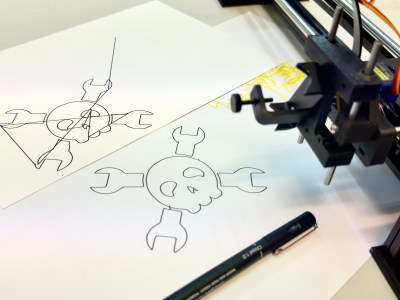
Here’s the before and after image where I had the pen up/down in the wrong spot in the GCode template. I love to use Hackaday’s Jolly Wrencher logo as a test bed for these kinds of things! It’s a nice clean and simple set of shapes.
You probably do not understand exactly how happy this has made me right now… just some final #fluidnc tuning and a more accurate vpype-gcode config to create… #penplotter #diy #hackaday #maker #plotter
— Andy Piper (@andypiper@macaw.social) 2024-07-21T13:18:13.782Z
Getting a clean plot completed was a huge step forward! I used OpenBuildsCONTROL as the GCode sender, as it seems to be one of the only apps I can find that works well communicating with FluidNC over the network. I’ve previously used UGS and CNCjs with my hanging polar plotter, but that currently talks something that resembles GRBL, and runs over USB serial only (another project I want to get around to updating, some time).
After that… I got cocky. I decided to try to draw a grid of these at 10% size (tip: Inkscape can easily generate this kind of thing, using Path Effects – super useful). However, 10% size was waaaay too small (not pictured or recorded, unrecognisable squiggles), so, I went for something a bit larger – although, not much.
https://www.youtube.com/watch?v=muXezKabU64
This all took around 20 minutes to plot out – not super fast, but having done some reading, I think pushing the stepper motors too much will have a negative effect.
Given that this is supposed to be a grid of 25 identical Jolly Wrenchers… I can see that some more tuning is needed! It is a cheap(ish) self-assembly machine… and I felt pretty good about how I put it together, but I also noticed that the belt probably needs adjusting and I’m sure I can do a better job on the mechanical side of things.
TODO: adjustments as above; build a mounting box for the FluidNC controller; look into improving the vpype-gcode template; put it all on Hackday and GitHub or Codeberg; considering replacing the SG90 with a nicer servo (extra credit idea, unnecessary).
Results!
[side note: I also put the video above onto my Peertube account, but I don’t think I can embed that here at the moment. WordPress / Automattic are moving in the direction of the Fediverse, but apparently I can’t embed from PeerTube yet…]
Like it? Share it -
https://andypiper.co.uk/2024/07/21/its-alive/
#100DaysToOffload #fluidnc #gcode #hardware #penplotter #plotter
 viernullvier
 FreeCAD
 equinoxefr
 rawe
rawe
 Incident Creator ❎
 Andy Piper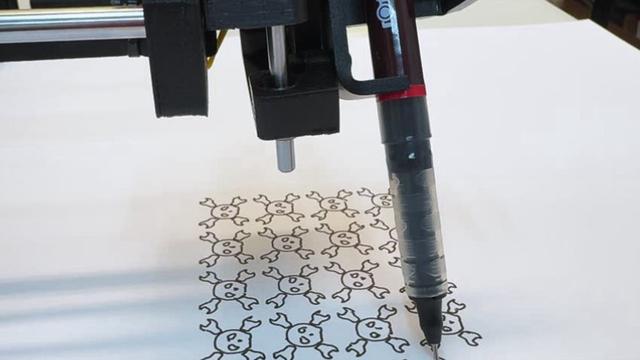
 Andy Piper
 Andy Piper