 5 🌳 walk into a bar… & say ow
I was going through photos of a bunch of original arts, and this one i decided to do a cheeky vector of.
"Vulture MVL" completed 2026 by 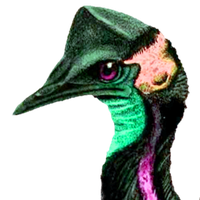

I was going through photos of a bunch of original arts, and this one i decided to do a cheeky vector of.
"Vulture MVL" completed 2026 by
Okay, found a solution! Keep duplicating the first path and growing its stroke to the desired size and then Stroke-to-Path. Much closer to the results with a computed stroke

Inkscape really doesn't like doing repeated Stroke-to-Path operations. This is breaking my heart because it looks great with the nested outlines ending in the Philadelphia pride colours, but the last outline has all sorts of shape aberrations.
Anybody know a great way around that?


Es geht auch mit #Inkscape gut. Einfache Sachen mache ich immer damit - weil die Lernkurve bei #Gimp recht steil ist.
Solange Du die Bilder nur anordnen und eventuell die Größe der Bilder ändern willst, ist Inkscape einfacher.
Wenn Du allerdings die Bilder selbst noch bearbeiten oder nacharbeiten willst, dann ist Gimp die richtige Wahl ...
Cartel para encuentro antiimperialista en la ENAH
Este cartel tuvo que salir al vapor para un evento en la ENAH. Realizado con GIMP, G’MIC e Inkscape, las fuentes son League Spartan y Syne para el cabezal.
#ENAh #GIMP #GMIC #Inkscape #RadioZapote

@doctormo Sorry, I didn't mean to complain or make you explain this. I just wanted to tag #inkscape for completeness
I've recently watched some of your #cmyk update videos and I can see it coming
The #Krita docs look very helpful. It at least answers my question about "double applying" a profile if you have one at the OS level already. Krita can ignore that and manage itself.
(everything below is me shouting into the wind to help me understand what it is that I want and even answer some of my own questions)
I think I'm coming at this from an #engineering system diagram pov where I want to visualize and control each subunit to understand what's happening.
We have some underlying "image data". To display that, we put it through an ICC profile conversion box. (Although in #scribus there are *four* boxes here for reasons that aren't at all clear.)
For print we have a similar thing. If you think of the printer itself as a "monitor" we have two more hidden variables for ink and paper type. I don't see any way in scribus, krita or #debian to even see those ICC conversion "boxes" let alone control what they are doing if I knew what adjustments I wanted.
Ohhhhh wait! I take a lot of that back. The argyllcms/displaycal stuff I installed to calibrate the monitor(s) has a lot of tools to visualize this and even build iccs by hand.
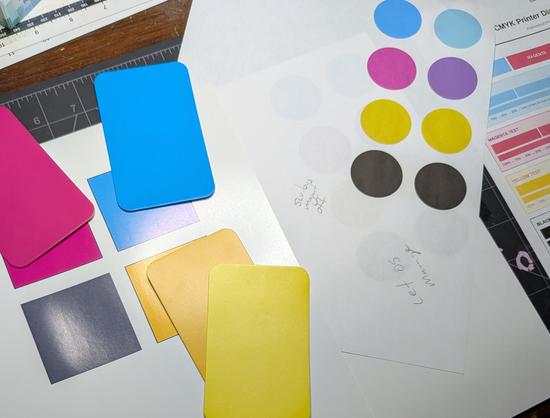
tryna #cmyk calibrate my #ecotank #printer
not sure why, since #inkscape cmyk support seems to be largely imaginary (I'm printing from #scribus)
this isn't made any easier by the fact that all the explanations are cargo-cultish and don't cover #linux
printer #color management variables include printer, ink and paper. #debian has a single icc slot. how and where does one manage this?
Cartel para conversatorio anti-FIFA
Cartel para un conversatorio en el Centro de Medios Libres La Fortaleza.
La imagen de abajo es de un mural de Vloque Negro en el bajopuente del Estadio Azteca. La de arriba es de una manifestación en 1968. Las fuentes que utilicé fueron Movement y de nuevo DINish, condensada y normal.
Realizado con GIMP y G’MIC, e Inkscape.
#antiFIFA #CDMX #GIMP #Inkscape #LaFortaleza #MediosLibres #Mundial #RadioZapote
 gee Ⓐ⚑
 🏳️🌈 Brie 🌞🚴🌱✨
 Guerric Haché
 Harald 哈拉德
 Benjamín Argumento
 dr 🛠️🛰️📡🎧