whoever is devloping wayland can bite my ass...

TWO YEARS LATER and there is STILL NO replacement for Xvfb?

Seriously - headless displays are like, a cornerstone - does no one really give a shit AT ALL?

I mean yeah - I guess it is opensource so just "code it yourself" - but jesus fuck dude seriously? SERIOUSLY?

You guys don't give a fuck about remote desktop capabilities or guis on your virtual sessions AT ALL?! REALLY?! REALLY REALLY?

#wayland #xvfb #linux #programming

#weston #xvfb replacement update ...
- CentOS Stream 10 container: Installing `epel-release` then `weston` gives me dependency issues. Currently a non-starter
- Ubuntu 22.04 on arm64 (real machine, the others are in containers: Tells me the display number in the startup). xclock runs ok
- Fedora or Ubuntu container (40/42/22.04): Works but segfaults with --xwayland unless you precreate /tmp/.X11-unix

There is hope!

I have #xdm launching with the appropriate `-screen` parameter to use an #Xvfb display using shared memory and `x11vnc` connecting to the display. I can SSH into the #AlpineLinux VM, but can't connect to VNC via localhost over that SSH tunnel, so I'm still missing something, but I'm clearly _very_ close. I'll sleep on it.

I definitely misremembered how much of a slog it was to initially get x11vnc running via #Xvfb and xenodm(1) in an #OpenBSD VM under vmm(4)/vmd(8), so the attempt to replicate under #AlpineLinux with x11vnc, xdm(1), and Xvfb has been nearly as slow while figuring out what packages need to be installed... especially "*-doc" for the manual pages I've come to expect to "just exist".

Frustrating: `x11vnc -auth guess` seems to work so well under OpenBSD, but I have to pass the xdm authfile here.

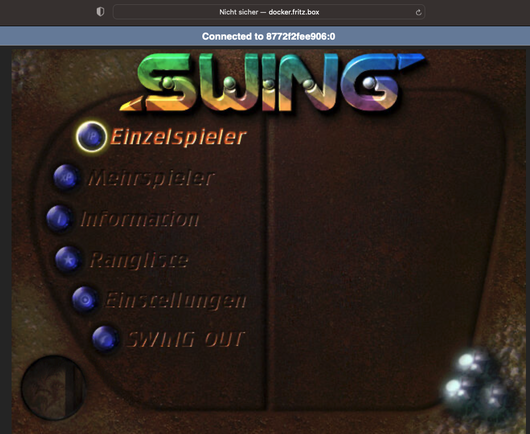
Endlich mal wieder den #Container zum laufen gebracht, in dem ich alte #Windows Spiele im Browser spielen kann!

Hier das Spiel "Swing".

Läuft unter Linux in #Docker mit #Wine, #XVFB, #X11, #noVNC mit #websockify

One of my most useful personal projects is my own customized #Debian #Linux ISO image, with my packages, tools, dotfiles and configuration just the way I want it.

It uses Debian Live to build the ISO, which can be used as a #liveusb or an installer. I can build it locally via #vagrant with #libvirt, or using a #GitHub workflow.

Here's what I think is one of the coolest things: the GitHub workflow builds the ISO then packages it into a #Docker image. When run, that container provides the following:

  • an HTTP server from which the ISO can be download
  • a #VNC server (using #novnc and #Xvfb) for connecting to the live instance running on #QEMU with #kvm
  • a #websockify interface for accessing the VNC server in a web browser

It's so useful for me to have my environment with me wherever I go as I carry it around with me on my #Ventoy thumb drive, whether running it as a one-off live instance or the installer, and to have the environment in a Docker container where I can spin it up as needed.

GitHub - mmguero/deblive: Debian-based Live Images

Debian-based Live Images. Contribute to mmguero/deblive development by creating an account on GitHub.

GitHub