Tip #764

Vivaldi フォーラムのトピックを最新順あるいは人気順で並べ替えてみよう

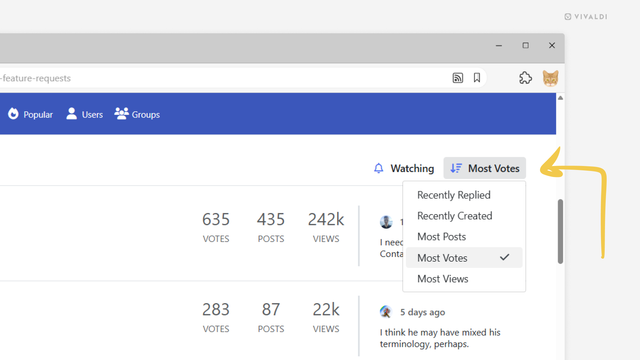
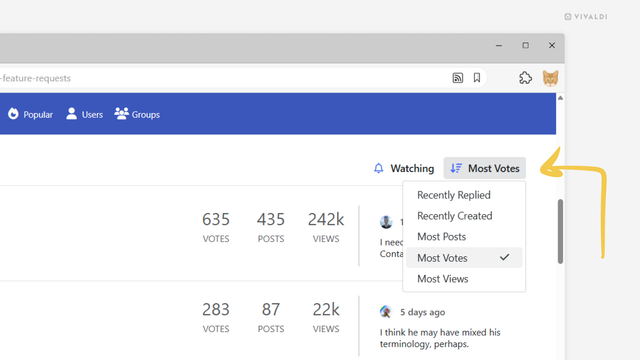
Vivaldi コミュニティでどんな機能が求められているのか確認したり、使用している OS のカテゴリーでの最新のディスカッションをブラウジングしたりしたい。そんな時は、トピックを並べ替えるメニューを利用すれば簡単に行えます。

フォーラムのトピックを並べ替えるには:

  • 並べ替えたいトピックのカテゴリーに移動する
  • 右側にあるトピックをクリックしてメニューのリストを表示する
  • 以下の並べ替えオプションから選択する
    • Recently Replied
    • Recently Created
    • 最大投稿
    • 最大評価
    • Most Views
  • #vivaldi #VivaldiForum #フォーラム

    https://vivaldi.com/ja/blog/tips/services-tips/forum-tips/tip-764/

    Tip #764

    Sort Vivaldi Forum topics by recency or popularity

    Want to see what features the Vivaldi Community is asking for most, or browse the latest discussions in your operating system’s category? Use the sorting menu to arrange topics however you like.

    To sort forum topics:

  • Go to the category where you want to sort topics.
  • Click on the menu above the list of topics, on the right side.
  • Choose between the following sorting options:
    • Recently Replied
    • Recently Created
    • Most Posts
    • Most Votes
    • Most Views
  • #forum #Vivaldi #VivaldiForum

    https://vivaldi.com/blog/tips/tip-764/

    @Shpankov @litclub
    Sent the message on #VivaldiForum/vivaldi.net

    @willegible @Vivaldi
    Yep, I got it now. I don't use #touchpad, this is why I didn't know. Asked on the #VivaldiForum about this? There are many people willing to #help, once they see your #post.

    #VivaldiBrowser #VivaldiTechnologies #Vivaldi

    @HalleAndert @Vivaldi
    @compliance, yep, submitting a feature request is the best way. Cause the developers look there on the #VivaldiForum, not on #VivaldiSocial or #Reddit or others

    #VivaldiBrowser #featureRequest

    Tip #745

    導入してもらいたい機能を Vivaldi に知らせる方法

    Vivaldi ではブラウザを利用するユーザーの意見を常に聴き、要望のあった機能をブラウザに多数追加してきました。ユーザーの考えを知ることができるよう、機能に関するリクエストを収集できる特別なカテゴリを Vivaldi Forum に用意しています。

    これらのカテゴリをチェックして、実装してほしいリクエストがあれば、それに対する支持を表明してください。

    機能のリクエストに賛成するには:

  • 機能のリクエストに関するトピックを開く
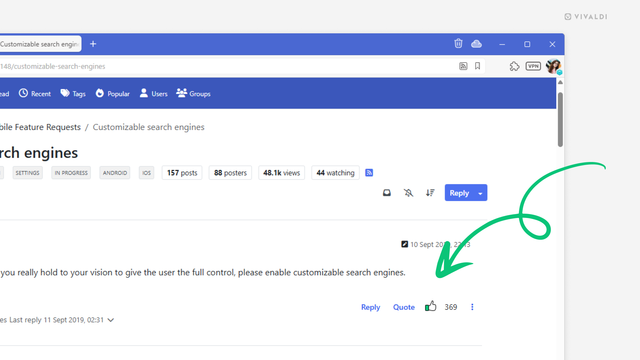
  • 最初の投稿にある 👍 ボタンをクリックする
  • 機能に追加してほしいことがあればコメントを記入する
  • フォーラムにまだ投稿されていないアイデアがあれば、他のユーザーがリクエストに賛同できるよう、新しいトピックを作成してください。

    #vivaldi #VivaldiForum #コミュニティ

    https://vivaldi.com/ja/blog/tips/services-tips/forum-tips/tip-745/

    Tip #745

    Let us know which features you’d like to see implemented in Vivaldi.

    At Vivaldi, we’ve always listened to users’ feedback and have added countless features that have been requested by the users of the browser. To learn about your wishes, we have special categories on the Vivaldi Forum, where we collect feature requests.

    Browse through these categories and show support for the requests you’d like to see us implement.

    To upvote a feature request:

  • Open the feature request topic.
  • Click on the thumbs-up 👍 button on the first post.
  • Leave a comment if you’ve got something to add to the feature request
  • If you have an idea that hasn’t been posted on the forum yet, create a new topic so others can upvote your feature request.

    #community #Vivaldi #VivaldiForum

    https://vivaldi.com/blog/tips/services-tips/forum-tips/tip-745/

    Tip #729

    フォーラムで共有されたリンクを新しいタブで開いてみよう

    Vivaldi フォーラムのコミュニティでは、Vivaldi に関する記事やインストラクションなど、興味深いウェブページへのリンクがよく共有されます。デフォルトでは、これらのリンクはフォーラムのディスカッションとして同じタブで開かれますが、フォーラム以外のリンクを新しいタブで開くように設定することができます。

    新しいタブでリンクを開くには:

  • フォーラムの右上のプロフィール画像をクリックして、メニューから設定を選択する
  • 「ブラウジングの設定」セクションに移動する
  • 「外部リンクを新しいタブで開く」にチェックを入れる
  • 「変更を保存」をクリックする
  • #vivaldi #VivaldiForum

    https://vivaldi.com/ja/blog/tips/services-tips/forum-tips/tip-729/

    @bieberium @Vivaldi
    Do you know if there is a feature request for this in the #VivaldiForum? If yes, please give the link. I would like to vote on it.