 Mopsi
MopsiI noticed a #feature that every #phone and #laptop should have but doesn't: Easy one click, or very feq click prevention of #ScreenLock. I am playing the flute and when I'm displaying sheet music on my laptop or on my phone if I have no other option, I can't touch the screen every few seconds. I'd like to set the screen to be always on, as easily as enabling location tracking or bluetooth.
 NiceMicro
@peppe thaks man... it feels good, as I'm on the suck train for a while now 😅
Since I've switched themes, LightDM stopped working, and I can't log in until I first log in on an other TTY in text mode... Apparently opening the #LightDM greeter settings app screwed everything up? Now I'm looking for an alternative, but nothing else seem to support a "switch user" type feature?
#justLinuxThings I guess...
smh
 Arcturax 🦇
Edit : NOPE! Turns out this issue is deeper and more mysterious, Steam is NOT at fault!
Had that "fan spin up and machine gets hot" issue on linux again. This time I've tracked it down! First tried HTOP, nothing on CPU. Then NVTOP, BINGO, GPU is pushed to 100%. But what?
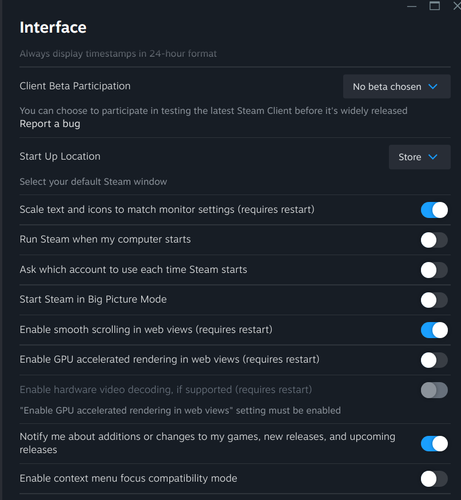
Turns out it was steam! When my machine goes into lock, nothing until screen goes into sleep and then BAM, 100% GPU. I send a sigkill to steamwebhelper and GPU drops and stays normal until I unlock and relock screen and it goes dark agian.
Going to Steam File->Settings->Interface and turning off "Enable GPU accelerated rendering in web views" seemed to fix it. The restart of steam didn't, but exiting steam fully, then restarting it did. Now I don't get that problem. I'll keep monitoring it,but that might be the fix!
 GTech Booster
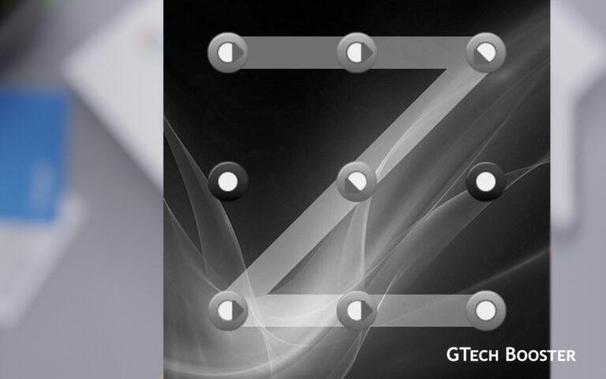
Bypass the Android Lock Screen with Factory Reset
https://gtechbooster.com/bypass-the-android-lock-screen-with-factory-reset/
#HowTo #Security #Android #ScreenLock
https://gtechbooster.com/bypass-the-android-lock-screen-with-factory-reset/
#HowTo #Security #Android #ScreenLock

 DevCodeF1.com
https://devcodef1.com/news/1078661/windows-11-screen-lock-customization?utm_source=mastodon #Windows11 #screenlock #customization #personalization
Learn how to customize the Windows 11 screen lock to your liking. You can choose the background image or application that displays content. This article will provide you with the options available and how to use each one. Remember to also check the open ports in Windows for security purposes. To change the appearance of the Windows 11 screen lock, g
Learn how to customize the Windows 11 screen lock to your liking. You can choose the background image or application that displays content. This article will provide you with the options available and how to use each one. Remember to also check the open ports in Windows for security purposes. To change the appearance of the Windows 11 screen lock, g

Configuring the Windows 11 Screen Lock
Learn how to customize the Windows 11 screen lock to your liking. You can choose the background image or application that displays content. This article will provide you with the options available and how to use each one. Remember to also check the open ports in Windows for security purposes. To change the appearance of the Windows 11 screen lock, go to the system configuration and select the Personalization section. From there, select the Screen Lock option. This will take you to the screen where you can change the entire appearance of the screen lock. First, you need to expand the Personalize the screen lock option, which will allow you to choose how the selected background image is displayed. The three options are: * Highlighted content from Windows: Displays a series of random images selected by Windows from its Microsoft servers. * Image: Choose a background image from your computer to display in the screen lock. * Slideshow: Choose a folder or album to display a different image every time you access the screen lock, all from the selected collection. Below, you can choose an application that displays data on the screen lock. By default, it is set to the calendar, but you can change it. Additionally, you can enable or disable the option to keep the background image in the login screen. Finally, there is an option for related configuration settings, where you can set the time delay for the screen lock and the login screen. You can also access the screen saver or lock screen protector directly from this section.
 chaos enby
Ever locked yourself out of your own system during screen unlock or plain login by mistyping your password too often?
If you’ve got root access to the system, you can reset the lock with the following command:
faillock --user USER --reset
and then try again logging in.
Follow these steps to set up Passkeys on Google
https://gtechbooster.com/follow-these-steps-to-set-up-passkeys-on-google/
#HowTo #Authentication #Facescan #FIDO #Fingerprint #Google #Passkeys #Password #Screenlock #WebAuthn
https://gtechbooster.com/follow-these-steps-to-set-up-passkeys-on-google/
#HowTo #Authentication #Facescan #FIDO #Fingerprint #Google #Passkeys #Password #Screenlock #WebAuthn


Follow these steps to set up Passkeys on Google - GTech Booster
Passkeys are a more convenient and safer alternative to passwords. They work on all major platforms and browsers, and allow users to sign in by unlocking their computer or mobile device with their fingerprint, face recognition or a local PIN.
Google rolls out Passkeys to compete with Passwords on Password Day
https://gtechbooster.com/google-rolls-out-passkeys-to-compete-with-passwords-on-password-day/
#Security #Authentication #Facescan #Fingerprint #Google #Passkeys #Password #Screenlock #W3C #WebAuthn
https://gtechbooster.com/google-rolls-out-passkeys-to-compete-with-passwords-on-password-day/
#Security #Authentication #Facescan #Fingerprint #Google #Passkeys #Password #Screenlock #W3C #WebAuthn

Google rolls out Passkeys to compete with Passwords on Password Day - GTech Booster
Passkeys can be used in two different ways: on the same device or from a different device. For example, if you need to sign in to a website on an Android device and you have a passkey stored on that same device, then using it only involves unlocking the phone.…
 Sami Lehtinen
Windows 11 screen lock is unreliable. Clear design flaw, sometimes hitting keyboard just randomly disables the screen lock, and you'll get back to desktop. Something is clearly designed in a very bad way. #Windows #security #screenlock #fail
 me·ta·phil, der