 Seth Grover
Malcolm v26.06.0 is primarily a security hardening release, addressing fifteen vulnerabilities (2 high severity, 6 medium, and 7 low) identified in a security assessment. Bug fixes address an issue with the zeek container causing performance degredation over time and a fix for duplicate virtual machine entries in NetBox autopopulation. A few component versions have also been updated.
If you are upgrading from an existing Malcolm installation, run ./scripts/status for Malcolm to migrate some settings prior to running ./scripts/configure, ./scripts/start, or other Malcolm control scripts.
https://github.com/idaholab/Malcolm/compare/v26.05.2...v26.06.0
- 🛡️ Security Remediation & Hardening (#996)
- Unauthenticated reflected XSS / open redirect in
/dashboards/app/refred; also addedContent-Security-Policyframing headers (frame-ancestors,base-uri,form-action) andX-Frame-Options: SAMEORIGINglobally to mitigate clickjacking (#997) - Authenticated command injection in filebeat container via SFTP-uploaded filename (#998)
- Password stored as MD5-crypt for SFTP (#1009)
- Authenticated archive zip-slip file write in filebeat container (#999)
- OpenSearch path injection via
/mapi/fields?template(#1000) submit.phpLocation:open redirect viaReferer(#1007)- htadmin proxied with no nginx auth gate (#1003)
- Keycloak OIDC
ssl_verifyalways set to false (#1006) - NetBox
SUPERUSER_PASSWORD=adminshipped default (#1011) - RBAC
defaultdict(lambda: True)fail-open for unlisted handlers in Malcolm API (#1004) - Read-only Arkime deny-regex omits
addtags/removetags(#1008) - Read-only deployment allows
POST /mapi/event(#1002) - WISE auth path selectable by client
User-Agent(#1001) ARKIME_PASSWORD_SECRET=Malcolmshipped default (#1005)requestsCVE bump reverted in logstash image (#1010)- Fix API auth errors and hide NGINX version disclosure (#989)
- Unauthenticated reflected XSS / open redirect in
- 🐛 Bug fixes
- auto-discovered Virtual Machines in NetBox seem to allow for duplicates (#978)
- Ensure list of archive file types supported by Malcolm for uploading Zeek logs (
application/gzip,application/vnd.rar,application/x-7z-compressed,application/x-bzip2,application/x-cpio,application/x-gzip,application/x-lzip,application/x-lzma,application/x-rar-compressed,application/x-tar,application/x-xz,application/zip) are consistently used across the platform. zeekcontainer continually grows/usr/local/zeek/crontab, causing Malcolm performance to gradually worsen (#1015)
- ✅ Component version updates
- 🧹 Code and project maintenance
- Fixed some incorrect links in documentation (#988, thanks @jsoref)
- Refactored NGINX error pages configuration into its own
includefile and added a401.htmlpage
- 📄 Configuration changes for Malcolm (in environment variables in
./config/). The Malcolm control script (e.g.,./scripts/status,./scripts/start) automatically handles creation and migration of variables according to./config/env-var-actions.yml.- Added
KEYCLOAK_SSL_VERIFY(defaultfalse) tokeycloak.envfor #1006 - The Arkime password hash secret
ARKIME_PASSWORD_SECRETinarkime-secret.envno longer has a default value: it must be set duringauth_setup(for #1005) - The Netbox superuser password
SUPERUSER_PASSWORDinnetbox-secret.envno longer has a default value: it must be set duringauth_setup(for #1011)
- Added
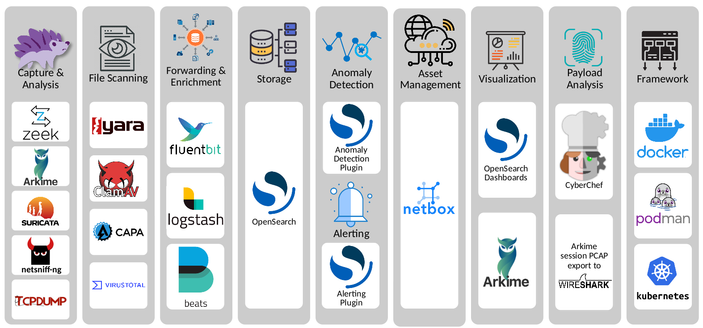
Malcolm is a powerful, easily deployable network 🖧 traffic analysis tool suite for network security monitoring 🕵🏻♀️.
Malcolm operates as a cluster of containers 📦, isolated sandboxes which each serve a dedicated function of the system. This makes Malcolm deployable with frameworks like Docker 🐋, Podman 🦭, and Kubernetes ⎈. Check out the Quick Start guide for examples on how to get up and running.
Alternatively, dedicated official ISO installer images 💿 for Malcolm and Hedgehog Linux 🦔 can be downloaded from Malcolm's releases page on GitHub. Due to limits on individual files in GitHub releases, these ISO files have been split 🪓 into 2GB chunks and can be reassembled with scripts provided for both Bash 🐧 (release_cleaver.sh) and PowerShell 🪟 (release_cleaver.ps1). See Downloading Malcolm - Installer ISOs for instructions.
As always, join us on the Malcolm discussions board 💬 to engage with the community, or pop some corn 🍿 and watch a video 📼.
#Malcolm #HedgehogLinux #Zeek #Arkime #Strelka #NetBox #OpenSearch #Elasticsearch #Suricata #PCAP #NetworkTrafficAnalysis #networksecuritymonitoring #OT #ICS #icssecurity #CyberSecurity #Cyber #Infosec #INL
 Rad Web Hosting
 mastodon.raddemo.host



 Soliman Hindy