#FediverseTip: Did you know you can use the Fediverse to write your future self a letter?

If you have a secondary account that you can use with a client that has a post scheduling feature, then you can send a private message to your main account that will arrive in a week, 3 months or 10 years.

If you don't have such an account yet, you can e.g. get a secondary Mastodon account (hint: climatejustice.social has a 5000 characters limit) and use e.g. Tusky or Fedilab.

Then you'll just have to stay active in the Fediverse and you might get regular letters from your past. 😊

#MastoTip #PostScheduling #LetterToTheFuture #Tusky #Fedilab

Another thing originally from a conversation I had with someone else that ought to be its own thing, so here you go!

Not happy with your current instance? Considering migrating? Here's a few steps!

1. Go to your settings, "Import and Export", go to "Export", and download everything you want to transfer over; they will be in .csv format; you can also request an archive of all your posts, that'll be sent via email when your instance is done compiling it, it'll be in a zip file.

2. Make the new account in a new instance.

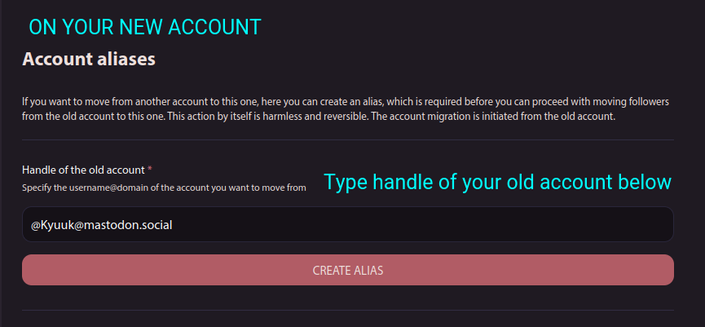
3. In the "Account settings" on your NEW account, under "Moving from a different account", click "create an account alias.", then type in the handle of your OLD account.

4. Then, when you're ready, go to the account settings on your OLD account. Under "Move to a new account", click "configure it here"; you'll move to a page where you type in the handle of your NEW account, and the password of your OLD account. After that, the two instances will attempt to transfer ALL of your followers over to your NEW account. Some failures MAY occur, but you can double check your old account's follower page. The usual failures in my experience are usually other old accounts that now redirect to new accounts.

5. Go back to "Import and Export" on your NEW account, go under "Import", and you'll be able to import all the CSVs that you've exported from your old account. You MAY be informed of failures while importing, notably for your "Following" list, but you usually get a list of everything that failed to import.

6. Keep in mind that the ability to import posts from your old account depends on instance - Mastodon instances usually don't have this feature, while other places (i.e. Misskey/Calckey/Firefish) usually have this feature.

7. Keep in mind that if you are a hashtag follower, hashtags that you are following won't transfer over to your new account, nor is there currently a way (to my knowledge) to transfer them using an automatic process.

PLEASE correct me if there are any errors, and feel free to provide other tips and tricks!

#MastodonTips #MastodonTip #MastoTips #MastoTip #FediverseTips #FediverseTip #FediTips #FediTip

Hey y'all! I posted this in a conversation re: differences between instances; I just thought I'd go ahead and make it its own post from the perspective of a user - there's other technical differences for instance admins, but this is an end-user perspective.

So, different instances might have:

- Different features (different character counts that may be higher than 500; emote reactions/favourites, different themes, markdown formatting for posts). From experience, different features from different instances have varying compatibility - i.e. Mastodon user favouriting Misskey/Firefish post shows as ❀️ reaction, Misskey user reacting to (vanilla) Mastodon posts counts on Mastodon as a favourite ⭐, Glitch-Soc Mastodon is inter-operable with both.

- They may have a specific topic in mind. For example, hachyderm.io and tech.lgbt are tech and LGBTQ+ related; urusai.social and sakurajima.moe (my home instance πŸ˜‰) has a focus on Japanese media discussion; mastodon.art is dedicated to art; kolektiva.social is political, anti-colonialist, left-wing.

- Moderation and rules may differ. Some instances might have bigger moderation staff and/or have small userbase to moderate, and some may have different or additional rules. Some may be more strict on stuff (prohibiting AI unless tagged, no NFTs, stricter NSFW culture, etc), some may ban certain instances for whatever reason (mastodon.art is infamous - for better or for worse - for having strict defederating policies with the rationale of protecting their users). You can choose an instance you're comfortable with and makes you feel safe.

- An extension of the previous point; the level of federation between different instances are different too, depending on what they're comfortable with handling. Instances can be completely blocked off, or they can be "silenced" and not appear on federated timelines (but can have people from different instances interact if they follow each other), have media rejected but other posts allowed through.

That's what I can think of off the top of my head when it comes to the differences between mastodon.social and other instances.

One more thing, DO NOT FORGET - this is a FEDERATED social network, that's why we call it the #Fediverse.

For example, if you have someone you know on mastodon.social or firefish.social or misskey.io; you WILL Be able to talk with them (unless your instance has completely blocked those instances). You may have to jump through a few hoops (putting the person's handle suffixed with @mastodon.social, or pasting a URL into the search box), or use extensions like FediAct (https://github.com/Lartsch/FediAct); but barring any restrictions or defederation, you shouldn't have any issues.

APOLOGIES FOR ANY ERRORS THAT I'VE MADE IN THIS POST! I'll give corrections when necessary!

#MastodonTips #MastodonTip #MastoTips #MastoTip #FediverseTips #FediverseTip #FediTips #FediTip

GitHub - Lartsch/FediAct: Chrome/Firefox extension that simplifies interactions on other Mastodon instances than your own.

Chrome/Firefox extension that simplifies interactions on other Mastodon instances than your own. - GitHub - Lartsch/FediAct: Chrome/Firefox extension that simplifies interactions on other Mastodon...

GitHub

@Kyuuk

If you DO decide to migrate, do the following.

1. Go to your settings, "Import and Export", go to "Export", and download everything you want to transfer over; they will be in .csv format; you can also request an archive of all your posts, that'll be sent via email when your instance is done compiling it, it'll be in a zip file.

2. Make the new account in a new instance.

3. On your NEW account, under "Moving from a different account", click "create an account alias.", then type in the handle of your OLD account.

4. Then, when you're ready, on your OLD account, under "Move to a new account", click "configure it here"; you'll move to a page where you type in the handle of your NEW account, and the password of your OLD account. After that, the two instances will attempt to transfer ALL of your followers over to your NEW account. Some failures MAY occur; possibly due to some of your followers being defederated from your new instance, or the account is a private/restricted account.

5. Go back to "Import and Export" on your NEW account, go under "Import", and you'll be able to import all the CSVs that you've exported from your old account.

#MastodonTips #MastodonTip #MastoTips #MastoTip #FediverseTips #FediverseTip #FediTips #FediTip

@Kyuuk Instances might have:

- different features (different character counts that may be higher than 500; emote reactions, different themes)

- They may have a specific topic in mind. Off the top of my head, hachyderm.io and tech.lgbt are tech and LGBTQ+ related; urusai.social and sakurajima.moe (my home instance πŸ˜‰) has a focus on Japanese media discussion; and kolektiva.social is political, anti-colonialist, and anti-capitalist/left-wing.

- Moderation and rules that you'd be more comfortable with. Smaller instances are generally easier to moderate due to the smaller pool of users; and some may have different rules that you would be more comfortable with. Some may be more strict on stuff in general (prohibiting AI unless tagged, no NFTs, stricter NSFW culture, etc), some may ban certain instances for whatever reason (mastodon.art is infamous - for better or for worse - for being really strict with how they defederate instances that they feel might harm their users in some way).

That's what I can think of off the top of my head when it comes to the differences between mastodon.social and other instances.

EDIT: DO NOT FORGET - this is a FEDERATED social network. Therefore, you WILL be able to access people in mastodon.social on ANOTHER instance. You may have to jump through a few hoops (putting the person's handle suffixed with @mastodon.social, or pasting a URL into the search box); but unless an instance hides-by-default or is defederated from mastodon.social, you shouldn't have any issues.

If you DO decide to migrate; I guess I'll make a separate post on what to do re: migration.

#MastodonTips #MastodonTip #MastoTips #MastoTip #FediverseTips #FediverseTip #FediTips #FediTip

Here's a little bit of a few tips on how to find people or posts in the Fediverse (Mastodon, Misskey, Firefish/Calckey, Pleroma, Akkoma, etc.) - this could mean artists, cool people, or whatever else!

0. There's no algorithm, and - in many cases, no full-text search (the merits or downsides I'm not getting into here). So you'll have to do a little bit of work when it comes to curating your own feed. It does make it a little bit harder, but it's worth it in the end! There's a few things you could do too (consider these the bonus tips of using blocks and filters) to not have stuff you don't want on your timeline, but this is mostly about finding people instead of removing bad actors out of your timeline.

1. Use hashtags. Unlike on X (but like Tumblr), you can follow hashtags. Plus, try casting a wide net - i.e. if you're into coffee, try following "coffee", "V60", "Aeropress", "Espresso", etc; for anime, follow hashtags using names in English, Japanese, and romanji. Plus, it doesn't hurt checking the hashtags when looking through other servers, as there often may be people whose posts may not have been loaded into your home instance - using an extension like FediAct, searching the person's account, or searching the URL of the person/post on your home instance will then let you interact with that post to reply/boost/renote/favourite/like/react/etc.

2. Use resources like Fedifinder! It skims through the profiles of people on X. In the case o Fedifinder, if the person's Fediverse account is in the description, location, listed as their URL, or as a part of a pinned Tweet; that person's corresponding Fediverse account will appear. After that, the resource will likely provide you with a .csv file with everyone that it has found, and you'll be able to import that list through the settings.

3. Lurk through your home feed and all timelines/live feeds. This has worked wonders for me. I'd figure home feed would work better for those who already have a decently active home feed going than for those just starting out, but it doesn't hurt to check! Plus, this is where the bonus tips of blocking and filtering come into play - especially when it comes to discovering keywords that you might've missed!

4. Lurk through the feeds of people that you already follow. This is honestly something that works REALLY well for me, and has helped me find a lot of new artists in my case. You will likely have to look through the person's feed on their home instance, through clicking "View full profile" or "View on remote instance"; although sometimes I didn't need to go that far to find someone I wasn't following before.

...and that's it! I've garnered a decent-sized list of people that I follow because of a few of these tips. If there's any more tips that you'd like to share, please feel free to do so!

#MastodonTips #MastodonTip #MastoTips #MastoTip #FediverseTips #FediverseTip #FediTips #FediTip #MisskeyTips #MisskeyTip #CalckeyTips #CalckeyTip

Another #FediverseTip (inaccurately called #Mastodon network).

You don't have to stay in the first instance you registered on. In fact, it is advisable to find a different instance where you will feel at home and in agreement with their local community and policies.

While, yes, flagship servers (a.k.a. instances #fediverse software devs are handling themselves) are more likely to stay for the next 20 years or so, those are also often used as "test" servers. Not to mention, their time will be divided between developing their fediverse software and managing their flagship instance.

In other words, it is good that users spread out to different instances.

#ExploreTheFediverse

#YourOnlyOne

Btw, if you wanna check out what instances your instance has banned, click on the little "About" down on the left. It also shows you the rules on your instance. #Mastodon #tipps #FediverseTip (I hope the hashtags are correct, lol)

I know a bunch of #EroticaAuthors like to use scheduled posts to pre-plan and spread out their posts. I haven't found a way to do that in the web interface, but check your phone app - I use Tusky on Android and it's got a "schedule this toot" feature!

(And I'm using it RIGHT NOW.) #FediverseTip

@DaNanner oh this is what I've been needing to help me find people! Thank you!

#mastotip #mastodontip #fediversetip