Wie sich manche krampfhaft an KI Assistenten klammern, die "schnell" Antworten liefern, aber das konstant ungenau machen.

Ich meinte, wenn das Ergebnis des KI Assistenten schon seit zwei Wochen immer wieder fehlerhafte Abfragen liefert (und damit varierende, nicht vergleichbare Ergebnisse), sollte man evtl doch zu stabilen selbstprogrammierten Abfragen wechseln.

Die Reaktion war, dass AI in Zukunft funktionieren muss und man sich nicht an Legacy Tools aufhalten sollte.

Okay. Das ist dann so der Punkt, wo ich argumentativ auch nicht mehr weiter weiß.

#Workslop #AISlop #AI #ChatClients

Heute ein Feedback einer Vonovia Call Center Supportmitarbeiterin:

Die neuen Chatclients, wo die Mieter*innen als erstes verwiesen werden, um Service-Anfragen auszulösen, seien so schlecht, dass sie inzwischen deutliche Mehrarbeit haben, den ganzen Unsinn dann per Telefon und Post wieder geradezuziehen.

Das agentische System dahinter scheint auch eher random Request anzunehmen und teilweise auf fachfremde Firmen zu verteilen. So werden auch zusammenhängende Anfragen getrennt und unterschiedlich bestätigt. Es kommen mehrere Subunternehmer teilweise in falscher Reihenfolge (Maler vor dem Klempner).

Schöne neue Welt 😂

#AI #ChatClients #KI #Vonovia

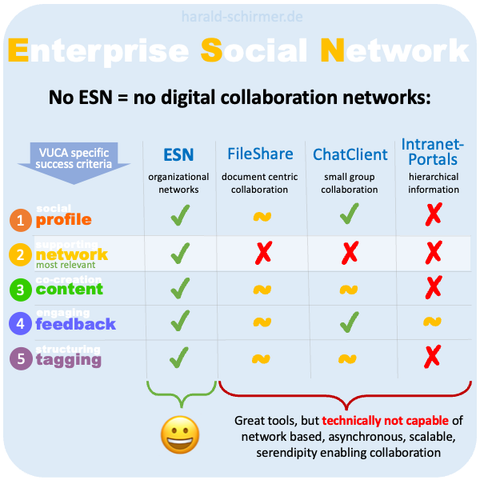
#ESN Basics:
You can‘t eat soup with a fork!

Many organizations try to establish #Communities or build #Networks to solve complex tasks with #Fileshare platforms (e.g. SharePoint, Dropbox, GoogleDrive), #ChatClients (e.g. Teams, Slack, WhatsApp) or #Intranet solutions (some call themselves „social“).

Only real #ESNplatforms are technically capable of #network based, #asynchronous, #scalable, #serendipity enabling #collaboration

My current WeeChat setup

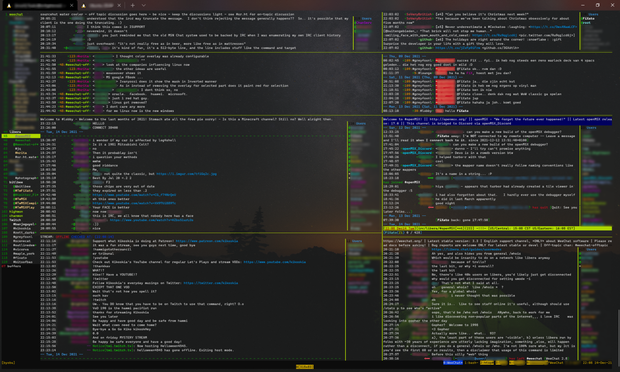
Since it's come up in conversation a couple of times in the past week (waves at @snowdusk__ and @yarmo), here's a #screenshot of my current #WeeChat setup (though with different buffers selected than my usual arrangement).

"What am I looking at on the screenshot?"

A buffer list ¹ on the left. Buffers represent the channels, private message streams and status timelines from the various chat media you are connected to.
Side the buffer list are a variety of horizontally and vertically panes, which @weechat called 'windows', each window showing the contents of one
² of the buffers.

"What buffers are visible in these window panes?"

From top left to bottom right these are:

"What's making it work?"

All running in a #tmux terminal multiplexer session, running under #WSL2 on #Windows, in the #WindowsTerminalPreview #terminal client.

(Repost to fix an at-mention...)

Footnotes

¹ though I still use buffers.pl script rather than the built-in buflist plugin because I'm too lazy to migrate my settings to make it look and act in the way I've gotten used to.
² or more, as buffers can be merged, displaying the contents of each of the merged buffers chronologically in the same window pane.

Hashtags

#Battlestations #chat #chatClients #IRCClients #IRCClient #InternetRelayChat #MultiProtocol #FOSS #FLOSS

IRC Guide

Chatbots & IRC Guide

Twitch Developers