 FiXato
My current WeeChat setup
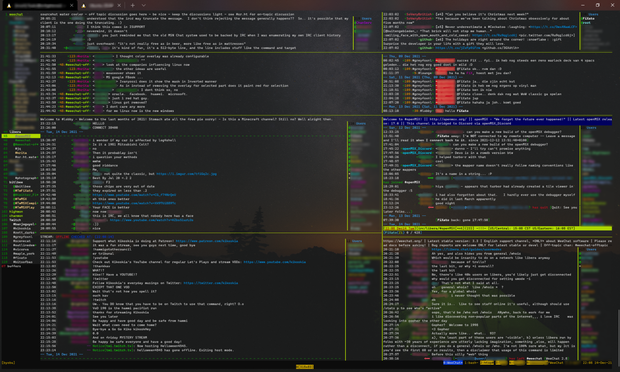
Since it's come up in conversation a couple of times in the past week (waves at @snowdusk__ and @yarmo), here's a #screenshot of my current #WeeChat setup (though with different buffers selected than my usual arrangement).
"What am I looking at on the screenshot?"
A buffer list ¹ on the left. Buffers represent the channels, private message streams and status timelines from the various chat media you are connected to.
Side the buffer list are a variety of horizontally and vertically panes, which @weechat called 'windows', each window showing the contents of one
² of the buffers.
"What buffers are visible in these window panes?"
From top left to bottom right these are:
- #sourcehut's water cooler IRC channel,
- #Twitter timeline, provided through the Twitter #libpurple plugin for #Bitlbee.
- #chanmon, a Perl script to display activity from all currently active (and monitored) buffers.
- #highmon, a Perl script to display highlights from all (highlight-monitored) buffers.
- Lobby #IRC channel, general discussion channel.
- #openMSX on #liberaChat IRC network, for discussions regarding the #MSX emulator I occasionally contribute to.
- #Twitch chat channel for #Kikoskia's stream, provided by setting up a Twitch OAuth token and connecting over their IRC-compatible interface along with twitch python script for stream status details.
- The #WeeChat IRC channel on #libera.
"What's making it work?"
All running in a #tmux terminal multiplexer session, running under #WSL2 on #Windows, in the #WindowsTerminalPreview #terminal client.
(Repost to fix an at-mention...)
Footnotes
¹ though I still use buffers.pl script rather than the built-in buflist plugin because I'm too lazy to migrate my settings to make it look and act in the way I've gotten used to.
² or more, as buffers can be merged, displaying the contents of each of the merged buffers chronologically in the same window pane.
Hashtags
#Battlestations #chat #chatClients #IRCClients #IRCClient #InternetRelayChat #MultiProtocol #FOSS #FLOSS