Well... today, I finally ⊦ to bite the bullet...
I finally updated to #IOS. 26.5. Why'd I do it you ask?
I did it to play with the #BITS Connect beta of course! :-) ;-)
I hope my #Braille doesn't break to badly, and, that I don't become infested with too many #VoiceOver and #Braille bugs, and that I do not get bitten by the #Braille bug in the mail app on #IOS. that makes the app and #BrailleDisplay jump around.
One thing that I'm already noticing, and that's driving me crazy, is that there's now numbers on my tab bars. For instance:
Home Tab 1/5
Is there any way I could turn that off, and just have #VoiceOver speak the numbers? Thanks in advance, and, I appologize if this is a little mess-up. This is my ist time doing this here, so please have mercy on me! ;-) :-)
Anyone who knows what they're doing want to cobble together a #NVDA add on that effectively acts as a screen saver for a connected #BrailleDisplay that will raise and lower each cell in a wave type pattern when the computer is idle longer than a set duration?
@main @mastoblind

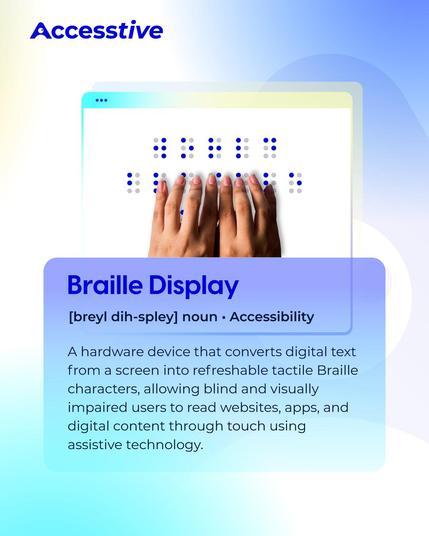
Braille displays turn digital text into tactile Braille, helping blind and visually impaired users access websites, apps, and documents independently. ♿

Accessibility tools like this make digital experiences more inclusive💙

#Accessibility #BrailleDisplay #WebAccessibility

Braille Literacy Month is a great time to explore the Split Braille feature in JAWS. This feature allows Braille display users to split their display into two regions, making it easier to compare or track content from different locations at once.

Learn how it works and when to use it in our YouTube playlist: https://youtube.com/playlist?list=PLk-npwu4WEBRsJMiElYC9cMmI7NtlNpIT&si=ZoZ2vP1Ys16YiuvU

#BrailleLiteracyMonth #Braille #BrailleLiteracy #BrailleDisplay #JAWS

Split Braille in JAWS

The new Split Braille feature in JAWS 2024 gives Braille display users powerful new functionality, including the ability to view content from different locat...

YouTube

This is a real long shot, but does anyone happen to have any documentation for the Papenmeier Notex 40P? I bought one because old gadgets are cool, but even Papenmeier don't have any documentation for it (I emailed them and everything).
Please boost for reach :)

#blind #assistiveTechnology #assistive_technology #braille #brailleDisplay #braileNoteTaker #Papenmeier #notex #madeInWestGermany #retro #vintage #fedihelp

@RaineyDay Hahaha I hear ya there friend. And for those who took notice of the #Monarch hashtag we're speaking of the multi-line #BrailleDisplay for the #Blind not the gloriously colored creatures.
I have finally become acquainted with my #MantisQ40 #BrailleDisplay and this week, I'll be adding it to my workflow. With multiple #ministry meetings a couple of rehearsals and private #music practice, it is sure to be put through its paces. After reassigning the thumb buttons, I was thrown for a loop when I first paired it with my MacBook Pro and realized that the button assignments were not as I had chosen them for the operation of the Mantis. A few adjustments to Braille in the Voiceover utility and my using the right buttons had everything working as it should. I have it paired with iPhone, iPad and Mac using Bluetooth, and have the USB connection for my Windows PC. The solid Bluetooth connection impresses me, and I appreciate having full control of my connected devices without one of them cutting in at an inopportune time. I'm not soaring yet, but definitely increasing altitude, and thoroughly enjoying the ride into another generation of electronic #Braille.

Today is bittersweet as it has become apparent that I am truly ready for a new #Brailledisplay. The old Active #Braille 2011, affectionately known as "Clink" from its little system noises, is developing a flakey bluetooth connection. It still works great as a standalone unit and with USB connected to the computers, but at the ripe, old age of 14 years, with no more firmware updates due to the 2021 model being released, it is definitely time to move forward.

I've opted for the Mantis Q-40 with a Turtleback case and have just placed the order today. The decision was not an easy one. I have thoroughly enjoyed the Handy Tech experience, but the price point of the Mantis won out. I didn't want a lot of extra bells and whistles, just a solid Braille display with usb ane Bluetooth connectivity and very basic standalone notetaker functionality. Honestly, if it weren't for the noisy display, I would have considered the Orbit line of products.

As I await my new Mantis, I just want to say a heartfelt thanks to all in our #Blind community who publish articles and reviews about these devices for those of us who do not readily have an opportunity to have hands-on experience with multiple Braille displays. I also want to thank everyone who manufactures and distributes Braille displays. It means so much to have such a wonderful variety of tech from which to choose.

Will keep y'all posted. Blessings from Charleston, South Carolina, and y'all stay cool.

🌟 Tech Toward Triumph: Help Me Access the World Through Braille 🌟

Hi all,

I’ve launched a Crowdfunder campaign to raise support for a Handy Tech Activator Braille display—a device that would make a huge difference in my life. My mom and I created this campaign together, and she wrote a timeline of my health journey and everything I’ve been through. It’s been a long road, and this technology would help me move forward with more independence and opportunity.

🔗 https://www.crowdfunder.com/p/techtowardi-triump

This Braille display would allow me to:

  • Access digital content independently
  • Continue my studies and creative work
  • Stay connected and advocate for myself more effectively

If you can donate or share the campaign, it would mean the world to me. Every bit of support helps me take one more step toward triumph.

Thank you for reading, supporting, and believing in me. 💙

#BrailleDisplay #AccessibilityMatters #TechTowardTriumph #DisabilityAdvocacy #Crowdfunder #BlindTech #HandyTechActivator #Braille #blind #disability

Hi everyone! How’s your day going?

I’m really excited—my new iPhone 16 Pro Max is arriving tomorrow! 🎉📱

I got a refund from my university’s financial aid office, probably because I had to drop a course due to being sick. After talking it over with my mom, we agreed I needed something positive to look forward to after everything I’ve been through lately.

I’m still recovering from a severe reaction to a medication I was prescribed, and my rheumatoid arthritis has me mostly bedridden. My current phone, an iPhone 13 Mini, is showing its age and not running well. I’ve been using a Pixel 9 Pro through the Google Accessibility Trusted Testers program, but I’ve always preferred iPhones—so I used part of the refund to order a new one from Apple today. It’s scheduled to arrive tomorrow, and I can’t wait!

We’re also planning to launch a GoFundMe soon to help me upgrade my Braille display. The one I have is a few years old, and my dream device is the Handy Tech Activator. My mom really wants to help me get it, and I’m so grateful.

Tonight, I’m planning to reset my old Apple Watch to give to my mom. It’s not working well for me anymore—especially with the pain in my wrists and hands—and it’s too focused on fitness. I tried using it for health tracking, but it wasn’t a good fit for how I manage things now.

Thanks for reading, and I hope you’re all doing okay. 💜

#DisabilityLife #ChronicIllness #BlindTech #iPhone16ProMax #Accessibility #BrailleDisplay #RheumatoidArthritis #blind #AppleAccessibility #GoogleTrustedTester #GoFundMe #HealthJourney #disability #spoonie #ChronicIllness