 Kemal ASLAN
 13
13KernelUNO, An OS For The Arduino Uno https://hackaday.com/2026/04/23/kerneluno-an-os-for-the-arduino-uno/
#ArduinoHacks #ArduinoUno #Operatingsystem #Os
#ArduinoHacks #ArduinoUno #Operatingsystem #Os
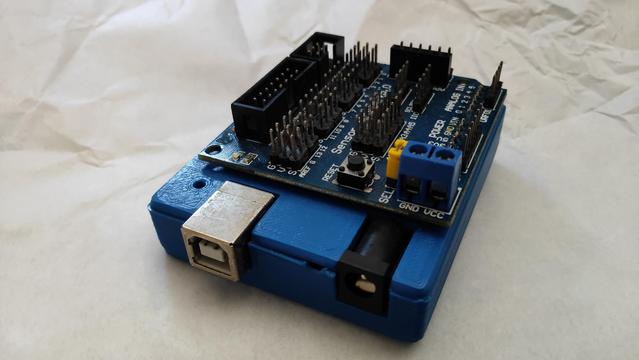
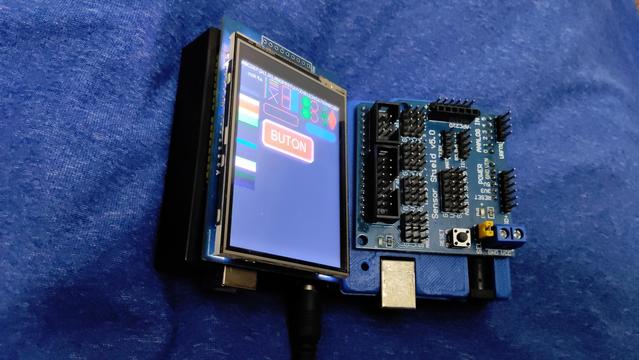
Bu fotoğrafları tekrar paylaşmak istiyorum.
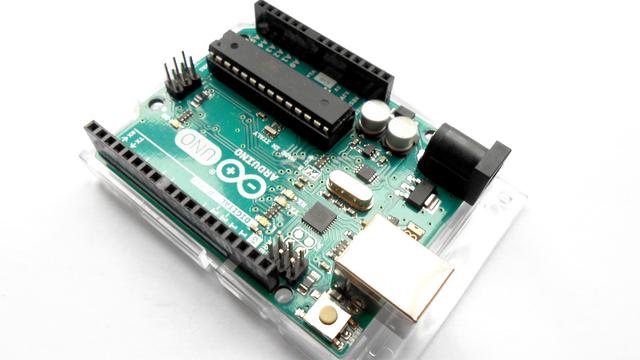
Bu benim iki Arduino UNO R3'üm. Birinin üzerinde 2.8 Dokunmatik Ekran takılı!
Artık Arduino'yu Qualcomm satın aldı ve ikonik Arduino UNO'nun sonuna yeni sahibini işaret eden "Q" harfini ekleyip Debian Linux çalıştıran bir tek kart bilgisayara dönüştürdüler!
Henüz dönüşüm aşaması tamamlanmadı ve ben de tüm Arduino severler gibi sonucu bekliyorum!
Eğer iyi olduğuna inanırsam 8GB RAM olanı çıkınca alabilirim.
Eğer inanırsam!
KernelUNO, An OS For The Arduino Uno
https://fed.brid.gy/r/https://hackaday.com/2026/04/23/kerneluno-an-os-for-the-arduino-uno/
Minimalist Lo-Fi Minimalism – Part 2
Last year I programmed up an Arduino with my Pi Day MIDI Sequencer to play a short extract from Philip Glass’ Einstein on the Beach. You can read all about that here: Minimalist Lo-Fi Minimalism.
Having spent a fair bit of the time since then playing around with an Arduino and SP0256A-AL2 and finally getting it hooked up to MIDI, I parked an idle though that it might be interesting to get it “singing” part of Einstein on the Beach. This post comes back to that idea.
https://makertube.net/w/4upxhBNemynPiFKfdzzea2
Warning! I strongly recommend using old or second hand equipment for your experiments. I am not responsible for any damage to expensive instruments!
These are the key Arduino tutorials for the main concepts used in this project:
If you are new to Arduino, see the Getting Started pages.
Parts list
The Circuit
I did wonder about combining both the Pi Day sequencer and SP0256A-AL2 shield into a single device, but then decided it would be simpler to treat them as two separate devices and use MIDI to pass control between them.
Consequently I’ve ended up as follows:
Where the Pi sequencer is running the code for Minimalist Lo-Fi Minimalism with a small update to send additional MIDI messages to be interpreted by the SL0256A-AL2. All other MIDI is passed through the SL0256A onto a MIDI synth as before.
The Code
Having decided on the basic architecture, the next decision was how to encode the information destined for the speech synthesizer. I need to be able to tell it a pitch and a number to be “sung”. I toyed with the following ideas:
I opted for the last option, treating each number as a different instrument on a different MIDI channel. This is a bit wasteful but was a lot easier for testing than attempting to get a specific velocity or having to send MIDI PC messages to keep reselecting the “voice” before each note.
As described previously in Minimalist Lo-Fi Minimalism MIDI channels 1,2 and 3 are already used for the bass and two voice lines, so I’m using MIDI channels 4 through to 13 for the numbers one to ten.
The code for the Glass already has pitch and which number encoded into the data structures. To trigger the “singing” via the speech synthesizer I’m using the Soprano voice pitches, but an octave lower, so it is a relatively simple matter of adding in an additional MIDI send as follows:
MIDI.sendNoteOn(sop[i], 64, MIDI_CHANNEL_SOP); // Original codeIt is using the “NUM” MIDI channel – 1 as I’m encoding the numbers 1 to 10 which are stored in the num[] array. As the speech synthesis is essentially running at a fixed duration for each utterance, I’m not even bothering with a Note Off message.
On the speech synth side, again essentially all of the code is the same as for the Arduino and SP0256A-AL2 – Part 6 MIDI code, but instead of singing “do, re, mi”, etc linked to pitch, I need to take the word from the MIDI channel. To do this, I’ve expanded the speak() function to include the number and call it as follows from the NoteOn callback:
speak(channel-MIDI_CH2NUM, pitch);This will result in a number from 1 to 10 and a MIDI pitch which can then be used to select the playback frequency as before and then say the allophones corresponding to the received number.
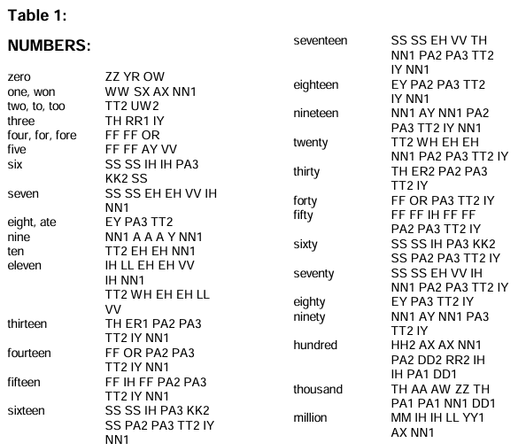
void speak (uint8_t num, uint8_t note) {The SP0256A-AL2 datasheet lists the allophones to use for the basic numbers.
I’ve used, in a few cases, slightly shortened versions of the numbers from one to ten. In particular I’ve removed the duplicate allophones for six and seven to make them a little shorter to playback.
The allophones for “One” includes the use of “SX” but I can find no other mention of that in the datasheet, so I’ve ignored it.
One final change was to tweak the timings of the original playback. I’ve had to slow it down a lot to give the SP0256A-AL2 time to say each number, and I’ve also introduced a small delay between sending the MIDI messages and updating the numbers on the display to allow them to sync up a little better.
If the MIDI went to the synth directly from the Pi Day sequencer then a delay would probably be required there too, but as it has to go through the SP0256A-AL2 and get sent back out using the “software THRU” of the Arduino MIDI library, it has a natural slight delay already and isn’t too noticeably out of sync.
Closing Thoughts
I always knew there would be a few limitations, not least of which due to the time it takes to play back the allophones, but in essence I believe this works. I’d rather it was a little more up tempo, but sometimes one just has to work with what is available.
I think it is certainly keeping within the spirit of attempting an extract of the original opera on 8-bit microcontrollers, so it’s not doing too badly.
Kevin
#arduinoUno #midi #Minimalism #PhilipGlass #piday #sp0256aal2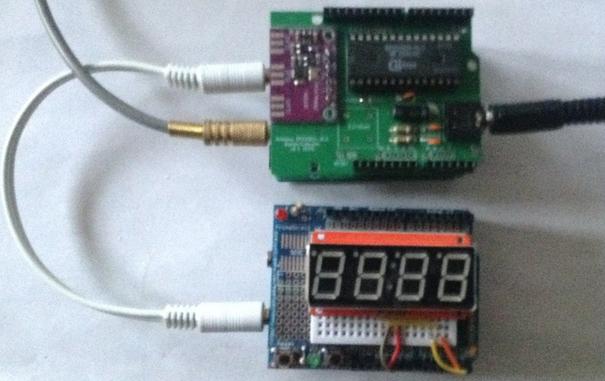
I've persuaded my SP0256A-AL2 to "sing" the Twelve Days of Christmas.
https://diyelectromusic.com/2025/12/23/sp0256a-al2-sings-the-twelve-days-of-christmas/
#SP0256AAL2 #ArduinoUno #MusicAdventCalendar #MyApologies #FiveGoldRings
SP0256A-AL2 Sings the Twelve Days of Christmas
Partly prompted by a programming challenge by Futzle on Mastodon, I thought it might be interesting to try to get my Arduino and SP0256A-AL2 to sing the Twelve Days of Christmas.
https://makertube.net/w/diBkzrhkh3tekAPBhGzrVj
Warning! I strongly recommend using old or second hand equipment for your experiments. I am not responsible for any damage to expensive instruments!
These are the key Arduino tutorials for the main concepts used in this project:
If you are new to Arduino, see the Getting Started pages.
Parts list
The Code
I wasn’t aiming for a clever code solution, as can be seen submitted to the programming competition already, but I was hoping to get the computer to do at least some of the work for me.
The first issue is getting a useful range for the song. My original MIDI SP0256 project managed around an octave and a half. Well it so happens that the 12 Days of Christmas is just over 1 octave, so if I can position that to the top end of the range, I should be ok.
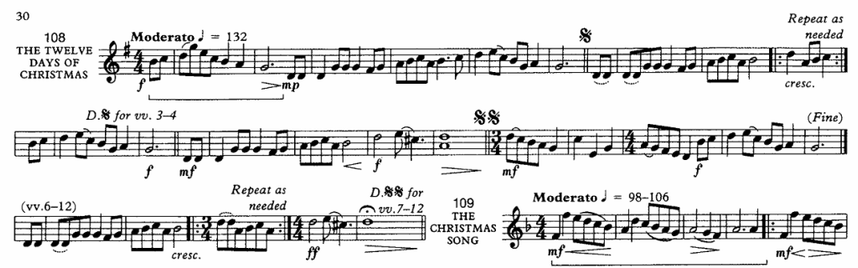
This is the most compact notation of the tune that I know of. This is from the “Christmas Praise” Brass Band carol book, which seems to be one of the most common references for any band out caroling at this time of year.
Ignoring the introduction, I’m going to transpose this into concert Bb (i.e. up a minor third) which gives me a note range from F2 through to G3. This allows me to use a sensible range of the SP0256A without it getting too slow down at the bottom end of things.
The main text/lyric structure will be set up in a series of functions as follows:
intro() - "on the nth day of Christmas my true love gave to me"Some variations are required as follows:
In order to capture the variations and repeats for each verse, I’ve opted to use an increasing bitmask for each time through to trigger the various phrases. Bit 0 always indicates one() must be called. Bit 1 indicates two(), and so on. It starts with the value 1 but will keep adding another bit as the verses change, so will have the values 1, 3, 7, 15, 31, 63, etc. thus allowing me to build up the verses with one bit per verse.
one() takes bool parameters to indicate first time and last time through. two(), three(), four() take a bool parameter to indicate if it is a “post five gold rings” verse. Using the bitmask this is pretty easy as it just means any of the bits 0x0FF0 will be set for verses 5+.
Here is the main code loop.
uint16_t phrase=1;The timings were really quite tricky as I have several variables to work to:
In principle I could probably work out the slowest interval and work back from there to get some accurate timings, but I just did a bit of trial and error on each phrase until it was close enough. The unevenness remaining was because I didn’t want to slow the whole thing down to the slowest phrases being “sung”. It is slow enough already!
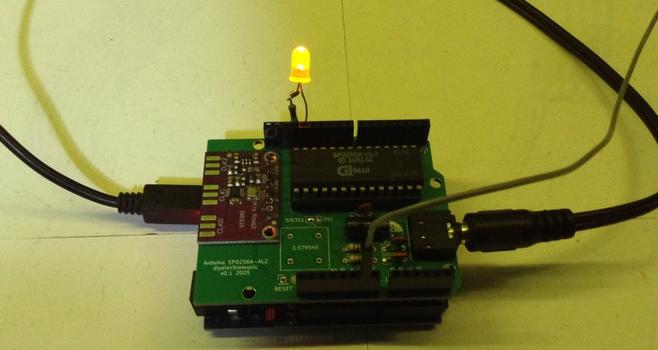
Also, as it doesn’t look much, I’ve added an LED to light up at the start of an allophone and to go off whenever a pause is encountered.
Closing Thoughts
I’m actually really pleased with this. It is a good balance of close enough to show the principle without me undertaking complex timing and endless fiddling.
I could probably get a bit cleverer with the code, but that wasn’t really the point for me. I’ve used an algorithm where it mattered to me, and was quite happy to spell out the allophones, frequencies, and timings by hand as I went.
Lastly, let me wish you the compliments of the season, to you and yours.
Kevin
Atari Synth Cart Controller
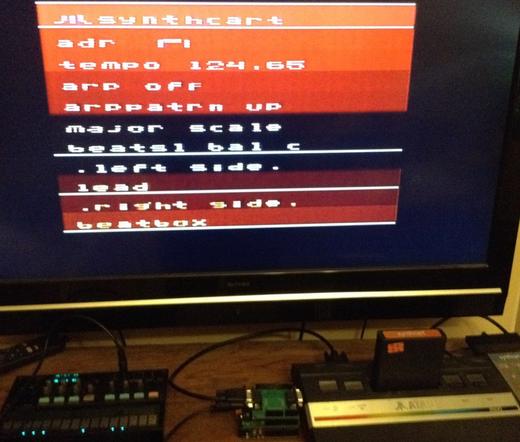
This project uses my Atari 2600 Controller Shield PCB in reverse, to allow the Arduino to act as an Atari keypad controller and thus allow it to control the Atari Synth Cart.
https://makertube.net/w/ryCciwFyQQpcs1Q4Wwy52x
Warning! I strongly recommend using old or second hand equipment for your experiments. I am not responsible for any damage to expensive instruments!
These are the key Arduino tutorials for the main concepts used in this project:
If you are new to Arduino, see the Getting Started pages.
Parts list
The Circuit
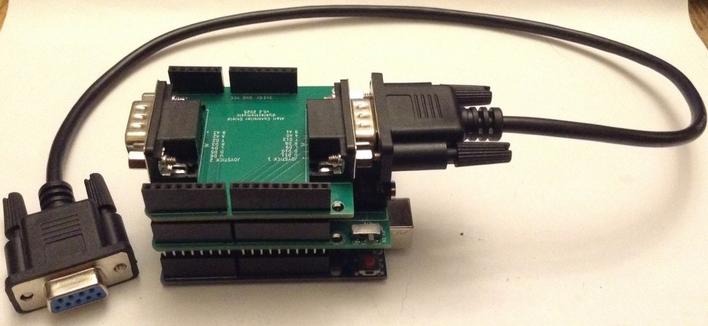
In this use of my Atari 2600 Controller Shield PCB the 9-pin d-type connectors are directly connected to the Atari console.
There is one issue however. Which device should provide 5V? The Atari pinout has 5V present on pin 7 and this is hooked up to the Arduino 5V line.
It may be possible to run the Arduino off the Atari 5V line, which would be really convenient if so. But I’ve not found a definitive statement of the maximum current draw through the 5V pin of the d-type connector from an Atari 2600.
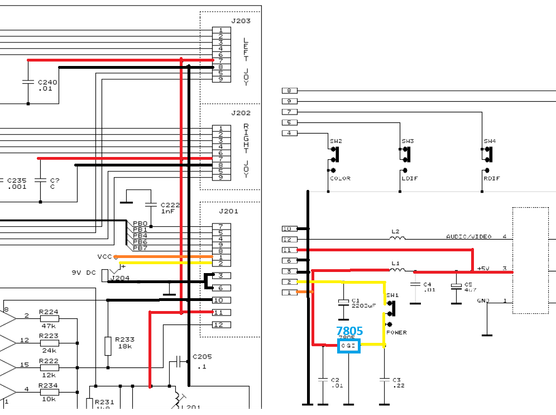
From the schematics for the 2600, it appears that the 5V comes directly from a 7805 regulator. This may or may not go via a single inductor depending on what version of the schematic I’m looking at (yes, for the schematics on Atari Age, below, no for the schematic in the field service manual).
From the BOM in the field service manual, this would appear to be a 78M05 which I believe has a maximum current output of 500mA with a suitable heatsink.
But that has to power the entire console of course. In a not particularly scientific measurement, I believe my 2600 jnr was drawing around 360mA and my “woody” perhaps around 320mA. I don’t know how this changes with different games or controllers.
According to this post, an Arduino Uno with no IO pin current draw, will pull around 50mA when powered from the 5V line directly. Curiously, a bare-bones ATMega328P can apparently drop to almost 15mA when not driving regulators, a USB chip and a power LED…
From powering up a number of Arduino projects I had lying around, most hardly registered on a simple USB current meter using 10mA units. Some with LEDs got to show 0.02A. Some with screens got up to 0.2A.
So just thinking about it in a somewhat hand-wavy kind of way, I suspect that powering an Uno would probably be ok…
If not, then the 5V line to the d-type connectors will have to be cut and the Arduino independently powered. But then the signals for the keypad will be set at the Arduino’s idea of what 5V looks like, not the Atari. They ought to be essentially the same, but it can’t be guaranteed.
Ideally to go this route, the Arduino would isolated from the Atari and be switching the Atari’s 5V line on and off for the input signals as required, but that would require a new design of the PCB.
So time for an IMPORTANT WARNING: This could well damage the Atari 2600 console as I’m essentially making it up as I go at this point.
I have a cheap Atari 2600 junior that I picked up a while back that I’m happy to experiment with. I’m not using my own, original “woody”. In the end I used the following:
Volca <– 3.5 mm jack to jack –> Arduino TRS MIDI + Atari Shield <– 9-pin to 9-pin –> 2600
Here is the full setup using a Video Touch Pad as the second controller. Note the Arduino is fully powered from the Atari at this point, but the Volca is running on batteries.
The Code
The basic principle for the Arduino is to monitor the Atari’s “row” signals via INPUT pins and when detected drive any OUTPUTs LOW to indicate keys being pressed. The basic algorithm is as follows:
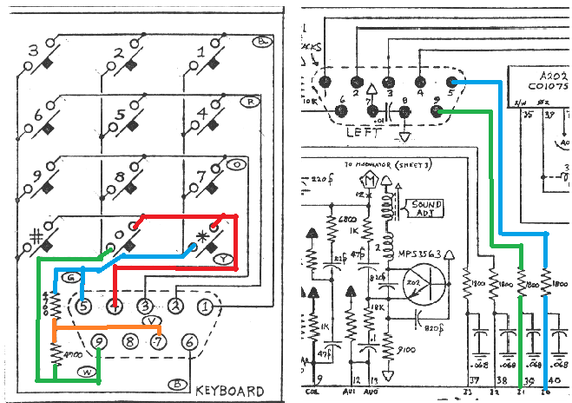
rows[] = IO INPUT pins connected to D-type pins 1, 2, 3, 4The keypad row/column map was shown in Arduino Atari MIDI Keypad and reproduced here:
Active (pressed) keys will show as LOW in a column when that row is scanned, so to emulate 6 being pressed, when row on pin 2 is detected as being LOW, column on pin 6 should be driven LOW and columns on pins 5 and 9 should be driven HIGH.
I need to map these keys over onto MIDI notes. One issue is that the Atari doesn’t have a natural scale as generating the frequencies for notes is pretty limited.
Still, I’ve mapped the 12 keys, with their non-natural scale, over onto MIDI notes 60-71 – i.e. all semitones up from middle C.
I’m using PORT IO in an interrupt driven scanning routine to ensure the Arduino is as responsive as it can be to ROW scanning. I also pre-compute the actual column bit values when a MIDI note is received, meaning the scanning routine only has to write out the preset values.
The main functions that achieve this are shown below, with the PORT IO values set up for the second Atari controller connector on my Atari 2600 Controller Shield PCB.
uint8_t row[ROWS];As the Synth Cart notes are mostly controlled from the left controller, I’m only coding up for the Arduino to drive one controller. I’m using a genuine Video Touch Pad for the second controller.
Update: The code now includes a controller pass-through mode. If a keypad is plugged into the second socket on the Arduino, then either MIDI or the keypad can be used to drive the Synth Cart.
To achieve this, there are now two sets of row[] arrays containing the column values and when it comes to writing them out, they are combined as follows:
if ((PINB & 0x08) == 0) { // D11As the signals are active LOW, the two values need to be logically ANDed together to get the correct result. I could have simply called the same noteOn/noteOff routines for the keypad, but then I’d have the situation where if both keys for a note are active, the first one released will stop the sound. By combining them in this way, the note will keep sounding until both keys are released.
Closing Thoughts
I really ought to map the pitches of the Atari notes onto their respective MIDI notes, but then I’m not sure what to do for the gaps.
In principle I could wire up both controllers and then use MIDI pads on a MIDI controller just as MIDI-driving control keys rather than actual keyboard notes, but this shows the principle.
I’m still not sure about the power issues, but it seems to work. I guess it will keep working until one day it might not and I’ll be looking for a new Atari 2600 junior.
The slight stuttering in the video is when I end up touching a couple of the volca’s keys at the same time. I suspect I could do something a bit more robust in code to prevent repeat triggering, but this is all fine for now as a proof of concept.
Kevin
TD4 4-bit DIY CPU – Part 7
Once the idea was floated, in Part 6 of creating an Arduino “direct to ROM” assembler, I had to just do it, so this post is a little diversion from the hardware discussion into how that could work.
Basic Concepts
This relies on using an Arduino as the ROM as described in Part 6, but the Arduino now has the option to change the ROM contents independently of the TD4 itself.
The Arduino sketch will do the following:
The code will thus have a number of key sections:
The TD4 ROM routine has already been fully described in Part 6. The only difference is that the scanning routine will be driven from a 1mS timer using the TimerOne library.
As I want to still support a built-in demo, I now have the concept of ROM being the demo code and RAM being the “live” code to pass onto the TD4. The Arduino will initialise the RAM on startup from the ROM.
As far as the TD4 is concerned of course, this is all still ROM.
Command Line Interpreter
The standard Arduino Serial routines will be used to scan for input via the serial port. It will support a line-oriented input as follows:
bool cmdRunner (void) {This will keep adding any received characters to the cmdInput buffer until a newline is received, at which point the command is saved in cmdSaved and the routine will return true indicating a full line is ready to be processed.
Once a complete line is received, then a processing function will parse it.
Key to the processing of commands is a command table that stores the text to match and the handler function to call on finding a valid command. There is an additional parameter that will be passed into the handler function to allow the same handler function to support several commands. This will be used in the assembler itself later.
struct cmd_t {The algorithm for parsing commands is as follows:
cmdProcess:The implementation is a bit complex, as it uses string pointers and has to chop and parse strings as it goes. It is also detailing with the command table in the Arduino’s PROGMEM which is an additional complication too.
In order to be able to use the same command line interpreter for the input of assembler instructions, I’ve had to simplify the syntax. There are no spaces in opcodes and there has to be a space between the opcode and immediate value if used.
Here are some examples:
IN A -> INAHandler Routines
All handler routines have the following prototype:
typedef void (*hdlr_t)(int idx, char *param);The idx parameter is the number in the last field of the command table. pParam will be a pointer to the parameter string for the command (if used).
As we’re dealing with strings all the time, there are a number of helper functions to do things like convert strings to numbers as well as others to print numbers in various formats.
Number formats are assumed to be as follows:
0..9 - decimal digitsThe code provides the following:
The code supports the following commands, so each has its own handler function:
Assembler
As already mentioned, I’m using the same command line interpreter code to create the assembler. To do this, each opcode has an entry in the command table:
const cmd_t PROGMEM cmdTable[NUM_CMDS] = {The order corresponds to the opcode command value, as does the parameter. As these are at the start of the table, I can assume that the position in the table is the same as the command value. This does mean that I also need to account for the duplicated instructions even if I don’t need to use them.
I’m making the following design decisions:
The main logic of the assembler handler is as follows:
Assembler:Disassembler
Disassembly is really largely a look-up table matching opcode command values to text. This is all hidden away behind the two print routines printins() and printop().
void printins (uint8_t ins) {The main complexity is pulling the strings out of the command table. I’ve had to include a macro to provide access to the strings from the Arduino’s PROGMEM:
#define FSH(x) ((const __FlashStringHelper *)x)This feels like a bit of a hack, but apparently this is how it should be done for the kind of thing I need to do!
There is another macro here that needs explaining:
#define HASIM(op) (op==0||op==3||op==5||op==7||op>9)This is a set of conditions that if true means that the command supports an immediate value. This is used in a few places to know how to parse the commands.
Whilst in principle all commands could use the immediate value, the “official” statement of how they work assumes im=0 in many cases. So, for example, OUT B does not require an immediate value, but if one is provided then OUT B becomes OUT B+im.
I’m not really supporting that with this code at the moment.
Putting it all together
Here is a serial output log of a session using the assembler.
> HConclusion
The basics for this actually came together fairly quickly, but I must admit to spending a fair bit of time fiddling about with output formats and refactoring various bits of code to try to give some consistency in terms of when newlines are applied, what is shown in binary, what in hex, and so on.
I can’t guarantee everything has been caught, but I’ve typed in all the code (using the newer, limited syntax) from Part 3 and they all seem to work.
It would be nice to be able to automatically reset the TD4 from the Arduino, but for now, pressing the button when required is fine.
For the most part, unless there is a loop to get caught in, the code will cycle back to the start anyway.
In terms of possible updates and enhancements, there are a few on my mind:
If I expand the instruction set and architecture, then I’ll have to think again about chunks of this code, but for now, it seems to work pretty well.
Kevin
TD4 4-bit DIY CPU – Part 6
Having now successfully built my own version of the TD4 4-bit CPU in Part 5, I’m now chewing over some of the ways I’d like to try to expand it.
I already have a list of others extended projects at the end of Part 4, so I might be drawing on some of them for inspiration moving forward. Many of these are very similar projects, but with a completely different architecture. But really at this stage rather than build a different, more capable, 4-bit CPU from someone else’s design, I’m interested in seeing how far the TD4 design can go. So, ultimately, like all my projects, the fun here is in the reinventing and learning on the way.
One of the questions I have is can I replace the DIP switches with something that can provide the data in a better way? This would be particularly critical if I expand the address space in the future. A ROM is the obvious option, but something more dynamic might be an interesting experiment too.
This post looks at options for replacing the DIP switches with microcontrollers.
Now I feel like I really ought to state right up front that this is a pretty ludicrous thing to do.
At the more charitable end of the endeavor I’m using a 16MHz 8-bit AVR microcontroller with 2kB of RAM to serve up 16 8-bit values to a 10Hz 4-bit CPU.
At the most extreme end I’m using a 125MHz, dual-core, 32-bit ARM Cortex M0+ CPU with 264 kB of RAM running an entire interpreted programming environment requiring (probably) millions of lines of low-level code to implement it, to do the same thing.
So why bother? Well – why not?
TD4 without the ROM
To interface to a microcontroller, I’m after two things:
The best place to get at these signals is on the interface to the ROM itself – the 74HC540 octal line driver, and 74HC154 4-to-8 line decoder.
Conveniently, these signals can be broken out quite easily on my board as shown below.
The pink shaded area shows which components are needed for a ROM-less build. The two yellow highlights show where headers should be soldered to permit access to the address lines (top) and data lines (bottom).
In this build, the following components are omitted from the full board:
I’ve used 6-way and 10-way pin header sockets to allow me to patch in a microcontroller. This allows for each header to conveniently include 5V and GND too. I’ve included the USB socket for power to the PCB but expect I’ll probably power the board via these 5V and GND links from the microcontroller.
Using Arduino
The natural choice here is to use one of the older Arduino boards, as these are all 5V IO which makes interfacing with the 4-bit CPU fairly straight forward.
Using Arduino direct PORTIO should also make it pretty trivial to read address lines and write the data. I’ve configured the connections as follows:
TD4 SignalArduino GPIOArduino PORTIOA0A0PORTC:0A1A1PORTC:1A2A2PORTC:2A3A3PORTC:3D0D8PORTB:0D1D9PORTB:1D2D10PORTB:2D3D11PORTB:3D4D4PORTD:4D5D5PORTD:5D6D6PORTD:6D7D7PORTD:7I’m avoiding D0/D1 (PORTD[0:1]) and D13 as they all have other hardware attached (serial port and LED in this case).
Accessing the data corresponding to any specific address is as simple as follows:
uint8_t ROM[16];The code could be simplified if I didn’t mind trashing whatever is configured for the other GPIO pins via the PORTIO, but it is good practice to preserve those values when only writing to a subset of the IO ports.
In the final code below, I’ve included a toggle for A5 which allows me to do some timing measurements too.
uint8_t ROM[16] = {Running the code in a loop like this gives a scan frequency of around 500kHz and a response time of something like 2-3 uS for each read. That seems pretty responsive and I’m sure will be fine for a 10Hz CPU. And it is – it works great!
Using Circuitpython
One thing that would be really nice is a workflow that allows more of a “direct save to the CPU” approach to programming it. One option is to use a more modern microcontroller that supports a filesystem.
The obvious choice here is a 32-bit microcontroller that supports Circuitpython. But will IO in Circuitpython be fast enough to respond to the CPU? There is one obvious way to find out – give it a try.
There is another complication too – most Circuitpython boards run at 3.3V not 5V so that needs to be addressed too.
Level Shifting
I’m going to use a 74LVC245. The Adafruit product page puts it best:
“essentially: connect VCC to your logic level you want to convert to (say 3.3V), Ground connects to Ground. Wire OE (output enable) to ground to enable the device and DIR (direction) to VCC. Then digital logic on the A pins up to 5V will appear on the B pins shifted down to the VCC logic.”
This is an 8-way bi-directional bus transceiver and should be powered by 3V3, then the direction pin will determine the direction of the conversion as shown[ below.
Two devices will be required. The address lines will need a 5V to 3V3 conversion; the data lines will need 3V3 o 5V.
Here is how I’ve wired these up for a Raspberry Pi Pico:
The Pico is connected as follows:
CircuitPython ROM
The basic algorithm will be as follows:
ROM = [16 command byte values]For performance reasons it would be best to optimise both the reading of the address lines and the writing of the data lines, ideally into a single access. But as this is for a CPU that runs at a maximum of 10Hz, so for now, I’m just going with simple and see how it goes.
import boardI’ve included a timing pin to GPIO21 so I can see how long it takes to access the IO.
It turns out that it takes something of the order of 50-60uS to read the four address lines and something in the region of 70-80uS to write out the 8 data lines. The above simple Circuitpython code to do this is running with a frequency of around 7kHz.
Now at this point I ought to be reading through the datasheets for the ICs used in the CPU to check response times and timing tolerances so see if this is ok. But I didn’t bother with any of that as it all appears to work!
Conclusion
The Circuitpython is obviously a lot slower than the Arduino running optimised PORTIO code, even though the Circuitpython is running on a 125MHz processor compared to the Arduino’s 16MHz. Of course, if performance was critical then switching to direct GPIO access in C on the Pico would be a lot faster again. Even just having a way to do a single block-access of GPIO would probably make quite a difference.
But for this application, either as they are seem to work absolutely fine.
The ability to quickly edit the ROM contents is pretty useful with the Circuitpython. But I am now wondering how difficult it would be to have some kind of uploader to the Arduino over the serial port. There are only 16 bytes to transfer after all.
In fact it might even be possible to create a simple interactive assembler that allows code to be typed in over the serial port using proper word-based op-codes (like ADD, IN, OUT, etc). At the very least a simple serial port interface to type in numeric values would be relatively straight forward I think. It might also be possible to allow the microcontroller to reset the CPU too.
I’m not sure the added complications of logic shifting, etc, make it worth carrying on with a Pico version at this stage, so I think improving the Arduino is probably the way to go for now.
Kevin
#4bit #arduinoUno #circuitpython #portio #raspberryPiPico #td4


 Simple DIY Electronic Music Projects
 diyelectromusic
 Fyra Labs
 Kevin's Blog