lurkingwyrm a. k. a. calime

@lurkingwyrm
11 Followers
78 Following
15 Posts
calime.dreamwidth.org

RT @[email protected]

A reminder: At midnight on 31 December, as we usher in 2023, Sherlock Holmes enters the public domain in the USA. The last stories were published in 1927, and so the 95 year copyright will expire. In ACD's words 'You may marry him, murder him, or do anything you like to him.'

🐦🔗: https://twitter.com/BakerStJournal/status/1608164416029364224

Baker Street Journal on Twitter

“A reminder: At midnight on 31 December, as we usher in 2023, Sherlock Holmes enters the public domain in the USA. The last stories were published in 1927, and so the 95 year copyright will expire. In ACD's words 'You may marry him, murder him, or do anything you like to him.'”

Twitter
Also, even if you're not there substantively anymore, a good time to rerun Fedifinder (or similar tools) to see how many folks have transitioned since you last checked, since those tools will likely be *much* harder to use reliably very soon https://fedifinder.glitch.me/
Fedifinder

Fediverse accounts of your X/Twitter followings

Are you tagged in a thread that you don't want to take part in any more?

You can mute just the conversation itself, no one will know you've done this:

-Log in through website or a third party app, go to one of your posts in the thread, click on ⋯ and "Mute conversation".

-If you haven't posted in the thread, go to a post where you were tagged, then ⋯ and "Mute conversation".

-If you change your mind, do same thing but select "Unmute conversation".

The official app doesn't have this yet.

Tiny Mastodon Tip 🐘✨:

If there are some topics you would rather not see in your timelines anymore, for example a certain Birdsite, you can use Filters!  

HOW TO ❓

1. On desktop, go to Preferences > Filters.

2. Click the “Add new filter" button on the upper right.

3. There you can write the word or words that you want to hide from your timelines. For example things like “twitter.com/” or “Twitter” or “Birdsite” or something else or all of the above!

4. You can even set an expiration date if you think you'll want to hear about it again later on.

5. In the options when creating or editing your Filter, if you select “Hide with warning” the toots (posts) containing this word(s) will now be hidden and instead you will see a line saying “Filtered: {TOPIC}. Show anyway” You will be able to click on “Show anyway” if you decide you want to see the filtered toot anyway.

6. Alternatively, in the options when creating or editing your Filter, if you select “Hide completely” you will not see anything at all in your timelines when filtered content is posted.

7. Enjoy! 😌

#TinyMastodonTip

@bonibaru
@Avatrix

I don't know, I finally settled on looking for #instances where I could understand what/why they block versus what instances most likely will be blocked.

The best advice is to look for one that follows the Mastodon Server Covenant
https://joinmastodon.org/covenant

#blocking is should be the last step after silencing. Blocking prevents you from making a choice as to who you follow. Silencing let's you still choose, it just removes the instance from the default federated feed. 1/n

Mastodon Server Covenant for joinmastodon.org

#Dreamwidth fandom friends &/or people who are considering joining dreamwidth:

xancredible is running a friending meme! drop you name in & see if you can meet some new DWer’s with shared interests

https://xancredible.dreamwidth.org/779278.html

Captcha Check

Reboosting for #NewHere

TIP OF THE DAY

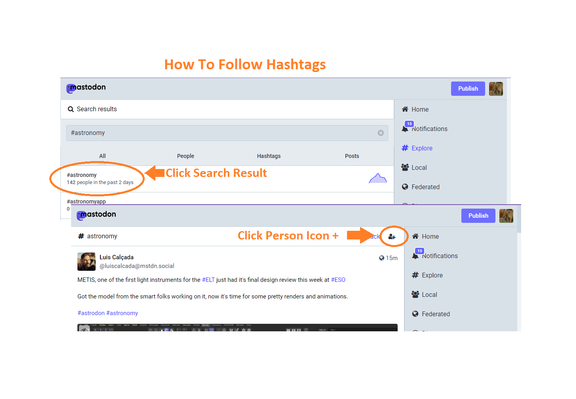
Use and Follow #hashtags !!!

Mastodon has #NoAds, #500Chars, #5Pins, and #PostEdits, but the best thing is #NoAlgorithm. On the #BirdSite you are force-fed by an #algorithm. A mishmash of your history, likes, follows and whatever Twitter wants to cram into you. With #NoAlgorithm, you are in control. Your feeds are just who and what you follow, and you can follow #hashtags .

Include #hashtags liberally so others can follow your ideas.

#twittermigration

#Instance #blocking Is like email spam filters. If your email server (instance) is considered a source of spam or viruses, you will be blocked. You won't be able to send emails to your friend & your friends emails to you will be also blocked. Even if you haven't done anything wrong. You're just caught in the crossfire. What some instances are doing is letting new & current members know which instances they are blocking & why. Some are not however. If you have questions contact your mods

People who complain about the Baltic states joining NATO (in their agency-denying language, 'NATO expansion') are effectively saying that the Baltics should have either turned into dictatorships like Belarus, or suffered the same fate – invasion and genocide – as Ukraine.

There was never a credible fourth alternative, and with the benefit of hindsight, it has only become clearer.

#Baltics #NATO

Some Mastodon thoughts, for bird-site expats (which include myself). I'm aggregating these from posts I've boosted before, so little of this is my own brain.

- There's no algorithm here. That means favoriting/liking doesn't do anything except communicate approval to the OP and others (which is still nice!).

- No algorithm means boosting ("retweeting") is the true method to increase a post's visibility. Do that more than you did on birdsite.

- There's no post-quoting here, and that's by design. Look at quote-tweets on the birdsite; it's a feature primarily used for toxicity.

- There's no direct word-search here either; that means you want to use hashtags to make posts more searchable. This is also intended, since word-searching posts was often used to harass/stalk on the birdsite and elsewhere, so that was left by the wayside here. This also means hashtags are much more a thing here than any of the algorithm-powered sites.

- It's encouraged to put in text descriptions when you post images; a lot of Mastodon users use screen-readers due to various disabilities, and getting an image description read out loud helps them immensely.

- Speaking of screen-readers: using capitalization in your hashtags allows the screen-readers to read them more easily, especially if you're smashing multiple words together. #rockmusic = unreadable. #RockMusic = readable.

- The best way to make threads is to make set your first post as public, but "unlist" all of your replies. This prevents your whole thread from clogging up feeds.

- Content Warnings should be used more liberally here. If you haven't gotten the impression yet, much of Mastodon was built and populated by marginalized groups who were harassed/bullied off of other platforms. This is the culture they built, to respect each other's mental health. It's not a rule, but it's well-appreciated.

- Consider chipping a few bucks towards whomever runs the server you're on; the strain is real, and most server admins were likely paying out of pocket before so don't have an existing donation base. The growth here has been extremely fast, and that means money's needed.

- DMs are just posts with privacy settings. So if you @ someone in a DM, you pull them into the thread. That could be embarrassing.

- Also, no, DMs aren't end-to-end encrypted, but they aren't on Twitter either. Don't use either if you want true privacy.

- Including your Mastodon handle in your birdsite profile will help people find you here; there's a tool (pruvisto.org/debirdify/ is one of them that's used) people can use to pull Mastodon handles from Twitter profile.

- Use the blocking and reporting features liberally, if needed. This should go without saying, but they work, and work well!

- If there's an entire Mastodon server you don't want to hear from, you can block the whole thing too.

- Preferences -> Appearance -> "Slow Mode": this can make larger "Local" feeds and any "Federated" feed much more readable.

I'll reply with some more as I see them, or reply here too. I've only been here 4 days but I'm loving it so far.