Markor v2.9 - Snippets, Templates, Graphs, Charts, Diagrams, YAML front-matter, Chemistry
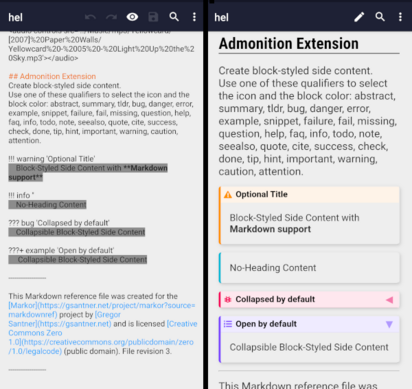
Markor v2.9 update is out! Get the update from F-Droid or GitHub! Continue reading to find out what’s new, improved and fixed in this update. Highlights Install Markor / Update to latest version Availability You can install (& update) Markor from GitHub Releases and F-Droid. Google Play The 2.8.0 version remains available, but no updates will be deployed to Google Play. The available downloads on GitHub are signed by me (gsantner) and have the same signature like on Google Play. This means you can download the *.apk from GitHub and directly install the update if you currently use the Google Play version. Download the latest Markor update from GitHub here: Markor is also available from F-Droid, the store for free & open source apps. The *.apk’s available for download are signed by the F-Droid team and guaranteed to correspond to the (open source) source code of Markor. Generally this is the recommended way to install Markor & keep it updated. Admonition: block-styled side content The Admonition Extension allows for easy creation of beautiful colored boxes. Helpful when you often work with side notes and boxed content. Snippets / Custom templates Create as many custom snippets / templates you like by placing textfiles in the subdirectory .app/snippets of your Markor notebook (start) directory. Open a document and place the cursor on whatever position you want to insert text. Then click the new snippets button on the bottom-bar (see screenshot) and select the desired snippet. Note: The snippet directory is automatically created the first time you click the snippets button in the bottom-bar. The right place to ask If you have questions or found an issue please head to Markor GitHub Discussions and ask there. Search for same and related issues/questions before, it might be already answered or resolved. Every day I (gsantner) get many personal emails containing feature requests & questions about Markor. It takes much time to answer these things. Often it is already answered public - or to another person as response in private email. This means wasted time, which can’t be used for improving & developing Markor. You are kindly asked to discuss at the proper place, which is GitHub Discussions. Display YAML front-matter block contents Markor now parses the Markdown YAML front-matter and can display it’s contents in the view mode. The keys to display can be configured in the Markdown settings category. Increased performance & under the hood improvements Markor got lot’s of under the hood improvements in all areas - editor, filebrowser, syntax highlighting, textactions, widgets… Notable: Faster screen transitions, less/no white flashing Short-time filesystem metadata caching for quicker loading of folders at the filebrowser Charts / Graphs / Diagrams (mermaidjs) You can now create graphs using mermaidjs syntax in Markdown files. Checkout the mermaidjs live-editor for more & advanced examples. Other notable changes & additions Allow to install APK files from filebrowser on click Markdown Table of Contents options Zim: Follow links to other wiki pages todo.txt: Better browsing at editor with dialog & saved search queries Settings option to enable/disable Chrome Custom Tabs Privacy settings option to disallow screenshots of Markor Debloat & drop experimental/unused features, i.e. todo.txt huuid Support Android Day/Night theme system Filebrowser: Show full filename (multiline allowed instead of singleline only) View mode: Open links to folders in filebrowser Markdown: Better Math support, add mhchem chemistry module Per-file settings - In addition to the global settings, many options are now also configurable on a file basis Comments / Update disussion / feedback The discussion is here, feel free to join! All changes in this release Notice: Check the git history for most recent code changes. Add Markor blog posts markdown documents, by @gsantner Renumber list performance improvement, by @harshad1 (PR #1688) Fix: Template is not applied when creating new file, by @tifish (PR #1669) Enable filename text input filter at rename dialog, by @gsantner closes #1668 Cleaner widget logic, update widget on path change, by @harshad1 (PR #1660) Take picture: Change filename template to usual camera format, by @gsantner, #1655 Improve showing selection and related functions, by @harshad1 (PR #1658) Improvements to show selection after search / heading etc, by @harshad1, closes #1325 (PR #1653) Replace discussion reference from Matrix to GitHub discussions, by @gsantner Filebrowser: Fix copy/move getCurrentFolder() NullPointer, by @gsantner Fix ArrayIndexOutOfBounds at ShortcutUtils, by @gsantner Filemanager: disable search button at root directory, closes #1652, by @gsantner Base functionality to handle Toolbar (title) clicks & long-clicks, by @gsantner Simplify TextAction handling code, by @harshad1 (PR #1626) markdown: Fix rendered list indent with depth 3, closes #1643, by @fgtham (PR #1651) Don’t run auto-format immediately on document load, by @gsantner Fix version of AppIntro dependency, by @gsantner, closes #1632 Feature: Snippets, by @harshad1, closes #437 (PR #1624) Automatically set HTML lang attribute, by @fgtham (PR #1623) TextActions improvements for spacing and save, by @harshad1 (PR #1622) textactions: allow setting lower spacing, by @harshad1 (PR #1621) wording improvements Markdown: Fix wrong indentation of code blocks in checklists, by @fgtham, closes #1600 (PR #1620) markdown: YAML front-matter improvements, by @gsantner (PR #1597) rename string sort ‘Sort by’ -> sort_by, by @gsantner markdown: Support and display YAML front-matter block contents, by @fgtham @gsantner (PR #1597) Reformat code, optimize imports todo.txt: Insert new task start date generally if Auto-Format is enabled, remove special settings option, by @gsantner, closes #1592 Per-file toggle for auto-format, by @harshad1, closes #1592 (PR #1611) markdown: Add admonition extension, by @fgtham @gsantner (PR #1584) Markdown: Improve/Fix KaTeX math expression integration, closes #1389, closes #1393, by @fgtham @gsantner (PR #1576) ISSUE_TEMPLATE: improve template Markdown toc: Frontmatter may be followed by optional empty line, by @fgtham, closes #1246 (PR #1589) ISSUE_TEMPLATE: Add dropdown selection for format Update ISSUE_TEMPLATE Remove EXTRA_PATH_IS_FOLDER intent parameter everywhere, by @harshad1 (PR #1582) Improve document handling, by @harshad1 (PR #1579) markdown: Support flowcharts with mermaid, by @fgtham, closes #720 (PR #1581) markdown math/katex: support mhchem (chemistry), by @fgtham (PR #1575) Fix multiple windows not working in v2.8.5, by @harshad1, closes #1570 (PR #1572) Markor v2.8.6 update more: Add buildinfo field for last git commit message, by @gsantner readme: Improve structure and add more information readme: Remove codacy github badge preview: Open links to folders in filebrowser, closes #967, by @gsantner ShareInto: Strip common tracking parameters, by @gsantner, closes #1490 Editor: Fix crash at activity state restoring, closes #1565, by @gsantner ShareInto: Fix newline append issue, closes #1569, by @gsantner Replace Google Play badge Markor v2.8.5 update release Zim: Fix Android SDK API level error, by @gsantner Theming: Startup & Activity animations: Quicker, less flashing, closes #1517 #568, by @gsantner Filebrowser: Allow shown filename multiline expansion, by @gsantner, discussions #1557 #1558 #1559 Reformat XML files, by @gsantner Support day/night theme system, by @harshad1 @gsantner (PR #1543) Update year 2021->2022 Debloat: Drop todo.txt huuid experiment, by @gsantner Debloat: Drop redundant launcher shortcut option from editor (new->filebrowser), by @gsantner Reformat code, by @gsantner Add launcher shortcuts to folders, by @harshad1 (PR #1549) Set MIN_OVERWRITE_LENGTH=2 filebrowser: Change notebook folder menu icon to home, by @harshad1 (PR #1535) Bugfix: TextActions document can be null, by @harshad1 (PR #1544) Document menu: Swap search<->save button position, by @gsantner Directly show view mode in mainactivity (ToDo, QuickNote), by @gsantner Markdown: soft wrap lines with link, by @gsantner, closes #1536 File change state indication & general improvements, by @harshad1 @gsantner (PR #1516) Privacy: Add option to disallow screenshots, closes #1174 (PR #1514 by @Zoo-M0 @gsantner) ShareInto: Only trim line breaks when appending, by @gsantner, closes #1526 Combined storage permission check, restart mainactivity & reload all files after grant, by @gsantner (premerge #1359 #1521) Add view mode debugging hint. by @gsantner Update gradle-wrapper, export activites, by @gsantner (premerge #1359 #1521) Markor update v2.8.4 Rename markor baseactivity and use everywhere, move OpenEditor activity to subdir, by @gsantner Reformat code, by @gsantner Markdown: Support spaces in markdown links and images, closes #1365 (PR #1510), by @tifish @gsantner ShareInto: Fix todo.txt entry won’t appear, by @gsantner, PR #1495 Add option to control Chrome Custom Tab behaviour, by @gsantner, closes #686 #1385 todo.txt: Add option to save search queries, by @harshad1 (PR #1467) Remove NO_SUGGESTIONS hint from a few dialogs, by @gsantner, closes #1507 #1508 Delay inputfilter addition at document load Private AppStorage: Allow to access to files directory only (don’t allow access to internals like shared_preferences & databases) Share Into - Format MainActivity todo/quicknote scroll to bottom via setUserVisibleHint Remove one setDocumentViewVisibility call, #1502 ShareInto format/prefix: Improve wording, restore previous defaultvalue Share into format/prefix customization, by @harshad1, closes #1368 (PR #1495) Optimize imports & autoformat Improve file I/O, by @harshad1 (PR #1489) Move bundled fonts to thirdparty directory, drop 3 fonts to reduce apk size CI/CD: Makefile: Configurable flavor CI/CD: Makefile: Add app run job Markor v2.8.3 Add spellchecking capabilities for strings.xml to Makefile & CI/CD, by @gsantner filemanager: Always load latest fav/recent/popular files when browsing to it ShareInto:: reset modTime after writing, so it’s correctly reloaded at time of opening at editor, by @gsantner filebrowser::rename file::fix/workaround for Android’s filesystem case-insensitive filenaming, by @gsantner, closes #1481 Debug builds (aaTest): Properly show version of Markor at ‘More’ page Markor v2.8.2 Improve file open/close speed, fix file read/write issues, closes #1470, by @harshad1 @gsantner (PR #1473) Zim: follow links to other wiki pages, closes #1223, by @fredericjacob (PR #1437) Release update v2.8.1, by @gsantner Workaround for buggy keyboard at file/folder creation, fixes #1461 (PR #1466 by @gsantner) Remove unused class AppCast Fix preference-key based buttons in turkish locale, fixes #1425 # 1443 (PR #1455 @gsantner) Fix recently added languages not displayed accordingly (#1454 by @gsantner) Fix language preference: Properly show all languages (PR #1453 by @gsantner) Add language Odia/Oriya (India), Update translations (PR #1446 #1451) ZimWiki: Syntax highlighting for code, global setting (PR #1434 by @fredericjacob) Markdown: Individual table of contents level options (PR #1427 by @fredericjacob @gsantner) Update crowdin config Translation update (PR #1429) filebrowser: Improve performance a lot (speed of file list appearing) filebrowser:sort: use compareToIgnoreCase for name comparision Browse todo.txt file by various filters (PR #1408 by @harshad1) todotxt: Save priority on done by pri:X kv (PR #1420 by @harshad1) Allow to install APK files from filebrowser on click, by @gsantner (PR #1417) Automatically find FileProvider, by @gsantner ShareUtils:: mark fileProviderAuthority static

 Tucker


 Jörg Kantel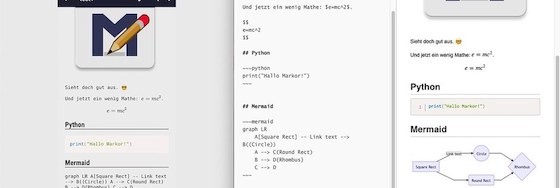

 【Ξnigmatico】
 🐱
🐱 Yung爪
Yung爪
 Wir stellen uns quer!
 Alexander
 blabber.im
 Deleted Account