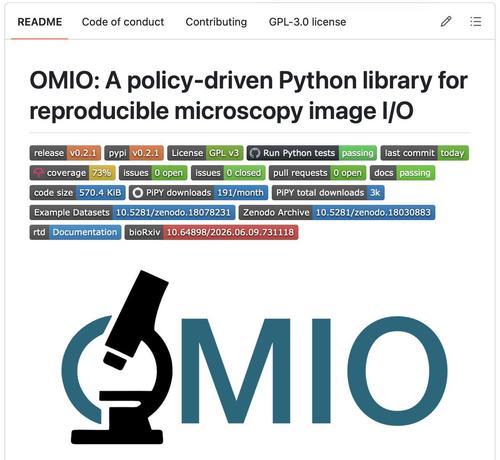
If you work with #microscopy images πŸ§ πŸ”¬ in #Python πŸπŸ‘¨β€πŸ’», you may know the situation: Different file formats, readers, axis conventions, metadata structures... At least I found this increasingly frustrating. So I built #OMIO (Open Microscopy Image I/O), a unified microscopy image reader & writer for #Python:

🌍 https://omio.readthedocs.io/

🧡1/8

#BioimageAnalysis

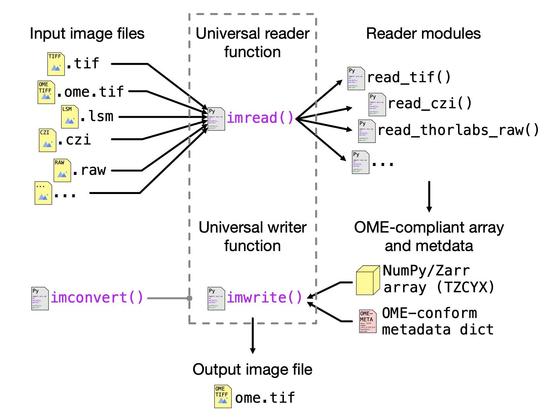
#OMIO currently supports: #TIFF, #OMETIFF, #TIFFseries, #ZEISS #LSM and #CZI, #Thorlabs RAW. All inputs are mapped to a unified representation with #OME-compatible axis semantics and standardized metadata handling.

🧡2/8

A major goal of #OMIO is to make image semantics explicit:

βœ“ normalizes axis order
βœ“ preserves singleton dimensions
βœ“ extracts physical scales when available
βœ“ keeps metadata accessible
βœ“ warns when critical metadata are missing

No more guessing whether the array is TZCYX, ZCYX, CZYX, ...

🧡3/8

For large microscopy datasets (e.g. >1 GB): #OMIO can materialize images directly as disk-backed #Zarr stores. This allows #MemoryMapped, slice-wise access w/o loading the entire dataset into RAM. And: It fully integrates with #Napari workflows ✌️

🧡4/8

#OMIO provides three main entry points:

β€’ imread() β†’ read microscopy data
β€’ imwrite() β†’ write standardized OME-TIFF
β€’ imconvert() β†’ convert between formats in a single step

The idea is simple: Read almost anything, normalize semantics, write OME-TIFF πŸ€—

🧡5/8

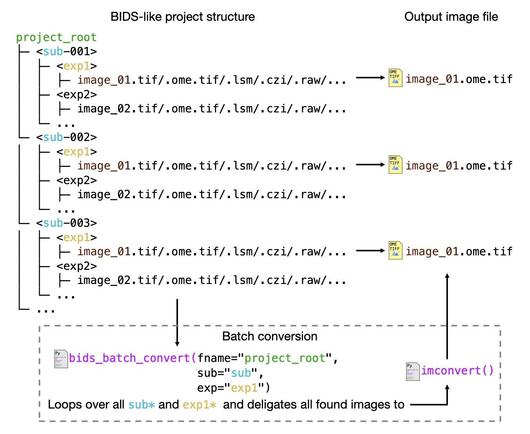
Working with large microscopy collections, e.g., full experiment series? #OMIO includes #BIDS-like batch conversion workflows that can traverse project trees and convert datasets automatically while applying the same semantic rules to every file. No format-specific batch scripts required.

🧡6/8

If you'd like to contribute 🀝, report 🐞, request features πŸš€ or new file format support πŸ—³οΈ, feel free to contact me via #OMIO's GitHub issues:

πŸ‘¨β€πŸ’» https://github.com/FabrizioMusacchio/omio/

#OpenSource #Python #Microscopy

🧡8/8

@FabMusacchio Neat!

Is the data stored in the order in which it is in the file, and then you just reorder the dimensions without copying, or do you store the data in your forced TZCYX order? I’m asking because it can have implications on processing efficiency.

@CrisLuengo OMIO reads TIFF, CZI, raw etc. and exposes them in OME-compliant TZCYX axis order. TZCYX is the OME axis convention not an arbitrary OMIO layout. If the source layout differs, OMIO reorders once, which can cost time, yes. But after saving, which is done as OME-TIFF, any downstream code can rely on the same axis order w/o guessing per file. That avoids repeated layout checks and reduces downstream error sources which is the actual purpose of OMIO.
@FabMusacchio Thanks. It’s good to know that you can rely on a specific ordering of the data in memory. No complaints here!
@FabMusacchio Any reasons not to build this on top of Bio-Formats? Would love to learn of your decision process there. I’m split on Bio-Formats. It’s a fantastic collection of file formats, but it’s also Java… :/

@CrisLuengo @FabMusacchio

I have been using https://bioio-devs.github.io/bioio/index.html until now, the successor of AICSImageIO, which handles in Python a substantial amount of Bio-Formats. But it has its issues. I will have to check OMIO!

bioio 3.3.0 documentation

@CrisLuengo I think, this is also already my answer: Bio-Formats is/needs Java πŸ™ˆ It always felt a bit off whenever I tried it out. There was just something running in the background that felt like "too much", and I was always worried it would crash at any moment. So I wanted something that was pure Python, w/o any additional layer in between.
@CrisLuengo …especially when you're running something in a Docker or Singularity image on a cluster: you're already hoping that everything runs smoothly there, and you don't want to introduce any additional bottlenecks.