 Microfractal 🫖
Got my first #Vulkan triangle oh my god
Got my first vertex-indexed rectangle.


I didn't think integrating Imgui into it would be so easy.
Output is inside a #DearImGui window ✅
Need to figure out where these ugly spec violations happen.
Need to figure out where these ugly spec violations happen.


codeberg.org/Microfractal/Bultom
Here is it. Unforunately not really usable, not cross platform, has some vulkan validation errors & no coloring options at the moment. I just made it public, so you can see and perhaps understand how perturbation and linear acceleration works.🥴
Here is it. Unforunately not really usable, not cross platform, has some vulkan validation errors & no coloring options at the moment. I just made it public, so you can see and perhaps understand how perturbation and linear acceleration works.🥴
Ah and it has linear approximation as mentioned before ✅
Some progress:
Separated computation into a map stage (iterations, distance estimates..)
and an image stage (RGBA), so image recoloring does not need to recompute the fractal again ✅
Wrapped DearImGui input scalars ✅
Custom DearImGui-like color editor ✅
Wrapped Vulkan compute shader into a structure ✅

TODO:
Higher quality by averaging multiple images (made out of sightly randomized map pixels), formula must be something like
newColor = Lerp(oldColor, newColor, 1.0 / weight)
Higher quality by averaging multiple images (made out of sightly randomized map pixels), formula must be something like
newColor = Lerp(oldColor, newColor, 1.0 / weight)
Saving images as png ✅
Finally got FloatExp numbers to work. A FloatExp datatype is a real-valued struct, which contain a floating point number and an extra integer, which holds the exponent.
Then, a real number {mantissa, exponent} can be represented using mantissa×2^exponent.
Using this method, numbers far beyond the range of single and double precision floating point numbers can be represented.
This image is computed using a 32+32 bit floatexp (32 bit mantissa and 32 bit exponent). Plain 32 bit floats are not enough. Of course, perturbation and linear acceleration is also used.
#Devlog #Fractal #Mandelbrot #DeepZoom #FloatingPoint #FloatExp

Added progress reporting. Getting the numerator & denominator is done using lambdas.

Got something like waypoint coloring to work, currenty hardcoded as static arrays in the shader.

Added the "extend" modes mirror and clamp.
Here's one example that uses a mirrored colormap. Coordinates found by @mathr "millionaires 8": https://mathr.co.uk/web/millionaires.html#008
#Mandelbrot #MandelbrotSet #Fractal #DeepZoom #JuliaMorphing #MathArt

Finally got a working GUI to edit a colormap. I'm still not 100% satisfied but much better than the other attempts.
I finally got exchange of colormap data between host and shader to work.

Currently rewriting some of the #Vulkan initialization code. Main part is done, using the C++ Vulkan wrapper reduces the mess in some blocks.
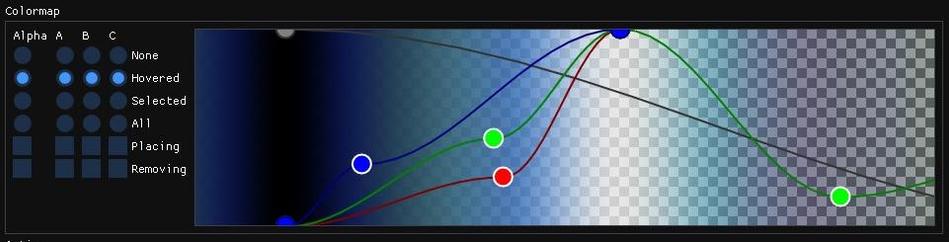
Now my colormap editor has a more nice looking appearance. Notice the cosine interpolation between all the points.
I started to separate the fractal generator into an external shared library. The idea is to execute arbitrary code separately from the core application. The Mandelbrot set is not the only thing im interested in and future graphical projects like cellular automata, raytracing or data visualization should also fit into that project, with possible data exchange.
Got higher quality images to work using multisampling / pixel value averaging.
Major parts rewritten.
Looks much better in my opinion.

Stress tested it using a ~1e-13874 sized deep zoom with around 38,000,000 iterations per pixel (usually much fever computation iterations due to linear approximation acceleration). Worked fine, no timeout or vulkan "device lost" errors, which happened with some deep zooms before. Coordinates: https://www.deviantart.com/dinkydauset/art/Tiling-iteration-Julia-ghost-819880424


Now rewriting everything to C++ using modules, because my math headers went crazy.
Conversion of the core program to modules is almost done. I also found some dead branches (never executed logic) which is now removed.
I made an object selection engine, which will be used as a base in the colormap-editor and many other widgets that rely on the fearture to (multi)select some markers/objects.
Progress! Just wrapped a bunch of ImGui functions into simplified ones. I also made a few new custom widgets, for example the coordinate axis on the left and the bottom of the plot. Scientific data visualization vibes lol.
By the way, here is a domain coloring visualization of the function f²(z), where f(z) = exsec(rot(z, time*0.5)),
where t is approximately time in seconds,
exsec is the complex exsecant and rot(z, t) rotates a complex number z around the origin by t radians.
#DevLog #DearImGui #Programming #Math #DomainColoring #ComplexNumbers
 David W. Jones
@dancingtreefrog Thank you
@Microfractal Thanks for sharing them. I use XFractint for making fractals, I don't know if the coordinates you have would work there?
@dancingtreefrog I don't know if fractint supports any arbitrary precision number types. Even if so, using high precision to run z->z²+c 38 million times! per pixel!! (assuming the image is around 1920x1080 pixels in resolution, I did set it to 3840x2160) will take an uncountable amount of time to finish the render process, because high precision is usually not directly supported by hardware (no direct cpu instructions to add or multiply two high precision numbers exists). That means, doing arithmetic with them must be implemented in software using algorithms (karatsuba multiplication, long division etc. there are libraries like GMP or MPFR for that) which results in decrease of computational speed. The coordinates for the image above have around 13,000 digits (more digits/bits of precision means more computational intensive).
@dancingtreefrog If fractint supports the so called 'perturbation method', then the arbitrary precision arithmetic is only needed for a single point (in this case 38 million iterations). The remaining pixels can then be computed using machine precision floating point numbers. If you exceed the exponent limit of the floating point type (for IEEE-754 single precision its around 1e-38, double precision is around 1e-308) then you need to store a separated representation of a floating point number to avoid underflow (truncation to zero) using mantissa × 2 ^ exponent. This is also a bit slower, but it's required to zoom beyond that 'underflow border'.
@dancingtreefrog Even if all this is supported, it will be still too slow. The last used algorithm extends the perturbation trick and creates an acceleration datastructure based on the single high precision point. Then a lot of iterations can be skipped and values can be approxed, which brings the computational complexity down again.
@dancingtreefrog So my short answer is: no, with Fractint it's not possible
@Microfractal
Agreed. Fractint does 16-bit int, that's what it's famous for. Beyond certain zoom levels, it switches to floating point, but that gets real slow!
Oh, well, I'll just enjoy your renderings instead!
Implemented reference orbit reusing: Avoid time consuming reference computations if we are near the previous point. This allows efficient navigation on locations that rely on a high iteration reference orbit. #Devlog