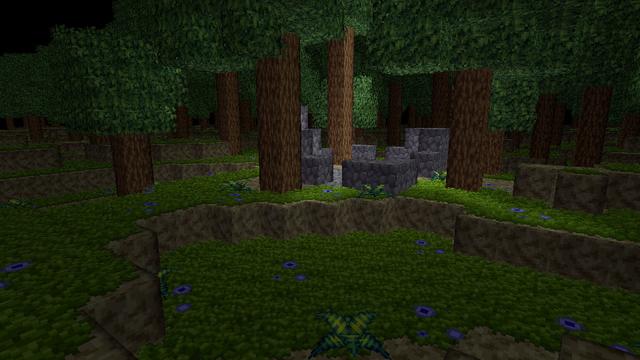
refined the 3d cursor a bit. pretty happy with it. the thickness will be user adjustable. it also shows through terrain, but slightly dimmer where it's obscured

also showing "mouse pointer mode" where you can mouse over anywhere on screen to interact with blocks, and you mouselook with the right mouse button

thinking of keeping this as a toggleable mouse mode. thoughts?

edit: broke my thread :( previous posts are here https://mastodon.gamedev.place/@eniko/115345413827332419

#EniBlockGame #GameDev #IndieDev #ProcGen

fun fact: in order to draw the cursor as translucent i had to use the stencil buffer, because the boxes that make up the "lines" overlap at the corners, so without the stencil buffer it'd be more opaque at the corners

#EniBlockGame #GameDev #IndieDev

testing customizable thickness/opacity for the 3d cursor. think being able to set this to whatever you want will be nice for accessibility

#EniBlockGame #GameDev #IndieDev

oooohhhh what if i made it jiggly??

#EniBlockGame #GameDev #IndieDev

added an outline to the 3d cursor so it's always visible

#EniBlockGame #GameDev #IndieDev

i can now overlay a block breaking decal on blocks, and it works on blocks with shell texturing and even nominally on objects like ferns and flowers

i draw the block's faces again using the stencil buffer, then draw the breaking decal with depth read/write off, masking using the stencil buffer

the way it works for ferns/flowers is i just draw all faces of the breaking pattern block, and any pixels outside the object model are masked

#EniBlockGame #GameDev #IndieDev #ProcGen #PixelArt

major milestone in block game development: the first actual gameplay! you can go around and hold the left mouse button on blocks in order to break em :D

#EniBlockGame #GameDev #IndieDev #ProcGen #PixelArt

just discovered that the shell textures on leaf blocks do a really cute thing when they surround another block :3

#EniBlockGame #GameDev #IndieDev

changed the way block breaking work. 3d cursor now changes to encompass the whole block and the breaking decal is shown on all faces

i'll probably change the cursor to full block vs face (or no cursor at all) depending on what your currently held item is later but for now this works

#EniBlockGame #GameDev #IndieDev

not 100% sure what to do about hidden corners. should they show through other geometry with xray vision or just not be drawn?

#EniBlockGame

show hidden corners with xray vision
19.3%
don't show hidden corners
30.1%
make an option, but show by default
21%
make an option, but don't show by default
29.5%
Poll ended at .

time to turn in for the night but i managed to get some item icon rendering going

#EniBlockGame #GameDev #IndieDev

current status: agonizing about what to do for font rendering. do i wanna do truetype fonts, or use pixel art fonts

does my old truetype font implementation even still work at all?

edit: nope my truetype implementation is gone so if i wanna go with something i already have i guess it's pixel fonts

edit2: ok i can feel the life draining out of me just researching font systems so for now i'll just go with what i have and works: pixel fonts

#EniBlockGame

decided to go with a very 16-bit feeling aesthetic for block game's GUI. took a while to set up the shader for the background color gradient but it's totally worth it with the dither and crunchy pixels. and it can go diagonal, horizontal, or vertical!

oh and yes, you can customize the gradient colors :3

#EniBlockGame #GameDev #IndieDev #PixelArt

Oh did I mention the GUI image atlas is loaded via json so, aside from the background gradient which is a shader, I guess that means the GUI is skinnable?

took all dang day but i have my custom font ready now. it's a tweak of the font i made for MidBoss to make it look a bit more like a system font, so i'm calling it sysboss

comes in regular and bold

#EniBlockGame #GameDev #IndieDev #PixelArt

Reminder: if you have questions about block game you may want to check the site at https://enikofox.com/blockgame because I probably answered your question in the FAQ on there
Block Game | Ultima/TES meets Minecraft

Ultima/Elder Scrolls meets Minecraft voxel sandbox game with building and crafting.

implemented auto GUI scaling, in a way where i can easily mix low res pixel and high resolution image elements

pictured are 640x360 and 960x540 (resized with nearest neighbor to 1080p in post) as well as 1080p

the GUI will be designed to scale cleanly with crisp pixels into 720/1080p and beyond (4k/8k)

#EniBlockGame #GameDev #IndieDev

note that the magnification and low resolution makes the linear scaling on the 540 pixel resolution look much worse than it is. for example, here is 1600x900, unscaled, which has linear filtering on the GUI pixels

#EniBlockGame #GameDev #IndieDev

this GUI scaling is why making the background gradient shader was kinda tricky. the way i render pixel perfect stuff at high scales is to just scale via nearest neighbor

but the gradient is just two colored triangles on the GPU, so there's no texture to scale. instead i had to do the pixelated effect in the fragment shader so i can set a scale and render the menu background at high res but with the expected chunky pixels

created the hotbar today, and block game is really starting to look like a game now!

and best of all, the entire bar is reskinnable by changing the gui.png and gui.json files :3

#EniBlockGame #GameDev #IndieDev #PixelArt 🎮

just gotta put blocks in the hotbar when you break em, and then place them in the world from the hotbar, and add torches somehow and we'll have ourselves a playable prototype

if i can pull that off in the next 10 days i'll have taken block game from nothing to playable in just 2 months. that'd be a nice feather in my cap

#EniBlockGame

it doesn't just look like a game now, it *is* a game! :D

select hotbar slots with scrollwheel or with the keys shown in the upper left of the slot (indicated by background color). press 'R' to ready/sheathe whatever's selected (indicated by the golden cursor). while nothing is readied or the slot is empty left click breaks blocks. if a block is readied left click places that block

#EniBlockGame #GameDev #IndieDev

made a little shack :3

#EniBlockGame

i have updated the block game website FAQ (https://enikofox.com/blockgame) with mouselook details
@eniko home sweet home 😍👍
@eniko when can snack in shack?
@eniko i think you should avoid the "block shapes" problem by just having a button to scroll between different shapes and variants available for any given block :3
like if i wanted cobblestone stairs i'd just hold R and scroll down once
Clutter No More - Minecraft Mod

Fixes the game's inventory clutter problem by unifying Stairs and Slabs into a single block: Transform your full blocks into other shapes with the press of a keybind!

Modrinth
@gemini0 yeah I have some ideas for that
@eniko hello, im efi, I can be trusted around your block house =3
@efi you gonna set fire to it aren't you
@eniko no, because you didn't implement fire yet =D
@eniko 🎶 Block Shack, baby, Block Shack! 🎶

@eniko TBH the gameplay as it now stands is how I perceive most crafting-survival games. Only with a lot more padding and annoyance. And maybe some sort of decay mechanism, so just make random blocks disappear once in a while. Yup that pretty much sums it up. Also make sure key materials are only available about 9 hours travel away, and are essential to build anything fun.

Hmm, sounds like I should talk to my therapist about this. :o

@eniko is direct to inventory temporary or do you think it will stay? I really like break and pickup being the same thing
@YinYinFalcon i haven't decided yet. i don't hate it?
@eniko @YinYinFalcon Hunting for the dropped materials is one of the more annoying parts of Minecraft, and being able to lose them off cliffs and into magma adds nothing to the game IMO.

@pianosaurus @eniko I mean it's the same flavour as a creeper blowing up your stuff - it certainly adds something, but I don't like it

I'd rather not have to be that careful

@eniko amazing to see the progress!
@eniko if you want playtester at some point, prod me...
@eniko or a nice block on your block, as they say in the block game business.
@eniko *touches the hotbar*
*takes damage*
ow
@eniko Are you handling the interpolation per quad or per triangle?

@Ronflaix per quad, it just has two color stops, one for one end of the gradient and another for the other end

i actually used 256x256 grayscale textures to get the gradient value at any given position

@eniko i've got two burning questions about block game: will there be blocks in it and will it "have game"?
@aeva I feel like it answers the latter via answering that it will have fox girls 🤔
@eniko When someone says "Yeah I really want to get into pixel art" they don't know they're signing up for "hand edit every letter of every alphabet."
@eniko How'd you do the black outline for the letters? Or is that part of the font sprites
@scherzog yeah its a separate set of character graphics for the stroke
@eniko I'm curious what it'd look like with a single pixel gap between characters. It feels a little crowded to me, horizontally.

@swetland oh yeah it's supposed to have a 2 pixel gap between characters, not 1 pixel, i forgot

thanks!

@eniko I don't recall if you've said this already, but I'm curious what you're building all this in! What language are you using? Any notable libraries? I've been thinking about dipping my toes into 3D ever since I saw that SDL3 has graphics support.

@mtthgn I'm using FNA in C#. There's more info on the site https://enikofox.com/blockgame

I wouldn't recommend using FNA for 3D

Block Game | Ultima/TES meets Minecraft

Ultima/Elder Scrolls meets Minecraft voxel sandbox game with building and crafting.

@eniko How do you do widget borders, are they resizable arbitrarily?
@lisyarus yeah. It has two pipes that get drawn over the edges, then the corners get drawn. There 16 variations of the corner pieces for what sides connect to a pipe