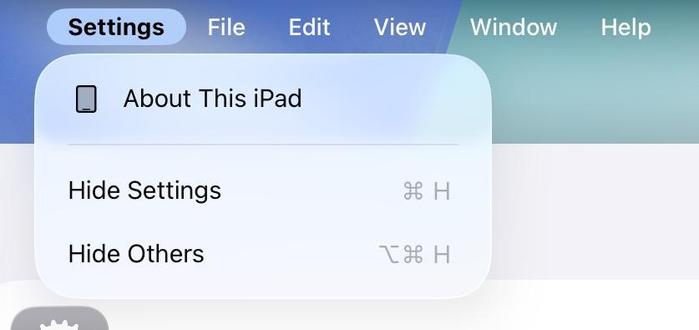
iPadOS 26.1 adds Hide, and Hide Others commands to the application menu, which was one of the radars I filed after WWDC (FB18283483 — not one I posted about here) 🥳

Now you can very easily clean up what's onscreen when you want to focus on the task at hand. Love it
New API on NSProcessInfo in visionOS 26.1 — 'isiOSAppOnVision'.

Finally there's an API to check if you're running on visionOS in compatibility mode

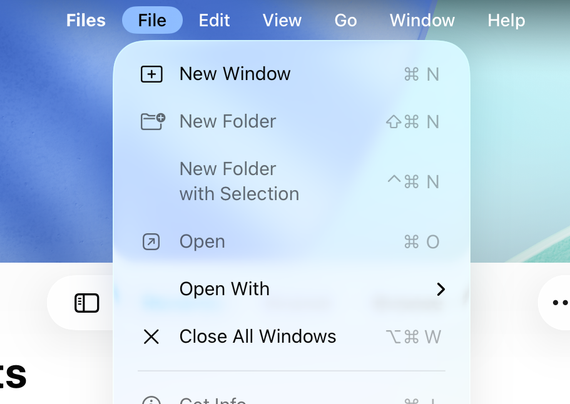
Also new in iPadOS 26.1 — there's a menu command to 'Close All Windows' if you hold the alt key.

This does *not* appear functional in beta 2, but if they make it work by release it will plug another big hole in iPadOS' new windowing mode

There's a second version of this command in the Window menu, which changes to 'Close All'. It does seem to function 🥳

An iPadOS 26.1 feature in testing that hasn't been enabled in builds yet:

SpringBoard itself has a system menu bar, with quick access to a bunch of things, including shut down and restart, screenshots, homescreen editing and more. Combined with the previous 'Control Center on External Displays' unreleased feature, I hope that they're slowly building towards clamshell mode for iPad…

xcrun simctl spawn booted defaults write com.apple.springboard SBHomeScreenMenuBar -bool YES; killall SpringBoard

@stroughtonsmith Looks good, feels good.
@stroughtonsmith still waiting for the “always show menu bar” setting
@stroughtonsmith Wait “Restart”? Omg thank you Apple, now I don’t need to count a few seconds in my head after shutdown to restart.

@AnimeAndVisial

That's a fine point. ^ ^

I think that's also possible today both with Siri and with built-in Shortcut actions.

@Starfia @AnimeAndVisial I think you can lock the screen with Shortcuts, but not shut down, restart, etc.

@edmn, @AnimeAndVisial

I've just checked. The "Shut Down" Shortcuts action does indeed allow for shutting down or restarting! And you can make a Control Center control that nicely adopts the corresponding symbol.

@Starfia @AnimeAndVisial Would you look at that! Thanks for the pointer.
@stroughtonsmith that would be AMAZING on the mini (which means they probably won’t do it)
@stroughtonsmith New iPad Pro imminent in typical October (maybe November) fashion, then. I’m thinking they will showcase this very Mac-resembling addition at the same time.
I want a “clamshell mode” on iPhones 😁

The new Hide command works per-display, and hides all open windows from the frontmost app. So if you have five Safari windows open on the iPad display, and another five Safari windows open on an external display, hitting cmd-H will hide just the five for whichever screen you were last interacting with.

To bring them back, you need to bring them back one by one from the multitasking screen — your layout isn't preserved when you Hide it

If I were to make any changes to how it works now, I would preserve the multi-window layout when an app is 'un-hidden', and bring back all the windows. That's a tougher sell just because it's so different to how iPad has traditionally worked, but I think it's what users will expect
@stroughtonsmith Yep this part is less than great. Having to bring back each window separately is a pain.
@stroughtonsmith thank you for your service 🫡
@stroughtonsmith just to confirm, CMD-H no longer acts like pressing the “Home” button? That would be amazing if so!
@stroughtonsmith Macintosh System Software 7 vibes! Love it