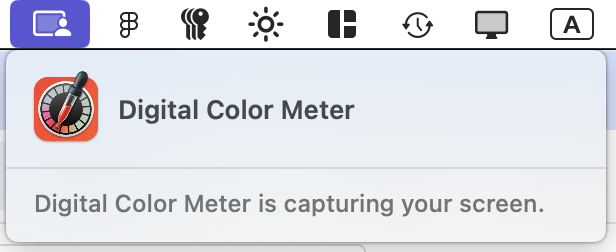
It’s been over a year with these macOS pop-ups and I still have any idea why an app is asking, what should I say, what is the penalty for choosing Don’t Allow, etc. What a frustrating experience.

(Edit: I’m showing Chrome here but I am getting them for so many other apps without seemingly any rhyme or reason.)

Well, this explains… some things.
I can’t help but think this whole system just feels poorly thought through in terms of design and UX writing. I don’t imagine Digital Color Meter is capturing my screen, and in iOS 26 beta this dialog somehow became even more scary (granted, it’s a beta).
@mwichary the importance lies in what’s dev provided writing and what’s apple provided writing and not being able to distinguish between the two reliably as a user
@tobimori @mwichary 🎯same with like, "App wants to install a helper tool." I used to work on software that used that UI and it got comments from users like "this is vague and scary, please make the popup explain what's happening instead." we would've loved to if we could. and somehow it's still like that.
@mwichary How would the colorimeter know the colors without capturing the screen?
@bitnacht To me, there’s a difference between capturing and having access to. Capturing implies storage.
@bitnacht Plus, I just used it. I was there and saw what was happening. What does it help me to see this notification pop up a minute after I’m done?
@mwichary I don't know if you are venting or asking a question and I don't have all the details. So my idea is: You have installed an App and granted it privileges to do a task. After that task is finished the app starts using these privileges without you knowing about it. The trick is to detect when a voluntary user interaction triggers the access. There are heuristics for that (well behaved app necessary). The OS can't reliably determine if the app stores the image.
@mwichary Affinity Designer has a similar feature. It doesn't trigger a warning on Tahoe after you granted the privileges.

@bitnacht @mwichary

The point is- there is absolutely no reason for such a feature or function to go onto the web PERIOD, nor see any thing but the volunteered pixels under an eyedropper. Even a pallete of the full image can be built and stored totally locally.

@bitnacht Thanks. The details are in my other posts under the original. But just to wrap up this one:

- this notification happens at a strange moment (after I put it aside) that adds more questions rather than providing answers
- this is Apple’s own app, so they know exactly what it’s doing
- even for other apps, there is a better way to describe it

I understand how this all works in principle. I just think a lot of details are wrong.

@mwichary Just in case you find it interesting: This is how it looks on my machine. #TahoeBeta … I get nothing else, just the thing in the control center.
@bitnacht Thanks! That seems a bit less prominent than what I see in Sequoia.
@mwichary @bitnacht if anything, I do appreciate that Apple is subjecting its own app to its own privacy shenanigans instead of giving themselves a leg up on third parties via an custom exemption
@numist @bitnacht Yeah, I was thinking it could even be educational in a sense. I just… don’t like it as much. It really feels very scary for a simple feature.

@mwichary @bitnacht Wasted opportunity. One of my own side projects (https://github.com/numist/Switch) is also affected by this (and does capture window contents, though it doesn't record them) and I'm sympathetic to the system's problem where it knows an app has access to the screen's contents but no notion of what that information is being used for.

You kinda *have* to assume the worst. Is this free colour picker app sending my bank balances to phishers as part of their mark selection? Who can say!

GitHub - numist/Switch: A window-based context switcher for the Mac

A window-based context switcher for the Mac. Contribute to numist/Switch development by creating an account on GitHub.

GitHub
@mwichary no, the entitlement means any access to the screen, even ephemeral. It is also required for remote sceen sharing apps.
@mwichary
Also, Chrome is clearly shite.

@mwichary I’ve written an app that can inspect & capture parts of the screen to zoom in on them. The permission being granted does permit the app to grab anything on screen.

It’s honest kind of a frightening level of access & you really need to thoroughly trust any app you give this permission to.

@causticmsngo I understand the system… I just question any system that tells me a built-in app for sampling colors is “capturing” the screen, and that it tells me that after I stop using it.

Whether it’s the permission system, the UI around it, or the timing around that UI, it just doesn’t seem that it’s working well. And that on top of the original, even more annoying “local network” permission.