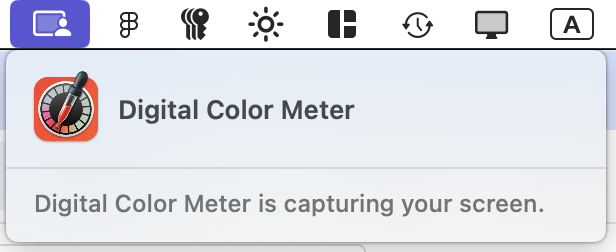
It’s been over a year with these macOS pop-ups and I still have any idea why an app is asking, what should I say, what is the penalty for choosing Don’t Allow, etc. What a frustrating experience.

(Edit: I’m showing Chrome here but I am getting them for so many other apps without seemingly any rhyme or reason.)

Well, this explains… some things.
I can’t help but think this whole system just feels poorly thought through in terms of design and UX writing. I don’t imagine Digital Color Meter is capturing my screen, and in iOS 26 beta this dialog somehow became even more scary (granted, it’s a beta).
@mwichary How would the colorimeter know the colors without capturing the screen?
@bitnacht To me, there’s a difference between capturing and having access to. Capturing implies storage.
@bitnacht Plus, I just used it. I was there and saw what was happening. What does it help me to see this notification pop up a minute after I’m done?
@mwichary I don't know if you are venting or asking a question and I don't have all the details. So my idea is: You have installed an App and granted it privileges to do a task. After that task is finished the app starts using these privileges without you knowing about it. The trick is to detect when a voluntary user interaction triggers the access. There are heuristics for that (well behaved app necessary). The OS can't reliably determine if the app stores the image.
@mwichary Affinity Designer has a similar feature. It doesn't trigger a warning on Tahoe after you granted the privileges.

@bitnacht @mwichary

The point is- there is absolutely no reason for such a feature or function to go onto the web PERIOD, nor see any thing but the volunteered pixels under an eyedropper. Even a pallete of the full image can be built and stored totally locally.