
If you are on mastodon.social and are having issues with some clients not able to refresh your timeline in the past few days, it is probably because of this:

https://status.mastodon.social/cm6i55duu000ijwc2g6f4t3kx

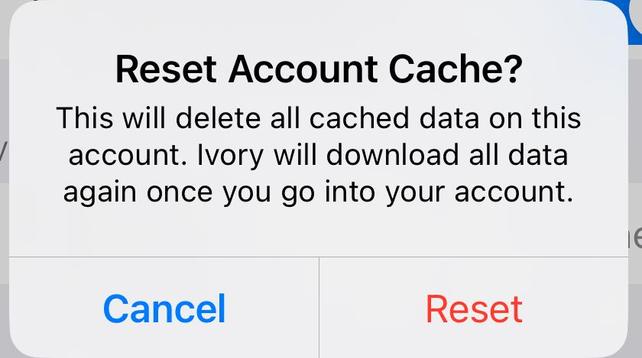
Current fix in Ivory is to go to your Ivory account settings and tap the “Reset Account Cache” button. Hopefully this issue gets resolved soon. 🤞


Degraded performance - Incident details - mastodon.social - Status

Degraded performance - Incident details - mastodon.social Status

@ivory That's what I'm doing the last days. Was wondering what changed. Now it's clear.
@ivory Definitely have been experiencing this. Thanks for the head's up.
@ivory Hit this also, thanks for the heads up on it, appreciated. 🙏
@ivory For some reason it was just my lists doing that. Thanks for the tip!
@ivory I stumbled upon that solution earlier this morning. Thanks for confirming! Glad it wasn't a bug in the app.
@ivory I figured this out on my own a few mins ago. Thanks for letting us know though!
@ivory thanks, haven’t been a heavy user here long and was wondering what was up.
@ivory
I've been checking for down time reports for the mastodon.social domain. Didn't think it might be a client app issue.
@ivory thank you, this was driving me batty! My Mac client wouldn't update but my iOS one was fine.

@ivory how?

Don’t see any place on my iPhone with that option.

@Rycaut settings then account settings within the app.
@ivory wheee the heck is that? I only see navigation setting. There are no other settings that I can see in the iOS app. And the settings in the iOS settings for the app don’t have it either.
@Rycaut tap your avatar in the very top left corner of the app. Settings is there.
@ivory it works for me now. Thanks!
@ivory Just curious: Why wasn’t the official Mastodon client affected?
@DavidAnson no idea. But also doesn’t remember your last read position, last time I checked.
@ivory It may not. But it was able to fetch new posts when Ivory could not. That was how I determined it was an Ivory problem vs. a server outage which led me to reset before your guidance was available. Thanks for the great app, BTW!
@DavidAnson it’s not an ivory problem as there’s nothing for us to fix on our end. It has affected other clients as well. Just not sure why not the main one. 🙂
@ivory I’m not here for an argument, so feel free to ignore this reply. That said, the observed behavior seems to be that resetting state on the client fixes its inability to synchronize. As no server change was needed, it seems that some state on the client got corrupted and prevented it from working. In my mind, that’s a client issue. That said, it could be the server changed in such a way as to block previously successful calls based on that state. Which I would agree is a server issue. :)
@ivory Writing that out and rereading it, my guess is that the client passes some continuation-like token to the server and the meaning of that changed in a way that made it invalid. The official client either handled this or knew not to pass that token, but that suggests the protocol does not *require* a client reset. It also suggests this may be a recoverable condition for Ivory, especially if an error code is present that identifies this situation. Good luck. :)

@ivory thanks. I had been looking in Ivory Settings, but found nothing I thought could be an issue.

I had seen ‘hangs’ happen most after side swiping to read deeper in a thread, then leaving Ivory open in background.

Cache does not automatically clear when closing the app?

What would you lose by Restting account cache? Last toot read and how many are left?

@Chancerubbage we cache a lot of things. If we didn’t, you would get rate limited by your server often and then the app would be useless most of the time. Different elements have different expiring times.

@ivory

So, mostly it is recent data interaction? Recent posts? And if I , a timeline completist, have ‘caught up’, I really should miss much from a reset?

@ivory This fixed the issue my wife was having after I texted this to her. Thanks!
@andrewbriscoe @ivory Also good to know it’s not primarily client based (having some issues with Icecubes too)

@ivory

My concern is, I don’t know exactly what the cached data even is.

My ignorance is to the point I might not even know how to log back in. The download reset, is it resetting to factory defaults? Or some past saved state on ivory servers?

Will I have to reset filters and mutes from scratch?

Will I reopen to a present state of my read time line being set to the present, if I had unread posts in my timeline? (Currently U’m caught up after hours missed)

@Chancerubbage you will not be logged out. It will reload all server configurations, images and all your timelines. You will lose last read positions. You won’t lose your filters.

@ivory

Thanks, as I have no idea exactly what is or was being cached.

@ivory I've been having analogous issues with Mastodon.online. Briefly: Ivory on my phone is getting wedged -- not seeing new posts or getting position updates. The cache clearing trick provided *temporary* reprieve. Looking forward to a fix, with every confidence in you.
@oldprof Unfortunately this is a mastodon.social and mastodon.online issue: https://tapbots.social/@ivory/113918447460108623
Ivory by Tapbots :emoji_wink: (@[email protected])

If you are on mastodon.social and are having issues with some clients not able to refresh your timeline in the past few days, it is probably because of this: https://status.mastodon.social/cm6i55duu000ijwc2g6f4t3kx Current fix in Ivory is to go to your Ivory account settings and tap the “Reset Account Cache” button. Hopefully this issue gets resolved soon. 🤞

tapbots.social