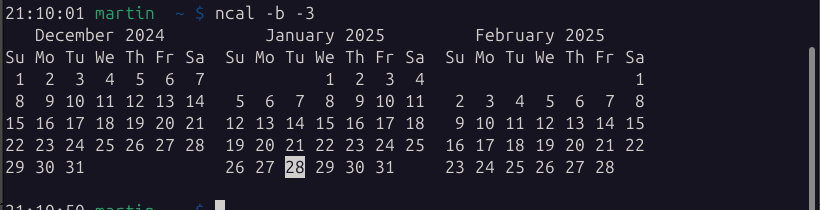

PSA: you can just run the command "cal" in your terminal to get a properly formatted calendar. or "cal -y" for the entire year.

i recently found out that surprisingly few modern linux users seem to be aware of this, and instead keep digging around for a graphical calendar. it's an old unix command so it's typically available on even the most lightweight of systems (like alpine)
earlier today i saw someone trying to figure out what date next wednesday would be while ssh'd into a server. it was painful watching them fiddle with the windows taskbar calendar just to look at a date, and it was even more painful when i ran "cal" and realized nobody around me had heard about that command before

@quad Or in this specific example

date -d="next wednesday"

But 'cal' is definitely shorter

@quad Even systemd could tell them this. Then again, systemd is a whole OS…

systemd-analyze calendar “Wed”

@quad

I got this list here bookmarked with a bunch of console services:

https://github.com/chubin/awesome-console-services

GitHub - chubin/awesome-console-services: A curated list of awesome console services (reachable via HTTP, HTTPS and other network protocols)

A curated list of awesome console services (reachable via HTTP, HTTPS and other network protocols) - chubin/awesome-console-services

GitHub
@simon_m nice. i use ifconfig.me a lot, but more is always useful
What Is My IP Address? - ifconfig.me

Get my IP Address

@quad Also there's https://github.com/leahneukirchen/wcal which I find to have a better output than most cal(1) implementations.

Also funnily, cal(1) is in POSIX but the output is undefined, I wonder why it got there…
https://pubs.opengroup.org/onlinepubs/9799919799/utilities/cal.html
@lanodan well, i'm honestly not sure how many people these days intentionally install a cli calendar.

the cal command it just nice because i have seen too many people move away from their ssh window, or even pull out their phone while setting up a cli server, just to check a date
@quad Yeah, at least here I did because well, GUIs are ephemeral pieces of software.
In fact I think the last time I used a graphical calendar was back in Gnome 2 era.
@lanodan Only calendar I actively use is the one on my phone. Even more than usual lately for medical appointments.

Besides that I usually just poke the calendar in KDE's panel when i need to check what weekday it is or similar.
@quad Also OP reminds me that I'd recommend terminally unix people to browse in the shell utilities section of POSIX.

2024 version of it: https://pubs.opengroup.org/onlinepubs/9799919799/
The Open Group Base Specifications Issue 8

@lanodan @quad even a GTK calendar has it's place though, https://yad-guide.ingk.se/calendar/yad-calendar.html on a status bar click comes in handy too from time to time
YAD Calendar

@quad @lanodan (n)cal -w is the easiest way for me to check the week number for a certain date and they're installed everywhere, most calendar programs don't show it (at least easily)
@eal @lanodan god yes, here in norway at least everything gets scheduled by weeks, it's often surprisingly difficult to figure out how to make a calendar display week numbers.
@quad @lanodan >here in norway at least everything gets scheduled by weeks
yes!! we have the same problem
@eal @lanodan i've heard this is a surprisingly nordic thing to do. if other countries don't do it i can't understand why, so much easier to keep track of a schedule when it's divided into 52 equal segments (well, except first/last week)
@quad @eal Meanwhile here you sometimes have to remember if it's a month with 28 days or 31 and… I just never do and feel like I shouldn't have to, feels kind of like old imperial units with weird stuff to remember vs. metric where you just shift numbers around.
@lanodan @eal Generally a fictional schedule at the shipyard I work at will be given in the following manner:

Vessel will arrive at end of week 5.
New plates will be fabricated and installed for port side week 6.
Starboard side's plating and polishing of both sides will be done week 7.
Vessel will be moved from the northern pier to the eastern pier, then get new piping installed in week 8.
Painters will do their thing week 9.
Customer will perform inspections and verify delivery in week 10, most likely Thursday.
@lanodan @eal Luckily I work in IT, so I don't have to care about most of it. But I usually get stuff like "A ship will arrive in week 7. Coordinate with <phone number> to ensure they get internet transit when they arrive"

@lanodan @quad @eal careful with week numbers! some programs just say "week number" without specifying whether it's the US one or the EU/ISO one. Sometimes it's locale-specific, sometimes it's hard-coded.

In gnome-shell, I had to look at the JS code to figure out how the number was grokked. (always ISO, even on an en_US locale IIRC)

@remi @lanodan @quad @eal Did not know that weeks are counted differently in the US. Imperial weeks?
@djupsjob @remi @lanodan @eal It's because they start their week on Sunday. This means that if Jan 1st is a Sunday, then Jan 2nd (First Monday) would be considered Week 2 everywhere in the world, except for the US where they would still consider it Week 1.
@djupsjob @eal @lanodan @remi Well actually it might not be divided quite like that. But my point is that US week numbers sometimes have an off-by-one error depending on where the new year lands that particular time.
@djupsjob @remi @quad @eal Imperial typically refers to commonwealth / british empire, so more like US customary I guess.
@lanodan @quad @eal @remi Yes, I know. But imperial nowadays usually refers to units used in the US and almost nowhere else. I was just trying to be funny.
@eal @quad Here in France I know internally it's effectively in weeks but annoyingly they tend to instead give rough estimates in days which is pretty hard to remember…
@lanodan @eal @quad I just re-learned: on iOS you can show week numbers in the regular calendar https://www.youtube.com/watch?v=4dOmqjwjrpg
Add the Week Numbers to your Calendar on the iPhone

YouTube
@dxzdb @lanodan @quad someone actually created a whole video for "go to settings->apps->calendar and enable 'week numbers'"
@eal @quad @dxzdb It's like the "Don't post screenshots of 3 lines of text!" but 100× worse.
@lanodan @dxzdb @eal you'd be amazed at how many niche things you can find entire youtube videos about. usually some indian kid showing you how to do something on a samsung phone
@quad @dxzdb @eal Wouldn't be surprised that reason for it is to guide someone with senator-level of tech illiteracy around the UI.
@eal @lanodan @quad Yeah a bit overkill, but no ALT text needed 😏 Also it does show you what you get so that adds some value for someone that might not be sure if they want to try it.

@quad yeah, lots of basics get lost over time...

I like khal which also displays your appointments alongside the calendar.

https://github.com/pimutils/khal

@lanodan

@quad @lanodan I packaged OpenBSD/MirBSD’s cal(1) for Debian to have sane calendar weeks guaranteed, both its cal and FreeBSD’s ncal (also packaged for Debian) are weird.

I also packaged MirBSD’s calendar(1) since it’s got extra functions (advent calculation, export in a format trivially converted to iCalendar, with a script and repo I also supply, so I now run calendar in each shell so I see my appointments but also have a readonly version of them on the smartphone).

@quad @lanodan It's also around on "legacy" OSes like AIX and HP-UX.
@jbowen @lanodan Yes, because it's a unix command. It should be around in some form on any unix system, and by extension most unix-like systems.

It's even available in some weird places like FreeDOS iirc.
@lanodan @quad another third-party utility is "mencal", which can be used for tracking any periodic events (such as menstrual cycle) in the console
@quad 🤯
@leo_wallentin amazing how a command can exist for 50 years and nobody tells you, eh
@quad cal -a 3 gives you 3 months in advance. This is soo fucking useful. 
@quad looks like not default on my debian system. weird
@nachtpfoetchen @quad it's a part of `util-linux` so maybe it's only available as root because it's in /sbin/ and debian is being debian
@kimapr @quad no actually on debian it is part of the 'ncal' package that isn't installed per default
@quad I recently learned of cal -3 as well.

@ryanc @quad I never knew about this - Thanks! I was expecting cal -5 or -6 to give me more months and that doesn't work😲

On also on macOS cal -a says “Illegal option"

@quad before i found out `cal` exists i didn't even use calendars... nowadays i do and uhh i still don't use calendars lmao

i just look at the current day number in my computer and when someone says something silly like "next Tuesday" i would be blissfully unaware wtf that means and ask them to use a real date format

@quad

(side note: different distros install different versions of `cal` with slightly different options (and not counting `ncal` and `gcal`))

@quad I've been using *nix systems since late last century.
I'd completely *forgotten* this command.
@quad Ran this from the command line of my Ubuntu 24.10 install and it said that I could install it w/ ncal
@jjesse @quad would you like to install this as a snap package? :D
@quad I regularly use `cal <date>` to figure out what date some old newspaper meant when they said "Last Tuesday". Much faster than scrolling back through Google Calendar.
@quad Cool!
Any idea why my ubuntu machine doesn’t Have Today Highlighted, Even Though `ncal` does? (Apologies For weird capitalisation, Mona is having a day)
@quad I think with the rise of servers, daemons and containers that we've forgotten that Unix started out as a *desktop* system for interactive users to create docs for printing, with roff. A bunch of user-friendly, quality of life tools like `cal` exist, text processing like awk, sort or join, and stuff that even I have never learned or forgotten about. There is a whole ecosystem still out there even if the great mass has moved on to webapps
@quad every day is full of wonders with this OS. I had no clue...
@quad this helps me so much oh my god
@quad - neat! It works nicely in terminal
@quad *BSD also has calendar(1) https://man.netbsd.org/calendar.1
calendar(1) - NetBSD Manual Pages

@quad I ended up with
alias cal='ncal -b -3'

ncal: because cal no longer highlights today's date
-b: make it display in the same orientation as cal
-3: show the previous and the next calendar months

The Debian/Ubuntu package for this is 'ncal'.