It's been hard to trust Bartender following its acquisition, so I’ve rounded up on @macstories some of my favorite menu bar utilities available right now + two tips to help manage the menu bar without having to install any third-party apps at all. 💻💡
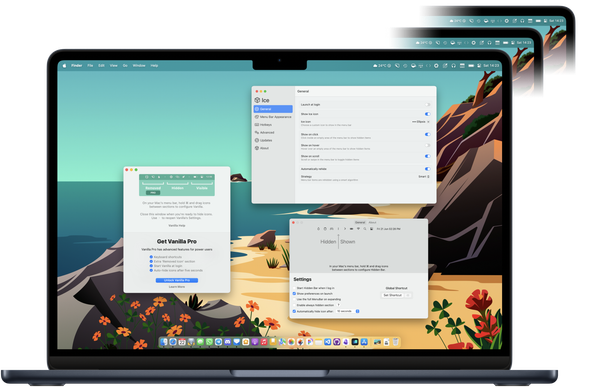
https://www.macstories.net/roundups/managing-your-mac-menu-bar-a-roundup-of-my-favorite-bartender-alternatives/

Managing Your Mac Menu Bar: A Roundup of My Favorite Bartender Alternatives

For years, Bartender has remained one of the best ways to manage the Mac’s menu bar, especially on newer MacBook models with a notch where menu bar real estate is even more valuable. I reviewed the great Bartender 5 last year and came away impressed. Unfortunately, though, my relationship with Bartender is not in a

@nileane @macstories Thanks! I just disabled "show in menu bar" on a bunch of my apps. No need to another app to keep me clean.
@nileane @viticci @macstories What do you recommend if I want a new list of icons to open under the menu bar now, instead of waiting for Ice to offer that feature?
@Granneman I don’t think I know any app that does this besides Bartender

@nileane Barbee does, which I’m using; however, it’s a bit buggy: it will show the second menu bar when I use a key command, but often moving your mouse or clicking on an icon makes it disappear, requiring me to use the key command a second time.

https://apps.apple.com/us/app/barbee-hide-menu-bar-items/id1548711022?mt=12

‎Barbee - Hide Menu Bar Items

‎Barbee – The Ultimate Menu Bar Manager Need a Bartender alternative? Barbee gives you full control over your menu bar! Why Choose Barbee? It’s lightweight, powerful, and designed to make your Mac’s menu bar cleaner and more efficient. Key Features: - Hide & Show Menu Bar Items Instantly – One-cl…

Mac App Store

@nileane iBar also shows the second menu. I haven’t tried it yet, but I think I’m going to in order to see if it’s more reliable than Barbee.

https://apps.apple.com/en/app/ibar-menubar-icon-control-tool/id6443843900

@nileane OK, after trying out iBar, it’s a no. No key command to show the second menu bar (right there, goodbye). Very clumsy management of icons. Limited settings. Ads everywhere for other apps. Barbee is better.
@nileane @macstories Thank you for putting this together!
@nileane @macstories Thanks for putting this together! I thought the update from the new company that appeared in Bartender’s update window seemed a bit odd, but didn’t think much more of it. It’s disappointing to hear how poorly the whole process was handled.
@nileane @macstories It’s also a bit surprising there’s still no native feature to help with this. For example, being able to move menu bar items into control center feels like an obvious way for Apple to address this, especially when that’s already an option for many of their own menu bar items.

@nileane @macstories Great write up!

If you’re using Bettertouchtool, you can hide menu bar items quite easily as well: https://community.folivora.ai/t/bartender-controversy-tutorial-on-how-to-manage-menubar-status-items-via-btt/37429

I’ve switched to this from Bartender for now

Bartender controversy, tutorial on how to manage menubar status items via BTT

I'm posting this because I have received multiple related requests due to the current Bartender controversy (PSA: Bartender Mac App Under New Ownership, But Lack of Transparency Raises Concerns - MacRumors) If you want to clean up your menubar status items using BTT you have multiple options. Predefined Action "Show / Hide Menubar Icons Left of BTT Icon The predefined action "Show / Hide Menubar Icons Left Of BTT Icon". This action will hide any menubar items left of the BTT icon (however it w...

BetterTouchTool Community
@nileane @macstories “Menu bar scene” 🤣
“A lot of the dock places have closed, but the menu bar scene is hopping!”
@nileane @macstories I ditched #Bartender5 when the ownership changed. I was using it via #SetApp. I switched to hidden bar (as it was in the App Store) which does the minimum I need it to do. #Ice sounds compelling, but unsure how trusting I should be of this app/developer as well even if it’s open source… is the code getting proper scrutiny… maybe I’m just a little paranoid now after feeling betrayed by the whole Bartender debacle. 🤔
@vanitalo @nileane @macstories Agreed. I used Bartender in SetApp as well and have now bailed. This was compounded by the fact that even when all the scrutiny and bad PR began to appear - the new developers still never really explained themselves or tried to corral it. It’s just really weird. Made me uncomfortable.

@nileane @macstories Great article, thank you! The idea to just reduce the space between items is definitely worth exploring.

And lots of interesting ideas in the comments here, too!

@nileane @czottmann @macstories
this is a great post with all good replacements of Bartender.

One thing I have learned after trying all three of them (prior to the
publishing of the article) is that *none* of them handles the notch.

I did notice that the screenshots/videos in the article are from a
laptop with notch. Does it mean they addressed the notch issue?

🙏🏽

@al3x @czottmann @macstories In my selection, the only one that will maybe be able to handle large amounts of icons with a notch is Ice, which plans to add a floating bar for overflowing icons
@nileane @czottmann @macstories Exactly! Ice had a ticket opened for implementing a solution for the notch. It was resurfaced and prioritized after the wave of new users.
@nileane @macstories Great piece. Still more interested in Bartender for my limited needs but understand others concerns.