Ahead of WWDC, I migrated all my personal passwords (~500 items) from 1Password to iCloud Keychain. I finally did it.

...and it's been mostly flawless? And I don't have weird autofill errors in Safari anymore? And this thing actually works?

I hope Apple announces a Password app on Monday, with support for secure attachments too. I'm ready.

@viticci hey Federico! How does multi platform work with iCloud Keychain? If you need to access it on a non Apple device?
@dordio there is an iCloud Passwords app for Windows that I'm using right now on my Legion Go
@viticci @dordio Is that app created by Apple? If not, do you trust its author with your holiest of holies... and what happens when Apple makes a breaking change?
@apicultor @dordio I'm pleased you're having fun. It's an official Apple app.
Apicultor šŸ (@[email protected])

@[email protected] @[email protected] @[email protected] Cool, so Windows-only, gated behind Windows Hello which has many insecure configurations, and no access from a browser in a pinch. If the only thing on the menu is a shit sandwich, own it. Don't call it filet mignon.

Hachyderm.io

@viticci @dordio There is also an iCloud Password Chrome Extension that looks kind of sketch (even though the developer is Apple Inc. on the extension). I tried briefly searching through Apple’s website and could only find documentation referencing that it works in Chrome in Windows and not Mac, but this article from the Verge links to it directly so believe it is real with outdated documentation. Been using it and it works great.

https://www.theverge.com/2023/7/13/23793532/apple-icloud-passwords-chrome-extension-mac-sonoma-beta

Apple’s Chrome extension for iCloud Passwords works in the macOS Sonoma beta

Apple’s password manager in iCloud can now be connected to Chrome and Edge on the Mac thanks to an extension update compatible with the macOS Sonoma developer and public betas.

The Verge
@dordio @viticci You literally made me start belly-laughing while in the checkout line at Lidl and people looked at me funny. šŸ‘
@viticci cool, roughly how long did that take?
@mzauk 30 minutes mostly to manually migrate a handful of logins that didn't transfer
@viticci yeah as a long time 1Password user (and from v2 up until around v7 a firm fan & advocate) I'm sorry but I'm ready for them to be Sherlocked.
@dj2mn @viticci But they do so much more than just passwords. It’s my ssh key server and command line auth data inputter. Apple will make passwords and then stop. They always do this. Half ass something and then leave it hanging
@gullevek @viticci ok yes that’s a fair point actually .. TBH I’m not entirely sure how it works or even how I made it work but I do have some things in 1P now that I did previously with an ssh-agent command i always had to look up to remember.. now I just get a prompt for the 1P password and it does it for me. So there’s that.. I’ll memo Tim in the morning.
@viticci I’ve done the same last week but I migrated from bitwarden to keychain.
@viticci I hope somewhere in the future Apple will add ssh keys support.
@viticci I migrated from @1password to @bitwarden. Self-hosted > everything else.
@viticci one thing I hope all the AI development bring will be smarter/ learning password entry suggestions — there are a handful of small internal sites I use at work where the password suggestion or 2FA fill never pop up and I have to select from the autofill menu. Nevermind it’s a reasonably easy thing to solve with bog-standard programming but at least there’s a higher chance of it happening if it’s attached to the AI hype.
@viticci I’m as all-in on the ecosystem as it gets and I have no desire to do this. I’m very happy with Bitwarden. Its Mac app and Safari plugin work great.
@viticci I moved my 1Password library to Strongbox (afaik the only app that imports 1Passwordā€˜s custom fields correctly), so I have a place for attachments and secure notes.
New and regularly used logins all go to iCloud keychain. Pretty happy with it so far.
@viticci it’s still so incredibly limited that I can’t see myself giving up proper password manager. I mean you can’t even edit the website url in saved items? Or add two website urls under same item? Basic functionality what user should expect a real password manager should have.
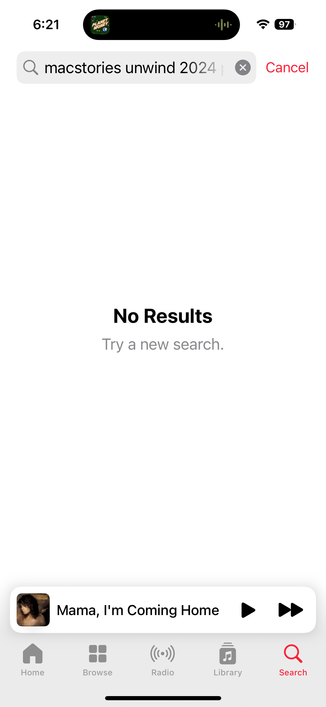
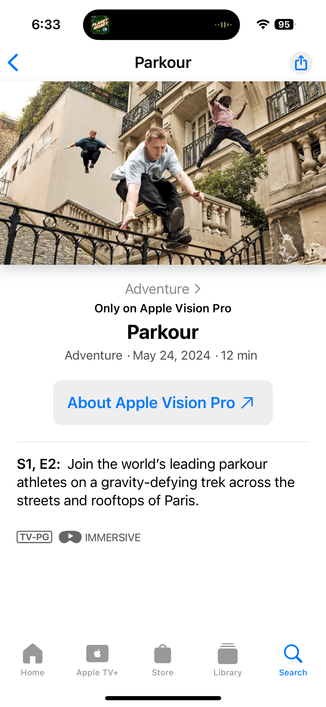
@viticci Podcast playlist is no longer available on Apple Music? See attached search. It wasn’t updating so I tried to delete and re-add but is no longer on Apple Music and the link from the Podcast just brings you to the Pakour video. Same behavior in Apple Podcasts and overcast. No playlist and bad link

@viticci >Ahead of WWDC, I migrated all my personal passwords (~500 items) from 1Password

This is the way. šŸ’Æ

> to iCloud Keychain

Ah. Well, good luck with that! šŸ¤žšŸ¼

@bitwarden works great _everywhere_.

@viticci how do you import 1password into Keychain?
@viticci was this a manual process or is there some export/import from one to another?
@BrokenFlows exported from 1Password as CSV and manually fixed a handful of items that didn't transition automatically
@viticci thanks for the answer! I may consider it for the future 😊

@viticci does Keychain support TOTP 2nd factor codes?

[shamefacedly] I use the built-in 1Password 2FA code generator for some accounts I consider dispensable. It would certainly hinder migration if iCloud Keychain didn’t

@viticci Considering the recent stories where bad actors got access to Apple ID accounts just via stealing an iPhone and knowing it's passcode (I know they've mitigated this, but still), keeping everything in one basket seems really frightening to me.

@viticci According to @1password, at least some of those issues are due to bugs in Safari.

I'm also in the camp of not wanting to switch to Apple tools as I need it to be cross platform and I simply don't trust Apple to do as good a job there. If you're all in on Apple platforms, then things are of course different.

@viticci I migrated myself many months ago and my parents just a few months ago. None of us have had a single issue. I actually really like having Touch ID to autofill on my Mac (but FaceID on Mac when?)
@viticci needs family sharing of some kind.
@viticci I’ve been putting this off for years. Did you just do it all manually?
@viticci I’ve just migrated my 1Password data to iCloud Passwords (for general usage) and Keepass (for the stuff that does not fit in there). So far (~5 months or so) I’ve reached to Keepass maybe 3-4 times. I do hope they make Passwords more powerful. Just the separate app is going to be a big deal, because having a shortcut to launch the current ā€žappletā€ didn’t solve all of the issues.
@viticci I'm staying on 1P for now (I'm also using a Linux laptop) but it's GREAT to know there are options. Also, competition is generally good.
@viticci How do you deal with websites that don't label the OTP field as an OTP field? 1Password solves that by copying the OTP into your clipboard so you can paste it there. It's the only thing that keeps me from moving onto iCloud Keychain 😭

@viticci Hopefully they support Firefox in addition to Chrome and Edge.

If they do, and it's generally a pleasant experience, I'll definitely switch from Bitwarden.

@viticci I would do it in a second but for my daily, heavy use of the (ick) Windows client on my work PCs.
@viticci another attempt for Apple to control ALL your information. Shouldn't you diversify your platforms so that one entity does not control your stuff? What if you decide to switch to Android, or Linux?
@viticci I will do it after I see what they deliver. I will switch if it’s a good app. 😁
@viticci if Monday they announced an app for it I will do the same (keeping 1 password until fall release) just need a good process how to do …
@viticci did you do this manually?
@viticci Man, Federico, I’m tempted, but I just can NOT get comfortable with putting my entire secrets vault behind only my device (mac or iphone) password. Someone shoulder surfs my password and later steals my device and they immediately have access to ALL my passwords?! At least with 1PW, it’s behind a 2nd auth (biometric or [different] password).

@viticci that’s great to hear! I’ve been hoping to do the same thing too (especially if rumors are true for wwdc24).

Where do you plan to store other sensitive info from 1Password (software registrations, credit card #’s, personal ids, secure notes, etc)

@viticci Do you find that password autofill options (whether with Apple’s system or 1Password) show up less reliably on websites when you’re using Stage Manager? Just wondered if that was a known bug or just something I’m experiencing for other site-specific reasons.
@viticci I’m interested in doing the same, but I need it to work on Windows too.
@viticci I need to do this, too, but man, I literally JUST got my wife to use 1Password reliably
@viticci Bit surprised honestly you haven’t waited until the beta and potentially the Passwords app with potentially even better 1Password import!
@viticci hm the only thing I miss is separate vaults for work related accounts. I guess then I could also switch.
@viticci If Apple makes an app and team password management an option, i’m ditching our 1password teams plan. Sharing accounts with 2FA across teams helps reduce the frequent pain that is the Safari Extension and Mac app. I’m ready to leave!
@viticci @caseyliss ā€œI need my passwords in my work Windows computerā€ is the main reason I haven’t migrated fully to iCloud Keychain. So, 1Password it still is.
@viticci Hopefully the new Apple app works with different browsers!
@viticci Did exactly the same just now. I was still running 1Password 7 tbh. If ever there were a time for this, it is now.
@mikkoh @viticci how onerous is the process?
@daveeed @viticci Personally, I just copied everything into Keychain (that wasn’t already there). So very. But I think people underestimate the value of just sitting down and typing away as long as it takes. It wasn’t that bad as I have only about 250-300 items total.
@viticci Glad this works but I had a good experience with 1Password so far. I have vaults shared with windows machines at work and I cannot easily put everything on iCloud for now. It will take some time until a Passeord app achieves feature parity I think. šŸ¤”
@viticci I kind felt that take a lot of effort to get that done. So I am 60% migrated, but an App to do what it does plus more features is more than welcome.