 Stephen Hackett
I need to speak to the person at Apple who wrote this UI copy.
 Dr Lee A. Christie
@ismh I know it's going to have been written in Swift or Objective C, but I'm noticing it's funny how similar this looks to a default Java dialog you see in a lot of Java programs.
 Chris Coleman
@ismh If only this could be accomplished with some kind of interface element that could be interacted with using a mouse. Alas, no such element exists.
 Jeff M
 jacob
jacob Frank Reiff
 Marc Palmer
@ismh why isn’t there just a cancel button?!
 Mario Guzmán
@ismh they once had a HIG that would show an example of how to do views like this or software update views so that things like this don’t happen. Then they got rid of that HIG.
 Collin Donnell
@marioguzman @ismh I bet this hasn't been touched since before Apple acquired Logic 😂
 Christopher Grande
 Patrick Mayo
@ismh That is an abomination. How did that get past QA?
 Matthew Abbott
 mingistech
@ismh love it.
 Chris Enns
@ismh 😆 I mean at least they show some sort of dialogue to tell you that's an option. I usually mash button combinations trying to remember what it is if I ever need to cancel a bounce.
 Jason Snell
@ismh I agree, they should just put a "Cancel" button that when you click on it would say "here's how to cancel, hold down the command key and press period.”
 Ste Grainer
@stegrainer @ismh Too risky
 Ryan Graves
 Peter Christensen
 JFB
JFB@jsnell @ismh @petergarner
Yeah Peter, a term that goes back to multi-track analog recorders, which, if I had to guess, most Logic Pro users in 2023 have never seen or used. Other oddity is “Bounce in Place” which is super useful in many cases, and is actually closer to what “bounce” meant: mixing and moving (via the recording console) a few recorded tracks to a single one, in order to free them up to record more parts in your production.
Yeah Peter, a term that goes back to multi-track analog recorders, which, if I had to guess, most Logic Pro users in 2023 have never seen or used. Other oddity is “Bounce in Place” which is super useful in many cases, and is actually closer to what “bounce” meant: mixing and moving (via the recording console) a few recorded tracks to a single one, in order to free them up to record more parts in your production.
 Tim Holmes
@jsnell @ismh Oooh, I can play this game!
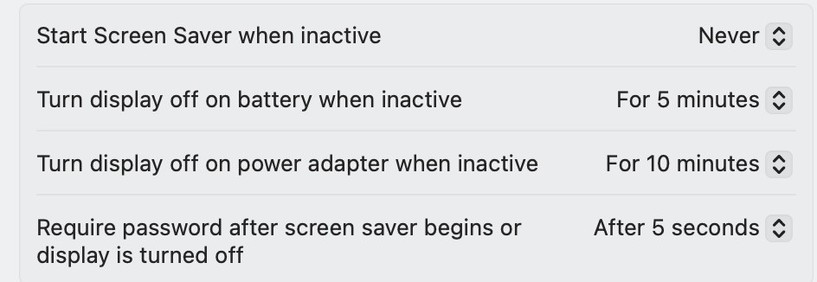
This one goes out to the macOS Sonoma UI folks... I hope it pisses you off as much as it does me.
 dLƎk
dLƎk@TPOHolmes @jsnell @ismh Great, now I’m going to procrastinate on upgrading until they stop making security updates for whatever comes before is called.
If I’m inactive I don’t need the thing turning back on after five minutes of blanking. Just stay blanked until I need you.
@dlek @jsnell @ismh THAT's an interpretation of it I hadn't even considered!
I want to know where the batteries with displays are. And why it’d ask for my password 5 seconds AFTER the display turns off? And why one option uses “After" while the others use “For” when neither seems right for the purpose? And is “screen saver" capitalized or no?
How can so many things be wrong with only four options described in only 40 words?
Which brings me to one of my favorite phrases…
Who tested this shit?
 Michael Bond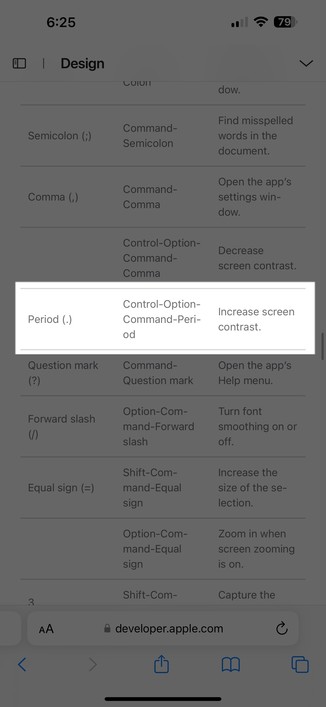
 Marco Arment
@ismh Also, it's great that they finally told people how to do that (which almost nobody knew), but would it have killed them to just put… A CANCEL BUTTON there?
@marcoarment for real.
 Bart
Bart@marcoarment @ismh woah, that's crazy talk. buttons don't grow on trees you know.
 Steven Goetz 🇨🇦
@marcoarment @ismh a button?!? In this economy?!
 Karl Baron
@marcoarment @ismh Logic predates OS X so my bet would be this is a holdover from some absolutely prehistoric event handling code.
 b_parkes
@marcoarment @ismh Are you sure there's not a button there somewhere that slowly fades into view when you hover over it for 10 mins?
 James Thomson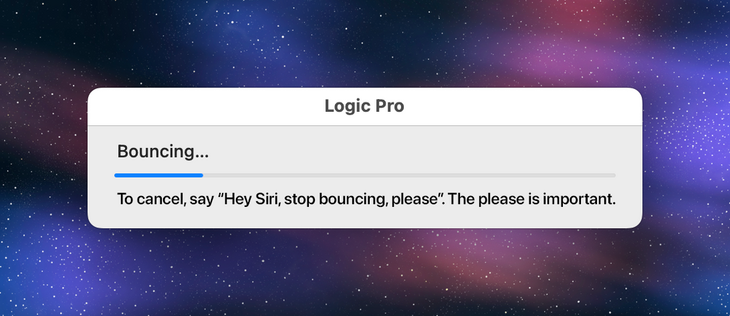
 tambourineman
@jamesthomson @ismh when people say Siri is bad, it’s because they haven’t tried asking it nicely.
 Kevin H
 Nick Foster
@jamesthomson @ismh “I found this on the web for ‘Top pouncing cheese’”
 Scott F
@ismh Change text to: “Cancelling this operation generally does not work so press [Command/Apple] [Alt/Opt] [Esc] at the same time to force quit this program”
(Of course in Mac OS Classic this would generally crash the Mac too 😂)
 Kevin Yank
@ismh I could almost live with it if not for the inconsistent use of symbols and glyph names. It should be “⌘ key (Command)” or “press period (.)”.
 Mike Pfeifer
@sentience @ismh I thought that was the whole point of the post, but you’re the first to actually mention it.
 Gavan Shanley
@ismh I love the addition of the “.” at the end just to confuse you as to how many times you need to press it!
 PointlessOne
@ismh Coincidentally that is a system-wide shortcut for something else on my system. I wonder whether it will trigger my shortcut or stop bouncing. Is there a way to know beforehand?
@ismh And odd one, you’re right…so I Command-B and walk away…I bet you do, too.