
The latest version of Mastodon (4.2.0) brings full text search, so you can search by words instead of hashtags.

However, for privacy reasons this only includes posts by people who have actively opted into full text search.

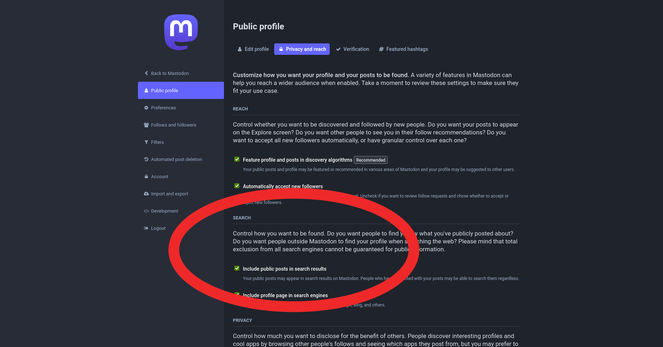
If your server is updated to 4.2.0 and you want to opt into full text search:

1. Log into your server's website
2. Click your profile icon
3. Click "Edit Profile"
4. Click tab "Privacy & Reach"
5. Tick box "Include Public Posts In Search results"
6. Click "Save Changes"

p.s. Apparently it can take a while for the search databases to build up after the upgrade. Don't worry if your searches aren't showing any results yet.

Also, you will only get results from posts by people who have opted into this system. As the system was only released today, it will take time as people find out about it and (possibly) opt in.

@feditips it took my personal instance about 10 minutes to get back to showing results in the various timelines & it has only 3 active users.
@feditips Can also manually (re)build the database it looks like with a command like "RAILS_ENV=production bin/tootctl search deploy --reset-chewy"
@feditips Hey there. My server has been on 4.2.0 for a few days now and I'm not getting results in search yet. How long do you think it should take? I've reached out to the server admin but they haven't got back to me and Fedi.Tips normally knows this sort of thing. Can the entire server opt out of letting users search? I've been able to do it on my mastodon. social account.

@ollie_francis

I think you'd have to ask your server's admin about that.

It sounds like the part of the server that powers the full text search isn't active?

For your server the admin is @matt

@feditips Hmmm. OK. Thanks for getting back to me. I guess I'll have to wait for the @matt's reply. Thanks again! I appreciate it.
@feditips You lost me at, “Log into your server’s website.”
I’m lucky I found Mastadon at all.
#Ludite #SpeakSlowly

@reverendref

Ah, sorry about that! 😃

Hopefully this helps:

Your server's website is usually the name of your server. You can log into your account through your server's website instead of an app.

For example your server is ohai.social, so the website for your server is https://ohai.social

The settings pages on server websites tend to be updated quicker than the settings pages on the apps. This means when a new option comes out it's often only accessible through the website at first.

ohai.social

A cozy, fast and secure Mastodon server where everyone is welcome. Run by the folks at ohai.is.

Mastodon hosted on ohai.social
@feditips Luddites thank you.

@reverendref

Luddites are the best! Do ask if there's anything else you want help with!

@feditips
People on servers with versions older than this are skipped, I presume?

@jherazob

Yeah, your server has to be running at least version 4.2.0 in order for you to opt into the full text search.

@feditips Since the update, some things don't seem to work as well. If I wanted to tag someone I follow or that follows me in a post, typing just the beginning of their handle would bring up their full name. Now it doesn't.

@BruceMirken

Hmm... It's working for me on 4.2.0... I assume you're typing @ before you're typing their name?

@feditips Yes. But now I tried again tagging the same account and it worked. Weird, but maybe a temporary glitch?

@BruceMirken

When the update happened on my server, there was a short period where everything was a bit buggy, but after a while it started working normally again.

I'm guessing it takes a little time for the server to get back to normal after installation?

@feditips Could be. Things seem okay now.
@feditips I've been looking forward to this update, enabled!
@feditips is it this setting?

@tzenes

No, it's not. That option is about whether your posts are indexed by search engines like Google, DuckDuckGo etc.

Your server mastodon.cloud isn't on 4.2.0 yet, so you don't have the full text search setting yet. If you ask your admin, they will tell you when/if they are upgrading.

@feditips ah, sorry. Thank you for clarifying!
@feditips didn't mastodon do it already? I'm pretty sure ES does full-text search.

@farcaller

Some servers installed unofficial patches, and some servers ran the test version of 4.2.0.

However, this is the first time the official release version of Mastodon includes full text search.

@feditips oh, the old one only indexed the users' own toots? whelp, I guess I don't search much.

@farcaller

Yeah, the old one was only for your own toots, or toots you had favourited etc. This one searches all toots of people who have opted into the system.

@feditips that actually explains why my ES was tiny, heh.

@feditips

Before when I used to use the search functionality in Mastodon it used to show me results from posts I've already interacted with before (boosts, favorites, replies, etc). But now it seems like I'm not able to do that anymore 😢 Is this how it's gonna be from now on? Or will there be an option to search for those previously interacted posts? For me that feature was extremely useful for finding posts I've seen before.

@futureisfoss @feditips
My understanding is that there is a search operator, in:library that will allow you to limit it to your own posts and those you've interacted with. I have not tested this myself as we do not have ElasticSearch setup.
@hybridhavoc @feditips Thank you so much for the info, I think this search filter does what I want.
@feditips Do you know if this includes boosts (that would be terrible) or only posts (and replies?) I made?

@jfml

It applies to posts that your server can see which were written by people who have opted into this system.

No one's posts will be searchable unless they want their posts to be searchable.

So, it would only apply to boosts where the person writing it has specifically opted in to being searchable.

@feditips Aaaahhh, of course, that makes sense! Thanks for the explanation! ^__^
@feditips which makes it necessary to still use #hashtags, thus it's a non-feature...

@kkarhan

I don't follow your logic?

@feditips Since findability is opt-in for full-text, I've to still rely on Hashtags.

@kkarhan

It depends on how many people opt in I guess?

@feditips yeah, but I assume nearly noone will...
@feditips Our admins on .art have disabled the search feature by default. Maybe add the note to check in the instances' patchnotes, if these steps are necessary on your instance :)

@Nihtgenga

Thanks, so if I understand correctly you mean disabled the feature completely, so people can't opt in?

Or do you mean off by default and they can switch it on? I think it's off by default for everyone?

@feditips No. While performing the update, the new feature is disabled by default. Who wants to opt-in, can opt-in.

I'd recommend checking the megaphone icon in the mastodon app or on the web for announcements about the update. If there's none, try checking the instance admin's posts :)

@Nihtgenga

That sounds like the same thing on all servers? As far as I know there are no servers where it is on by default?

@feditips Maybe let's just ask @Curator - the search thingy is switched on by default, if the admins don't disable it during the update, right?

@Nihtgenga @[email protected]

The feature is there by default, but everyone is also opted out of it by default.

So, the only search results are posts by people who change the setting to opt into the search.

@feditips @Nihtgenga correct, the default setting for the server is that all members are opted out unless they specifically individually opt in
@feditips
Sorry for my joke on this feature, but...
If i opt in
and type the word
scatter
do people find my post
who search for
cat
?
@feditips Going forward, if you create a new account on a server/instance that is 4.2.0+, will the new account have this option on or off by default?

@FalconMarkSix

As far as I know, the option is always off by default. It is opt-in, i.e. you have to personally opt in if you want it to work.

@feditips alas, my server is on 4.1.6
@feditips
Since I didn't see that option, I assume the server hasn't been updated yet. Is there a way to see what version is installed?

@prairiedog

Yeah, I can see your server is still on 4.1.9 so it doesn't have this feature.

You can see your server's version by going to its website's About page (to see About on desktop click Learn More, on mobile click ⋯).

@feditips @dogriley we doing this?

@feditips @markhhsp I have been thinking of firing up a masto instance….

I think we would need to start fresh….