
The latest version of Mastodon (4.2.0) brings full text search, so you can search by words instead of hashtags.

However, for privacy reasons this only includes posts by people who have actively opted into full text search.

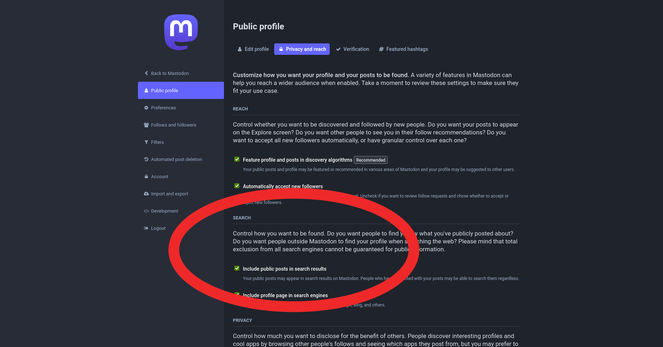
If your server is updated to 4.2.0 and you want to opt into full text search:

1. Log into your server's website
2. Click your profile icon
3. Click "Edit Profile"
4. Click tab "Privacy & Reach"
5. Tick box "Include Public Posts In Search results"
6. Click "Save Changes"

@feditips Since the update, some things don't seem to work as well. If I wanted to tag someone I follow or that follows me in a post, typing just the beginning of their handle would bring up their full name. Now it doesn't.

@BruceMirken

Hmm... It's working for me on 4.2.0... I assume you're typing @ before you're typing their name?

@feditips Yes. But now I tried again tagging the same account and it worked. Weird, but maybe a temporary glitch?

@BruceMirken

When the update happened on my server, there was a short period where everything was a bit buggy, but after a while it started working normally again.

I'm guessing it takes a little time for the server to get back to normal after installation?

@feditips Could be. Things seem okay now.