The latest version of Mastodon (4.2.0) brings full text search, so you can search by words instead of hashtags.

However, for privacy reasons this only includes posts by people who have actively opted into full text search.

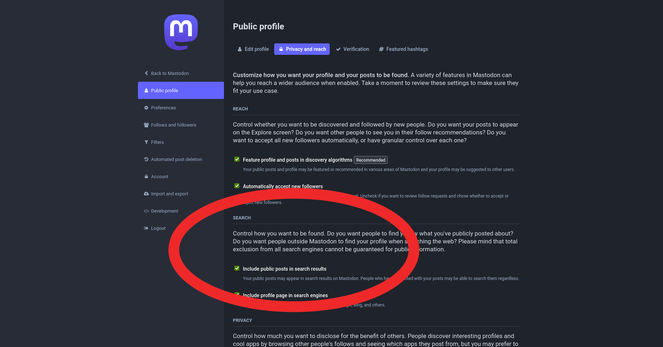
If your server is updated to 4.2.0 and you want to opt into full text search:

1. Log into your server's website
2. Click your profile icon
3. Click "Edit Profile"
4. Click tab "Privacy & Reach"
5. Tick box "Include Public Posts In Search results"
6. Click "Save Changes"

@feditips Our admins on .art have disabled the search feature by default. Maybe add the note to check in the instances' patchnotes, if these steps are necessary on your instance :)

@Nihtgenga

Thanks, so if I understand correctly you mean disabled the feature completely, so people can't opt in?

Or do you mean off by default and they can switch it on? I think it's off by default for everyone?

@feditips No. While performing the update, the new feature is disabled by default. Who wants to opt-in, can opt-in.

I'd recommend checking the megaphone icon in the mastodon app or on the web for announcements about the update. If there's none, try checking the instance admin's posts :)

@Nihtgenga

That sounds like the same thing on all servers? As far as I know there are no servers where it is on by default?

@feditips Maybe let's just ask @Curator - the search thingy is switched on by default, if the admins don't disable it during the update, right?

@Nihtgenga @[email protected]

The feature is there by default, but everyone is also opted out of it by default.

So, the only search results are posts by people who change the setting to opt into the search.

@feditips @Nihtgenga correct, the default setting for the server is that all members are opted out unless they specifically individually opt in