The latest version of Mastodon (4.2.0) brings full text search, so you can search by words instead of hashtags.

However, for privacy reasons this only includes posts by people who have actively opted into full text search.

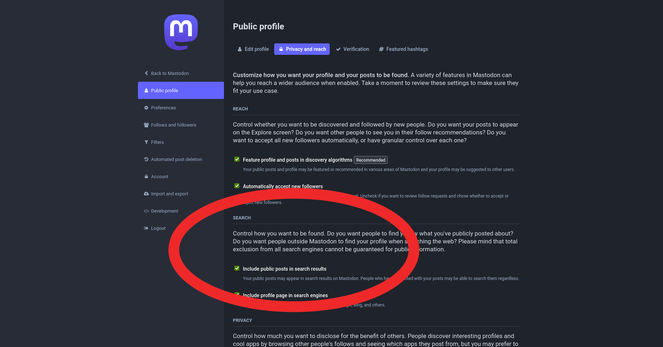
If your server is updated to 4.2.0 and you want to opt into full text search:

1. Log into your server's website
2. Click your profile icon
3. Click "Edit Profile"
4. Click tab "Privacy & Reach"
5. Tick box "Include Public Posts In Search results"
6. Click "Save Changes"

p.s. Apparently it can take a while for the search databases to build up after the upgrade. Don't worry if your searches aren't showing any results yet.

Also, you will only get results from posts by people who have opted into this system. As the system was only released today, it will take time as people find out about it and (possibly) opt in.

@feditips it took my personal instance about 10 minutes to get back to showing results in the various timelines & it has only 3 active users.
@feditips Can also manually (re)build the database it looks like with a command like "RAILS_ENV=production bin/tootctl search deploy --reset-chewy"
@feditips Hey there. My server has been on 4.2.0 for a few days now and I'm not getting results in search yet. How long do you think it should take? I've reached out to the server admin but they haven't got back to me and Fedi.Tips normally knows this sort of thing. Can the entire server opt out of letting users search? I've been able to do it on my mastodon. social account.

@ollie_francis

I think you'd have to ask your server's admin about that.

It sounds like the part of the server that powers the full text search isn't active?

For your server the admin is @matt

@feditips Hmmm. OK. Thanks for getting back to me. I guess I'll have to wait for the @matt's reply. Thanks again! I appreciate it.