
The latest version of Mastodon (4.2.0) brings full text search, so you can search by words instead of hashtags.

However, for privacy reasons this only includes posts by people who have actively opted into full text search.

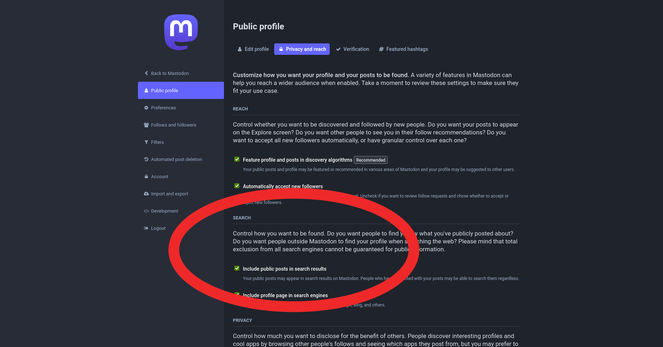
If your server is updated to 4.2.0 and you want to opt into full text search:

1. Log into your server's website
2. Click your profile icon
3. Click "Edit Profile"
4. Click tab "Privacy & Reach"
5. Tick box "Include Public Posts In Search results"
6. Click "Save Changes"

@feditips You lost me at, “Log into your server’s website.”
I’m lucky I found Mastadon at all.
#Ludite #SpeakSlowly

@reverendref

Ah, sorry about that! 😃

Hopefully this helps:

Your server's website is usually the name of your server. You can log into your account through your server's website instead of an app.

For example your server is ohai.social, so the website for your server is https://ohai.social

The settings pages on server websites tend to be updated quicker than the settings pages on the apps. This means when a new option comes out it's often only accessible through the website at first.

ohai.social

A cozy, fast and secure Mastodon server where everyone is welcome. Run by the folks at ohai.is.

Mastodon hosted on ohai.social
@feditips Luddites thank you.

@reverendref

Luddites are the best! Do ask if there's anything else you want help with!