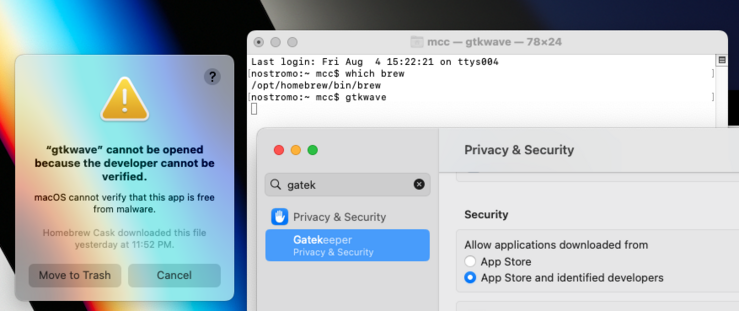
So. Homebrew is illegal now too, then?

EDIT: People seem to be misunderstanding this screenshot. This is me running a program installed by Brew and it being blocked by macOS Gatekeeper. You can see me executing it from the command line and you can see in the error message that Homebrew downloaded it. Although brew is in general working for me, this particular formula's app got blocked. After making the post I resolved the problem and do not need help.

I am never going to stop being angry at the people who told me, when I said around 2010 that Gatekeeper was the end of the Macintosh and possibly the end of all computers, that there was nothing to worry about because they'd never remove that third "run any software" option from the control panel
This is, by the way, why you should trust *nothing* Google says about how "Web Environment Integrity" has safeguards against abuse. The pro-user safeguards are there to be removed! The moment the users have bought into the program, the safeguards aren't needed anymore! That's how these things work! That's the only way these things work!

@mcc None of this is to safeguard us, it’s to safeguard *their money and power*.

I can see signing things and all sorts of things being good things, if they are collectively own.

But that’s not what this is about:(

@mcc I see plenty of flashbacks to the arguments over the standardization of EME.

They promised us that CDM vendors would license to independent browsers including new ones, that didn't happen once the spec became a W3C Recommendation!

@mcc google is making it impossible to have free will.
They do their very "best" to make it impossible to go elsewhere to get apps.
I use uptodown but many of the apps I would need (infinite painter or infinity design the pro version) can only go through google.

I definitely feel the same about them... their "don't be evil" motto has gone south and sour...

@mcc what is it with some humans wanting to trap each other
@lritter @mcc
Corporation != Humans
@prasoon @mcc right i forgot those are operated by robots
@lritter @mcc more like psychopaths. Fits the profile quite remarkably; well within the expected psychopathy percentage of the human population.
Executives need institutional support from a society with good public healthcare systems.
@prasoon @mcc right and psychopaths aren't humans, they have like two hearts and their brains are in their bums
@lritter @mcc Ah! I seem to have somehow offended you. Didn't mean to. To extend your analogy, it would be like looking at a blind person and arriving at the conclusion that humans are blind.
It's a self-fulfilling prophecy to say "one cannot trust others" so wanted to assure you that humans are quite kind by default, unkind behaviour is the exception but it is also easy to tip the scales (eg when I spend time on Twitter I end up perpetuating hate)
Meant no disrespect.
@prasoon @mcc *frantically edits original post*
@lritter A kind edit I hope :)
Leonard Ritter (@[email protected])

@[email protected] what is it with some humans wanting to trap each other

Gamedev Mastodon

@mcc THIS

I keep seeing people excusing oppressive technologies by pointing out the safeguards, or trying to find a "compromise" for whatever reason (sometimes it's doomerism that corporations will get what they want so we must stop resisting)

There are no safeguards and no compromises when it comes to user agency. If it's not carved in silicon, it's just a pinky promise, and we must not accept even the legitimate promises. They are in the wrong, and they must lose. Don't give them anything, because the slope is slippery and we have precedent to show it.

I've seen very smart people make this mistake before. Phones are the testbed for treacherous computing, and some people have been defending that despite the death grip tightening quickly.

Now TC is finally making a comeback on PCs, and people are defending its flaky safeguards and trying to refocus on some benefits that could be achieved through non-oppressive means. It will lead us the same way.

@mcc it’s only gone from the user-facing UI. You can right-click on the app, and go to “open”, and get a different interstitial speedbump that lets you proceed. You can also just dequarantine the binaries in the terminal, if you just want to allow it to execute with no restrictions.
@glyph I know, and I don't give a shit. Also, there is no user-facing UI. It's refusing to let me run a perl script from the command line
@glyph I did get it working eventually but I still wish I did not own a Macintosh
@mcc I am sorry that it’s been inflicted upon you. If you think gatekeeper isn’t granting you any meaningful security and you just want to blow it away entirely, I think this still works: https://disable-gatekeeper.github.io
Disable Gatekeeper on macOS Catalina (10.15)

Permanently disable or bypass Gatekeeper by following the instructions on this website.

@mcc in that case the problem is that cask is installing a perl script for some reason, which seems weird. If it were in a formula you wouldn’t hit this restriction.
@glyph Sometimes, software is written in Perl
@mcc the problem isn’t perl, it’s that Cask is the part of Brew which is supposed to install app-shaped things rather than script-shaped things. You can have apps in perl if you want, as long as you follow the app rules. It looks like this is installing a perl script where they bungled the packaging and should have made it like other scripts

@glyph @mcc it likely has Mark of The Web (aka com.apple.quarantine) as an xattr.

Part of the big issue is that Apple has just enough security in the wrong places that tools like Brew can do correct things, but then find out they did the Wrong Correct Thing.

@mcc @glyph before the system preferences redesign, there was a “allow” option at the bottom of the security page (the one with the option you showed); the process was try to run the thing, go to system preferences to click allow, try to run it again

I *think* that option still exists but don’t quote me

yes this is absolutely hideous; I am not defending it

@mcc @glyph ah saw downthread you fixed it, my bad
@mcc oh my god... they removed it?
@mcc I was an Apple user from 1992 onward but over the last decade I've slowly switched to a Windows user -- and WSL was the final thing that broke me free of Apple, as a developer. I also switched from iPhone to Android after many iPhones. I used every version of Windows from 3.11 onward and hated everything up until 8.1. I would never have thought I'd become a Microsoft "fan" 😱​
@mcc I'm honestly surprised that it took this long for Apple to go full walled-garden on the Mac
@mcc It's a big problem, indeed. I coordinate a small open source project and it is made deliberately difficult to run on macOS, with a very misleading error message.
@mcc wtf? pretty sure there's a way to disable that...... where the fucking fuck did that other option go? `sudo spctl --master-disable` isn't it?
@mcc well that sucks. no idea if this will actually be helpful but wikipedia says there's a workaround?
@tinytachyon @mcc the workaround has been removed, see control panel in the screengrab?
@mcc i turned gatekeeper off recently and it's the best decision i've ever made

@jneen @mcc gatekeeper is an incredibly arse-backwards way to implement platform security and could only be conceived by someone who has a binary view of the world: our code=good, anybody else's code=bad.

Why shouldn't I be allowed to have security while also having the ability to run what I want? What does it take to get these organisations to understand that security isn't binary?

Very few systems exist that solve this in the correct way, with Qubes OS probably being the most mature. Sadly these come with their own set of drawbacks which makes them suboptimal to a lot of people.

There is unfortunately no incentive for platform vendors to pursue this because locking down the platform also aligns with the financial incentives of the companies so we're just going to see more of this.

@jneen @mcc you can fully turn it off? gonna have to do that on my hackintosh partition, how do you do it? (assuming they're not exposing it in the settings gui)

@luna

sudo spctl --global-disable

they might have added a few annoying steps to it but try that first

@mcc sudo spctl --master-disable
@mcc You’re obviously right, but my frustration with the extremely slow and often not reliable homebrew becoming the standard over relatively speedy macports makes me just appreciate anything that might knock it off it’s pedestal. So maybe there’s a silver lining.
@mcc I switched to a Mac recently too and a friend had to teach me how to type “sudo xattr -rd com.apple.quarantine ~/Applications/CoQ.app” into the terminal and THEN @unormal’s Caves of Qud would run after all that other privilege setting exemptions.
@mcc if you navigate to the app in the finder and select Open in the contextual menu (aka right click) it’ll treat it as approved, if it’s just unsigned and not actively known malware.

@mcc @tobyink Add the --no-quarantine option when running `brew install` per the documentation: https://docs.brew.sh/Manpage#install-options-formulacask-

@homebrew is not “illegal” on #Mac. Many developers notarize their apps with #Apple for #macOS and do not require that switch. Stop spreading FUD.

brew(1) – The Missing Package Manager for macOS (or Linux)

Documentation for the missing package manager for macOS (or Linux).

Homebrew Documentation
@mcc @mjgardner uh excuse me if Homebrew is legal then how come it lets me run software without paying for it
@mcc @alienmelon warned us about this! https://nibblestew.blogspot.com/2020/11/how-apple-might-completely-take-over.html
(I remember posting about it on a frigging *Linux* website and getting answers such as "that's just like Windows 10, you can still sideload, nothing new here, what's the point". Never forgot, never forgave)
How Apple might completely take over end users' computers

Many people are concerned about Apple's ongoing attempts to take more and more control of end user machines from their users. Some go so far...

@mcc You can still run un-signed software, you just need to take an extra step of going to the security options and telling it to allow the launch of the program it blocked.

Plus, homebrew still exists, still lets you install and run things from the commandline.

@mcc Is this the MacOS Sonoma beta? I might not be able to upgrade since I literally need Homebrew for my job…
@ghalldev Homebrew works. It is this formula which is not working.
@mcc Oh gotcha. I misunderstood.
@ghalldev I made the post shortly before going to bed and it was surely vague
@mcc your fault for using an apple computer. Dork

@mcc So I might be misunderstanding this, but isn’t this Homebrew marking this executable as “quarantined”, which then causes MacOS to refuse to run it?

I can definitely still download and run Perl scripts myself on MacOS, without Homebrew.

@mcc I've been running into this too recently and it is *maddening.*

Apple made a really nice computer! I want to use it as a computer!

@mcc Not being snarky: you resolved it but what was the resolution?

@anderson_jon From memory: After dismissing the "cannot be opened" box I was able to find a log of events in Settings, I think the Privacy & Security box. When I selected the denial of gtkwave, it allowed me to manually approve gtkwave.

The way I would have normally handled this was by, instead of double-clicking the app, right-clicking it and selecting "open", which for some unfathomable reason is the backdoor to the "sure you want to open?" box. But this event happened command line.