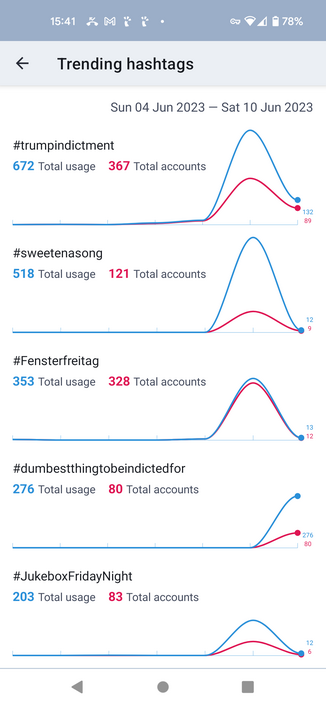
Day 1: Trending hashtags

Mastodon servers can report information about the hashtags that are trending, and #Tusky now shows this information for you. It's accessible from the left-hand navigation menu, and you can also add it as a dedicated tab.

I've attached a screenshot so you can see what it's like.

The work was done by @knossos in https://github.com/tuskyapp/Tusky/pull/3149
Add trending tags by DavidEdwards · Pull Request #3149 · tuskyapp/Tusky

Related to #2109. This adds the ability to add a trending tab to the bottom navigation bar. Includes a new custom view for graphing. This could perhaps be made nicer with an external library. Only ...

GitHub

Day 2: Editing image description and focus point

#Tusky v21 introduced support for editing the text of your posts.

Unfortunately, Mastodon introduced support for editing image descriptions and focus points too late in the release process for Tusky 21 for it to be included in Tusky (https://github.com/mastodon/mastodon/pull/20878).

Add support for editing media description and focus point of already-posted statuses by ClearlyClaire · Pull Request #20878 · mastodon/mastodon

This adds a media_attributes parameter to PUT /api/v1/statuses/:id. media_attributes is an array, items of which have the following attributes: id: the identifier of the media attachment to be mod...

GitHub

But here we are, a few months later, and #Tusky v22 supports this too. When you're editing one of your posts you can now tap any images you attached and edit the description and focus point.

@Tak did a lot of the initial work to support post editing in Tusky, and he's responsible for this new feature too, in https://github.com/tuskyapp/Tusky/pull/3215.

Add support for updating media description and focus point when editing statuses by Tak · Pull Request #3215 · tuskyapp/Tusky

Completes #3211 We could also add support for viewing them in the edit history view, but I think that will maybe not be super useful since that view is mainly for seeing the history of other people...

GitHub

Day 3: #Tusky v22 is smarter about the language defaults when you reply to a post.

The list of languages in the language menu is now sorted to prioritise:

- The language the post you're replying to was written in
- Your default posting language
- The languages you've configured in Tusky
- The languages you've configured in Android (Settings > System > Languages and Input)

@Tak did the work here, in https://github.com/tuskyapp/Tusky/pull/3293.

Improve language list prioritization by Tak · Pull Request #3293 · tuskyapp/Tusky

Ensures that all of (language of the post being replied to, default post language, configured app languages, configured system languages) are prioritized when constructing the language list for com...

GitHub

Day 4: Android Notifications

#Tusky v22.0 changes how Android notifications are displayed.

There's quite a lot to cover, and rather than spam the feed with 20+ posts I've put the write-up at https://write.as/nikclayton/tusky-v22-0-day-4-android-notifications

Tusky v22.0 day 4: Android Notifications

Tusky v22 changes how Android notifications are displayed. To understand why the behaviour is the way it is it helps to know a little bi...

nikclayton

Day 5: The Notifications Tab

The #Tusky notifications tab has got some new behaviour in v22.0.

Like yesterday there's quite a lot to cover here, so I've written about it over at https://write.as/nikclayton/tusky-v22-0-day-5-the-notifications-tab

Shorter updates to resume tomorrow...

Tusky v22.0 day 5: The Notifications Tab

Under the hood we're updating the Tusky design to make the code easier to work with and reason about, particularly with how timelines are...

nikclayton

Day 6: Show media controls for audio files

This was a regression in #Tusky v21 -- if you were playing audio file attachments the controls (play, pause, etc) would disappear, and tapping on the screen would not bring them back.

That's obviously not great.

@vv noticed this and provided a very clear bug report. @EricFrohnhoefer did the work to fix this in https://github.com/tuskyapp/Tusky/pull/3286.

Fix media controller UI not showing during audio playback by efrohnhoefer · Pull Request #3286 · tuskyapp/Tusky

Partially related to 3170e1c Moved code to show UI to OnPreparedListener because internally VideoView calls MediaController#setEnabled() in onPrepared(). Calling MediaController#show() before Medi...

GitHub

Day 7: Additional filtering controls

Mastodon 4.x introduced new filter options.

New filters have names, so you can give a filter a name that does not include the text you are filtering.

Filters can also be configured to hide content or show a warning.

And a single filter can be used to filter out multiple different words, instead of needing one filter per word.

The new filter support in #Tusky supports all these options, thanks to @Tak in https://github.com/tuskyapp/Tusky/pull/3188

Support the mastodon 4 filter api by Tak · Pull Request #3188 · tuskyapp/Tusky

What's done: Use the filter metadata attached to statuses when available Support the warn filter action Updated filter editing UI Gracefully degrade to the old filter api Outstanding: The edit f...

GitHub

Day 8: See what's changed in edited posts

In #Tusky v22.0 you can now see what's changed when a post has been edited. Deleted text is shown with a red background and struck through, while new text is shown in bold with a green background.

This is a great example of the collaborative nature of open source. I did the initial work in https://github.com/tuskyapp/Tusky/pull/3314, using DiffX, a third-party library that computes text differences (https://github.com/pageseeder/diffx).

Show the difference between edited statuses by nikclayton · Pull Request #3314 · tuskyapp/Tusky

Diff each status against the previous version, comparing the different HTML as XML to produce a structured diff. Mark new content with <tusky-ins>, deleted content with <tusky-del>. Convert these t...

GitHub

Then @rauschen noticed that this didn't work well with text that contained accented characters, provided an example, and a fix (https://github.com/tuskyapp/Tusky/pull/3314#issuecomment-1429669093).

We reported this to the DiffX maintainers in https://github.com/pageseeder/diffx/issues/10, they took the fix, released a new version, and now everyone else that uses their library benefits too.

Show the difference between edited statuses by nikclayton · Pull Request #3314 · tuskyapp/Tusky

Diff each status against the previous version, comparing the different HTML as XML to produce a structured diff. Mark new content with <tusky-ins>, deleted content with <tusky-del>. Convert these t...

GitHub

There are two bugs we know about that will be fixed in the 22.1 release, and are already fixed in #Tusky nightly.

1. The mechanism that's used to highlight changes does not work well if the changes run over more than one line. The change highlighting runs off the right margin.

2. Your server might know that a post has been edited, but it does not have a copy of the actual edits, so it doesn't return them. If this happens Tusky will crash. Sorry about that, https://github.com/mastodon/mastodon/issues/25398.

`api/v1/statuses/.../history` endpoint can return an empty array on an edited status · Issue #25398 · mastodon/mastodon

Steps to reproduce the problem 1 - search for status On a Mastodon server running 4.1.2 (I used tooot.im), search for the post with the URL https://spore.social/@tamarasiuda/110522895217050705. Not...

GitHub

Day 9: Account headers

In #Tusky 21 you could view an account and tap the avatar picture to view it full screen.

But you couldn't do that with the account's header image. Now you can.

KWierso (https://github.com/KWierso) noticed this and suggested it should be fixed, and @Tak made the change in https://github.com/tuskyapp/Tusky/pull/3274.

It was also possible for an account's header image to obscure the buttons at the top of the page. I fixed that in https://github.com/tuskyapp/Tusky/pull/3272.

KWierso - Overview

KWierso has 67 repositories available. Follow their code on GitHub.

GitHub

Day 10: Accessibility improvements

We made a number of changes in #Tusky 22.0 to improve accessibility

Some users reported that the design of the "Load more" break made it difficult to spot amongst other posts in a timeline.

@lakoja updated the design so that it is more visually distinctive in https://github.com/tuskyapp/Tusky/pull/3376.

The swipe-to-refresh gesture is not always accessible to assistive devices. I added an accessible "Refresh" menu entry as an alternative in https://github.com/tuskyapp/Tusky/pull/3121.

3311 load more more prominent by Lakoja · Pull Request #3376 · tuskyapp/Tusky

Fixes #3311 I went for a gradient (instead of a zig-zag line) because that matches the other status separators better. And especially it integrates the existing separators on top and bottom of such...

GitHub
Clickable things (links, hashtags) in posts can often be very small, so the area you have to tap to activate them is also very small. #Tusky 22.0 expands the tappable area around these things so you don't have to be pin-point accurate when you tap. That was also me, in https://github.com/tuskyapp/Tusky/pull/3382.
Meet accessibility guidelines for clickable spans by nikclayton · Pull Request #3382 · tuskyapp/Tusky

Clickable spans in textviews do not normally meet the Android accessibility guidelines of a minimum 48dp square touch target. This can't be fixed with a TouchDelegate, as the span is not a separate...

GitHub
And while I'm here, in day 8's post (https://mastodon.social/@nikclayton/110566377571465613) I discussed the new #Tusky feature that shows what's changed in posts that have been edited. I should also have credited @nasser, who provided valuable feedback while that feature was being developed, confirming that it worked correctly for text written in right-to-left script.

Day 11: Show post statistics in the timeline

#Tusky 22.0 can now show the number of replies, boosts, and favourites posts have on the main timeline.

Previously this information was only available if you tapped on the post.

This is off by default, and enabled with "Preferences > Show post statistics in timeline".

Grigorii Ioffe (https://github.com/zikasak) did this and made their first contribution to Tusky, in https://github.com/tuskyapp/Tusky/pull/3413

zikasak - Overview

zikasak has 7 repositories available. Follow their code on GitHub.

GitHub

Day 12: Confirmations as menus

(back from a brief hiatus, it's been a busy week)

Boosting or favouriting a post in #Tusky could show a dialog to confirm the action.

This didn't work well for posts with images. Or polls. Or that were very long. And the dialog obscured the post.

Now it's a menu. You can see the post, and this paves the way for extra options in the future. Like "Favourite as..." so you can perform these actions with a different account.

I did this, in https://github.com/tuskyapp/Tusky/pull/3418.

Show reblog/favourite confirmations as menus not dialogs by nikclayton · Pull Request #3418 · tuskyapp/Tusky

The previous code used dialogs and displayed the text of the status when reblogging or favouriting. This didn't work when the post just contained images, and other material from the status (content...

GitHub

Day 13: Follower bios in notifications

I'd get a follower notification in #Tusky, then tap through to their profile page to read their bio.

After a while this got tedious, so now notifications about new followers, and follow requests include the person's bio.

I did this for follow notifications https://github.com/tuskyapp/Tusky/pull/3281, @mcc provided the very sensible feedback that it should appear for follow requests as well.

Show the follower's bio/note in a "followed you" notification by nikclayton · Pull Request #3281 · tuskyapp/Tusky

This makes the notification view for a follow request contain more info about the new follower, and makes the layout (of their name / username) consistent with other notifications that show names/u...

GitHub
@nikclayton @mcc I made a small financial contribution to Tusky tonight. Such a game changer for someone new to #mastodon. Thank you! 🙏🏻

@nikclayton Any path to aggregating the favourites and boosts so that the notifications aren't overwhelmed by a popular post?

Of course we can filter, but seeing "xyz and 23 others favourited your post" would be a nice step forward.

818 group notifications by Lakoja · Pull Request #3452 · tuskyapp/Tusky

Fixes #818 and #1371 at least partly. The idea here is that only the newest notification about a status is shown. All others are filtered (either on input from the api) or by removing "older&q...

GitHub
@nikclayton @lakoja that sounds great. Thanks for the effort!
@nikclayton Oh wow I missed that setting. I thought it was a bug that these stats weren't displayed, feels like it should be enabled by default.

@nikclayton @Tusky @lakoja Question:

Has more keyboard shortcuts been added as a suggestion yet?

E.:
G
R = reply
L = liking/favoriting
B (or T) = Boosting

CTRL+N & CTRL+Enter for ‘New Toot’ & ‘Sending a toot’ respectfully, are already there.

Unless I missed these?

Do correct if so.

@queenslight Interesting idea. Would you mind reporting this as a new issue at https://github.com/tuskyapp/Tusky/issues ?
GitHub - tuskyapp/Tusky: An Android client for the microblogging server Mastodon

An Android client for the microblogging server Mastodon - tuskyapp/Tusky

GitHub

@nikclayton Issue created!

https://github.com/tuskyapp/Tusky/issues/3765

Thanks for recommending me to create said topic!

The External Keyboard Tusky Experience · Issue #3765 · tuskyapp/Tusky

As Tusky already has CTRL+N for creating a new toot and CTRL+Enter for sending one, along with Space and Enter for expanding threads, I prpose the following list of additional shortcuts: r = Reply ...

GitHub
@nikclayton @lakoja I have missed it occasionally on mine, perhaps the solution is to make it a stripe with the words on it.
@nikclayton @lakoja New, distinct Load More button was the first thing I noticed! Huge quality of life improvement for me.
@nikclayton @lakoja the load more is annoying for sure. After opening the app, I want to scroll up so I see what I missed. However I see load more button. I then expand it and I can't really tell where I am at.

@Sibshops @lakoja 1. Preferences > Reading order, and set it to "Oldest first".

2. I'm actively working on getting rid of "Load more" entirely, and Tusky will load what it needs as it needs it.

@nikclayton @lakoja Thanks, it works. It will be nice when the load more goes away, for sure.
@nikclayton @lakoja This is honestly my favorite change in this release. It's weird because it's such a simple change, but the higher color contrast makes a huuuuge UX difference there. Fantastic work! 

@nikclayton Nice! I just noticed, you can't even do that on the default mastodon web client. (v4.0.2)

@nikclayton Thanks to everyone involved - these are much appreciated.
@nikclayton is this desired? I don't necessarily want it to be easy for people to see my pre-edit posts all the time... were people asking for this feature?

@Scribs It (seeing that a post has been edited, and see the different versions of the post) is a Mastodon feature. You can do this in the web UI too.

Although Tusky's presentation of the differences is more useful.

You can also delete a post entirely and post a new one if you prefer, although that'll be weird if people have replied to the original post.

@nikclayton @Tusky Y’all guys do amazing work. May more #Fediverse & #Threadiverse applications follow your lead, especially with adding ‘custom accessibility actions within menus for #Talkback & other screen reader apps such as #Jieshuo.

Keep it up!

@nikclayton Thank you, kind sir! Your app is excellent.

Might I request the future addition of a quick shortcut for toggling between "all notifications" and "mentions only" on the fly?

@pynkbites Yeah. Something like that is at the back of my mind.
@nikclayton new #fucktionality .... pulling nose hairs laying in the couch..

@nikclayton nice article!

I noticed that the link to the mastodon server issue link is not working. You have a "(" too much at the end.

https://github.com/mastodon/mastodon/issues/25245

`/api/v1/notifications`, inconsistent handling of `min_id` · Issue #25245 · mastodon/mastodon

Steps to reproduce the problem API requests to https://mastodon.social/api/v1/notifications/ with a min_id value that is equal to or greater than the current newest notification ID do not always re...

GitHub
@nikclayton Great work and well explained! It also points out why I repeatedly receive a notification from pixelfed's last activity. =)
@nikclayton Really good thanks. Especially like the not getting a notification on the phone that you've already seen because you're on desktop. Does Mastodon desktop only mark them as read if you're in the tab? Ie, if you have the tab pinned but not viewed - so you see the desktop notification popup but not the tab - will the notification appear in Tusky, or is it considered received by the server?

@picard that'll depend on the specific web UI you use (Mastodon, Symphony, Elk, etc) and when they decide to update the marker.

If they don't use the marker, but just maintain their local idea of the reading position you'll see duplicate notifications between them all as well.

I'm not familiar enough with their code to say exactly what their behaviour is.

@nikclayton Thanks - just saw my desktop browser popup with your reply (normal Mastodon interface for my server) - didn't switch to the pinned tab. Checked phone - notification arrived there, so the open but unfocused tab didn't prevent notification. So I think that answers my question! Thanks for replying.
@nikclayton @Tak i don't think anymore if i set the language correctly.
@nikclayton @Tak "languages you've configured in Tusky", plural? Where do I find that option?
Change app language on your Android phone - Android Help

You can change the language for an individual app in your device settings. Important: Some of these steps work only on Android 14 and up. Learn how to check your Android version. Change the language

@texttheater @Tak There's the Tusky language (Preferences > Language) and your default posting language (which is per-account, Account preferences > Default posting language)
@nikclayton @Tak Really? Yay, thanks for that. An important improvement so we won't have to delete the image and select again to insert forgotten ALT text.

@nikclayton @knossos It's great seeing the app getting better day by day! Do you also consider adding support for quoted posts, like Fedilab did some time before?

BTW: I just saw your profile. A long time ago I was 2:2437/44.2

@heluecht @knossos Not explicitly yet, which just means no one's really thought about it. Filing an issue at https://github.com/tuskyapp/Tusky/issues would be the way to go.

And yes, @tomjennings has a lot to answer for :-)

GitHub - tuskyapp/Tusky: An Android client for the microblogging server Mastodon

An Android client for the microblogging server Mastodon - tuskyapp/Tusky

GitHub