
Day 1: Trending hashtags

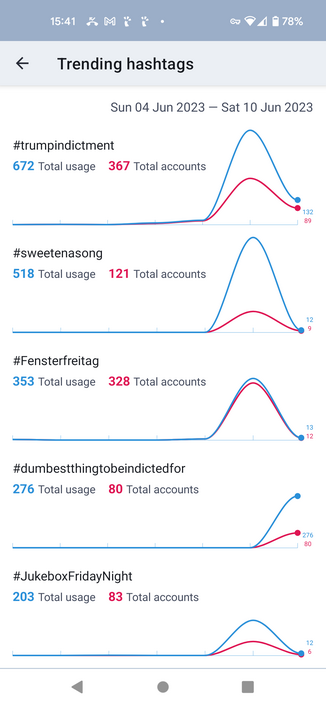
Mastodon servers can report information about the hashtags that are trending, and #Tusky now shows this information for you. It's accessible from the left-hand navigation menu, and you can also add it as a dedicated tab.

I've attached a screenshot so you can see what it's like.

The work was done by @knossos in https://github.com/tuskyapp/Tusky/pull/3149
Add trending tags by DavidEdwards · Pull Request #3149 · tuskyapp/Tusky

Related to #2109. This adds the ability to add a trending tab to the bottom navigation bar. Includes a new custom view for graphing. This could perhaps be made nicer with an external library. Only ...

GitHub

Day 2: Editing image description and focus point

#Tusky v21 introduced support for editing the text of your posts.

Unfortunately, Mastodon introduced support for editing image descriptions and focus points too late in the release process for Tusky 21 for it to be included in Tusky (https://github.com/mastodon/mastodon/pull/20878).

Add support for editing media description and focus point of already-posted statuses by ClearlyClaire · Pull Request #20878 · mastodon/mastodon

This adds a media_attributes parameter to PUT /api/v1/statuses/:id. media_attributes is an array, items of which have the following attributes: id: the identifier of the media attachment to be mod...

GitHub

But here we are, a few months later, and #Tusky v22 supports this too. When you're editing one of your posts you can now tap any images you attached and edit the description and focus point.

@Tak did a lot of the initial work to support post editing in Tusky, and he's responsible for this new feature too, in https://github.com/tuskyapp/Tusky/pull/3215.

Add support for updating media description and focus point when editing statuses by Tak · Pull Request #3215 · tuskyapp/Tusky

Completes #3211 We could also add support for viewing them in the edit history view, but I think that will maybe not be super useful since that view is mainly for seeing the history of other people...

GitHub

Day 3: #Tusky v22 is smarter about the language defaults when you reply to a post.

The list of languages in the language menu is now sorted to prioritise:

- The language the post you're replying to was written in
- Your default posting language
- The languages you've configured in Tusky
- The languages you've configured in Android (Settings > System > Languages and Input)

@Tak did the work here, in https://github.com/tuskyapp/Tusky/pull/3293.

Improve language list prioritization by Tak · Pull Request #3293 · tuskyapp/Tusky

Ensures that all of (language of the post being replied to, default post language, configured app languages, configured system languages) are prioritized when constructing the language list for com...

GitHub

Day 4: Android Notifications

#Tusky v22.0 changes how Android notifications are displayed.

There's quite a lot to cover, and rather than spam the feed with 20+ posts I've put the write-up at https://write.as/nikclayton/tusky-v22-0-day-4-android-notifications

Tusky v22.0 day 4: Android Notifications

Tusky v22 changes how Android notifications are displayed. To understand why the behaviour is the way it is it helps to know a little bi...

nikclayton

Day 5: The Notifications Tab

The #Tusky notifications tab has got some new behaviour in v22.0.

Like yesterday there's quite a lot to cover here, so I've written about it over at https://write.as/nikclayton/tusky-v22-0-day-5-the-notifications-tab

Shorter updates to resume tomorrow...

Tusky v22.0 day 5: The Notifications Tab

Under the hood we're updating the Tusky design to make the code easier to work with and reason about, particularly with how timelines are...

nikclayton

Day 6: Show media controls for audio files

This was a regression in #Tusky v21 -- if you were playing audio file attachments the controls (play, pause, etc) would disappear, and tapping on the screen would not bring them back.

That's obviously not great.

@vv noticed this and provided a very clear bug report. @EricFrohnhoefer did the work to fix this in https://github.com/tuskyapp/Tusky/pull/3286.

Fix media controller UI not showing during audio playback by efrohnhoefer · Pull Request #3286 · tuskyapp/Tusky

Partially related to 3170e1c Moved code to show UI to OnPreparedListener because internally VideoView calls MediaController#setEnabled() in onPrepared(). Calling MediaController#show() before Medi...

GitHub

Day 7: Additional filtering controls

Mastodon 4.x introduced new filter options.

New filters have names, so you can give a filter a name that does not include the text you are filtering.

Filters can also be configured to hide content or show a warning.

And a single filter can be used to filter out multiple different words, instead of needing one filter per word.

The new filter support in #Tusky supports all these options, thanks to @Tak in https://github.com/tuskyapp/Tusky/pull/3188

Support the mastodon 4 filter api by Tak · Pull Request #3188 · tuskyapp/Tusky

What's done: Use the filter metadata attached to statuses when available Support the warn filter action Updated filter editing UI Gracefully degrade to the old filter api Outstanding: The edit f...

GitHub

Day 8: See what's changed in edited posts

In #Tusky v22.0 you can now see what's changed when a post has been edited. Deleted text is shown with a red background and struck through, while new text is shown in bold with a green background.

This is a great example of the collaborative nature of open source. I did the initial work in https://github.com/tuskyapp/Tusky/pull/3314, using DiffX, a third-party library that computes text differences (https://github.com/pageseeder/diffx).

Show the difference between edited statuses by nikclayton · Pull Request #3314 · tuskyapp/Tusky

Diff each status against the previous version, comparing the different HTML as XML to produce a structured diff. Mark new content with <tusky-ins>, deleted content with <tusky-del>. Convert these t...

GitHub
@nikclayton is this desired? I don't necessarily want it to be easy for people to see my pre-edit posts all the time... were people asking for this feature?

@Scribs It (seeing that a post has been edited, and see the different versions of the post) is a Mastodon feature. You can do this in the web UI too.

Although Tusky's presentation of the differences is more useful.

You can also delete a post entirely and post a new one if you prefer, although that'll be weird if people have replied to the original post.