Got navigation with the arrow keys working in Runestone for AppKit.

I figured out how to reuse some of the code from the UIKit implementation so this turned out to be much easier than anticipated.

Next up is adding support for jumping between words with Option+Left/Right arrow keys.

Baby steps, y'all.
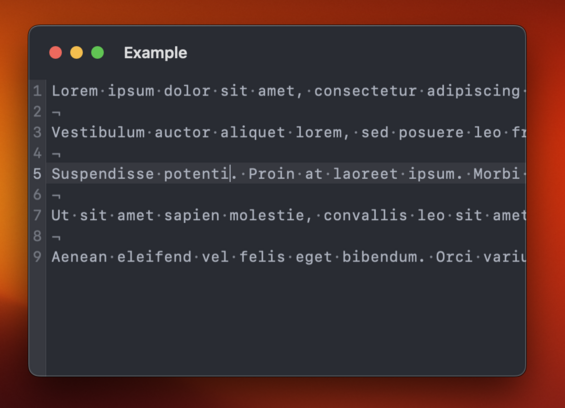
In order to move from word to word, UIKit relies on an implementation of UITextInputStringTokenizer. I managed to replicate UIKit's calls to my string tokenizer and reuse a lot of logic for moving between words. Baby steps, y'all.

While working on moving between words in Runestone for AppKit I found that the UIKit version had an incorrect behavior when moving between words followed by an emoji. The caret would always jump all the way to the end of the document which isn't correct, obviously. Fortunately, that was easy to fix and the fix works in both UIKit and AppKit.

And yes, it is supposed to jump all the way from the word "emoji" to the word "cool". That's how TextEdit does it too. Baby steps, y'all.

And now Runestone for AppKit supports moving to the line and document boundaries as well as clicking with the mouse to move to the closest location.

Maybe the next step is to support text selection. Or something more fun like line numbers.

Baby steps, y'all.

Fortunately, invisible characters, line height, kerning and theming works with no changes needed 😃

Line numbers and highlighting the selected line now works in Runestone for AppKit.

This one was a bit tricky because the view hierarchy is different between AppKit and UIKit and there's some important layering going on here to make it look the way I want it to.

On the other hand, disabling line wrapping worked without any changes 😃

Baby steps, y'all.

I quite like this look where the title bar is big and transparent ✨

Taking a break from this thread tonight*. I did a few minor things that aren’t worth showing off but I’ll prioritize playing with the Quest 2 and watching Slow Horses for the rest of the evening. I need a short break 🤗

* Since I’m posting this I guess I’m not really taking a break.

Just tested syntax highlighting in Runestone for AppKit for the first time. Was happy to discover that it just works 😃

Baby steps, y'all.

Mostly got text selection, copy, paste, and cut working in Runestone for AppKit today 😃

There are still a couple of bugs in the text selection that needs to be fixed but it's getting there.

Baby steps, y'all.

Still polishing the text selection in Runestone for AppKit. Getting all keyboard shortcuts working as expected is extremely tricky but I'm getting closer. However, I've just got text selection working with the mouse so that's something 😄

Baby steps, y'all.

In case you would like to start playing around with Runestone for AppKit, you can do so already now. It’s available in the GitHub repository: https://github.com/simonbs/Runestone/tree/mac

I’m still working on this, so bugs should be expected. Don’t waste too much time reporting issues. At this point I likely know they’re there but haven’t gotten around to fixing them yet 😊

And in case you are using Runestone in your project, remember that I have GitHub sponsors setup 🫶 https://github.com/sponsors/simonbs

GitHub - simonbs/Runestone at mac

📝 Performant plain text editor for iOS with syntax highlighting, line numbers, invisible characters and much more. - GitHub - simonbs/Runestone at mac

GitHub

Got double and triple clicking to select words and lines working in Runestone for AppKit 😃

Notice that it's even possible to double click an opening or closing bracket to select everything within the brackets 🤓

Baby steps, y'all.

Word selection was a prerequisite to support right-clicking to cut, copy, and paste and with word selection in place, it was trivial to the right-click menu 😃

Baby steps, y'all.

And now Runestone for AppKit supports undo and redo too 😃

Text selection, the right-click menu, and undo/redo are things I have missed while working on other features, so it is great to finally have those in place.

Baby steps, y'all.

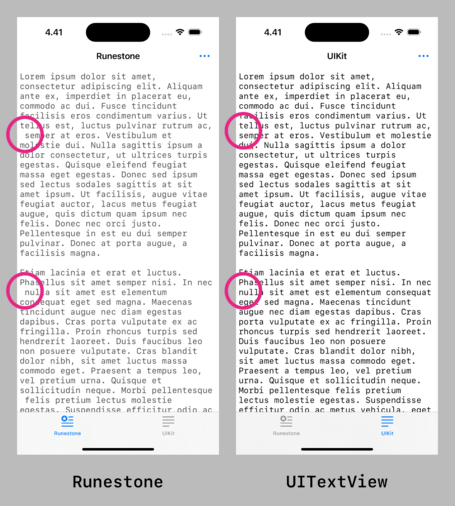
Hoping to fix this difference between Runestone and UITextView as part of bringing Runestone to the Mac.

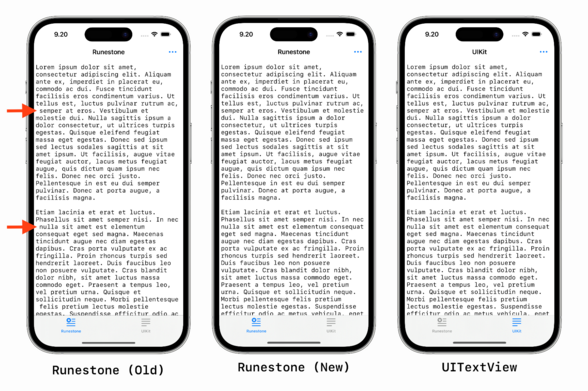
TextKit, and as a result UITextView, will remove leading spaces one line fragments when wrapping lines. This ensures that line fragments align vertically.

It's going to be tricky though 🤔

This turned out to be much easier than I anticipated! 😃

Runestone will now remove leading whitespace in line fragments to match the text layout of UITextView and NSTextView much closer.

This difference has been bothering me since the launch of Runestone so it feels great to finally have it addressed.

Here are the changes for anyone interested: https://github.com/simonbs/Runestone/pull/272

Hides leading whitespaces from line fragments by simonbs · Pull Request #272 · simonbs/Runestone

The changes in this PR hides the leading whitespace in line fragments to align with TextKit, i.e. UITextView and NSTextView. See the screenshot below for a comparison. The new caretLocation(forLine...

GitHub

Fixed a bug in Runestone for AppKit where it would reapply the syntax highlighting every time the window was resized, as such, causing the text to "blink”. 😃

Baby steps, y’all.

The AppKit version of Runestone is probably far enough that I can use it in Scriptable for Mac but now I have an itch to create tiny text editor app for Mac based on Runestone 😅
Quite surprised with how far I could get with Runestone for AppKit and a NSDocumentController in just an hour or so. This is practically a *super* simple text editor with line numbers, syntax highlighting, a page guide, and a bit more 😃
Part of me think Apple should ship something like this with macOS. Give TextEdit line numbers, syntax highlighting, and highlighting the current line. I could see that being useful to a large part of the developer community and make programming slightly more accessible to newcomers or at least pique young people’s interest.
Added support for creating new documents and saving documents to my little example project for testing Runestone for AppKit. It's starting to feel like TextEdit but with syntax highlighting and line numbers 😄
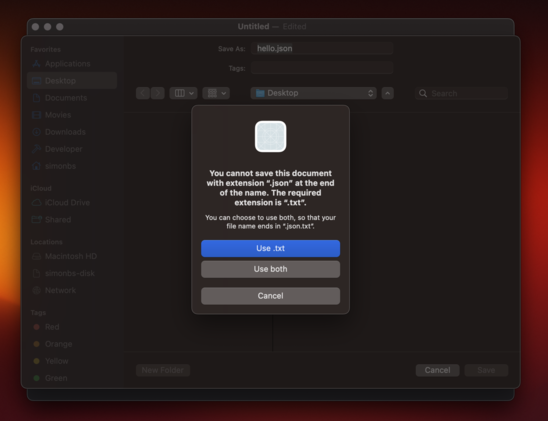
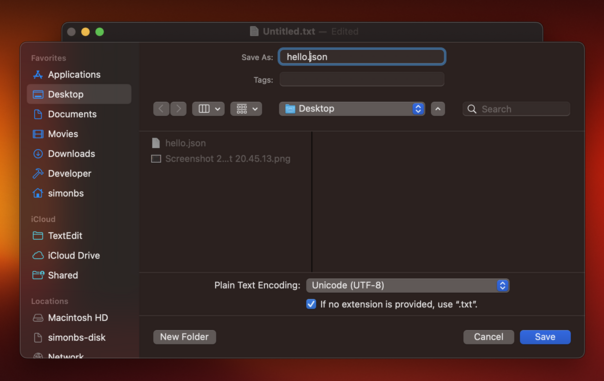
I wonder which part of NSDocument or NSDocumentController it is that is preventing me from saving files with the .json file extension 🤔
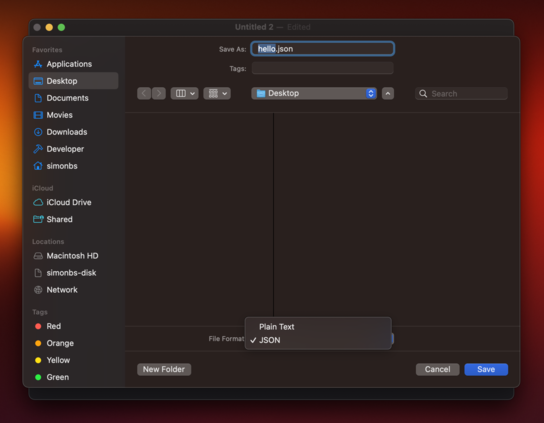
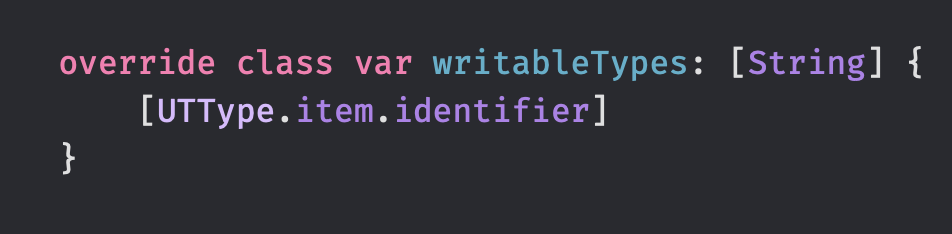
Returning [public.plain-text, public.json] in `writableTypes ` of my NSDocument subclass lets me save both plain text files and JSON files. This is not really want I want though. I want to allow any path extension, much like TextEdit does where it will just fallback to .txt if no extension is provided.
Returning [public.item] from writableTypes lets me save the document with any file extension. I guess this is fine 🤷‍♂️

Got window cascading working 😃

I was not able to get it working without using a storyboard which I'm not so happy about. Storyboards seem more common in the AppKit-world than in the iOS-world though.

Baby steps, y'all.

Happy to see that Runestone for AppKit has a pretty decent scroll performance 😃

This was a big focus point of mine when building Runestone for iOS and unsurprisingly, I can harvest the fruits when running Runestone on the Mac too.

This is a large JSON file with absurdly long lines and scrolling is fine but not perfect but I'm happy with it as a benchmark 😊

Baby steps, y'all.

Need to figure out how I can avoid the line numbers becoming "clipped" when scrolling past edge on the left-hand side 🤔

I have previously worked around this by adding the line numbers on top of the NSScrollView but now I'd like the line numbers to be part of the scroll view's document view.

This one is tricky…

Ooohh... The trick is probably to use addFloatingSubview(_:for:) on NSScrollView 👀 https://developer.apple.com/documentation/appkit/nsscrollview/1403546-addfloatingsubview
Apple Developer Documentation

Adding the line numbers as a floating view to the NSScrollView works fine until the find/replace panel is presented. Why does it have to be so hard to work with scroll views in AppKit? 😭

In UIKit I just add the line numbers to my scroll view and manually offset them when the user scrolls to make them appear sticky. That *almost* works in AppKit but the UI will sometimes flicker and get clipped in a way I don't like 😔

Here's an example where I'm not using the scroll view's floating view. Instead the line numbers are embedded into the scrollable content and manually offset on the X-axis to make them appear sticky. Scrolling works fine and the find/replace bar works as expected but now I have to deal with UI glitches that I can't figure out why are occurring 😑
Several people have suggested that I use a NSRulerView for the line numbers. I wanted to avoid that as I'd like the horizontal scroller to be on top of the line numbers, similar to how Xcode and Nova behaves. That's not the default behavior of NSScrollView when adding a NSRulerview.

This thread is going to be a bit quite the next few days as I rework some of the internals of Runestone to make it easier to support both the AppKit and the UIKit implementation. These changes should make the implementation of line numbers and find/replace a bit prettier, hopefully.

Baby steps, y'all.

As I move code out of large types in Runestone, I struggle to find proper names for those types. Here are a few examples.

- What's the name of the type coordinating a text change? TextEditService? TextEditController? TextEditor?
- The type laying out line fragments? LineFragmentLayouter? LineFragmentLayoutManager? LineFragmentLayoutController?
- The type managing the content size of the scroll view? ContentSizeManager? ContentSizeService?

I'm spending way to much time on this 😑

Refactoring my code to make it less it easier to maintain in the long wrong and I feel like I have forgotten how to write code. I'm like

"What's the best way to get notified when this object changes? 🫤💫”

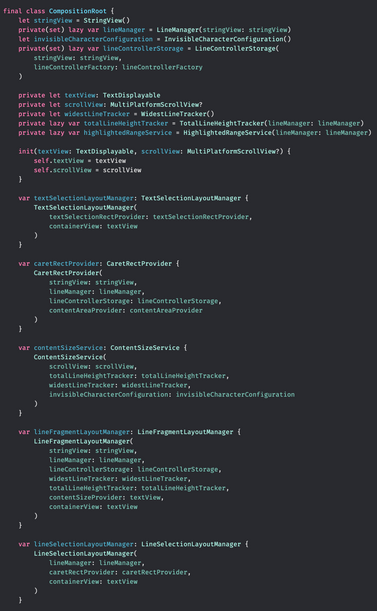
Making some progress on bringing the Composition Root pattern to the Runestone framework 😃

On one hand it's stressing me out a bit that I'm spending so much time refactoring Runestone's code but on the other hand, I think I'll appreciate this effort for several years going forward.

Today I made a small breakthrough in the clean up of the Runestone codebase. It feels so good and it's such a relief 😃😌

The past week I have written very little code on Runestone because I have been trying to figure out how I want to structure the code, each component's dependencies, and the communication between them. Today I realized that the question was right in front of me the entire time: Combine.

Now I have quite a few CurrentValueSubjects in Runestone's codebase and that leads to a whole lot of `foo.value` calls. It looks so ugly that it makes me consider if I am doing something wrong. CurrentValueSubject is a pretty decent way of distributing shared state though, right? 😕

Refactoring large parts of Runestone to isolate logic and make it communicate using Combine. This morning I got cursor movement working again and it feels like a tiny milestone 😄

Baby steps, y'all.

Lately I've been struggling to work on Runestone. I haven't had the motivation. Maybe I was a little burned out from working on it *very* intensively for a period of time.

Now I'm on vacation and slowly finding the motivation again. I'm hoping to progress a little on the refactoring each day but not so much that I end up not having a vacation and being burned out again.

Found a great spot to write a few lines of code today ☺️❄️

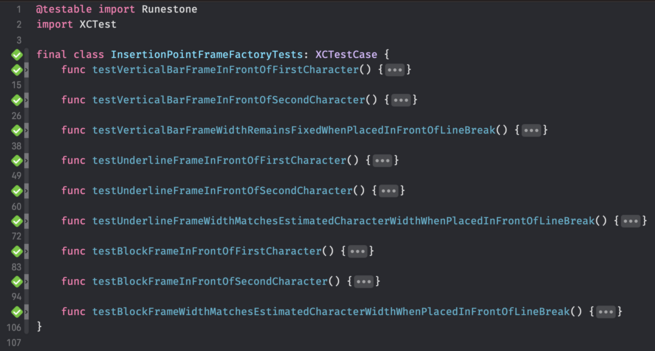
The past month or so I have been working on a big refactor of Runestone to split up some types in smaller types that are easier to unit test. Now I'm finally harvesting some of the fruits 😃

Baby steps, y'all.

Took a stab at supporting more caret shapes in Runestone for Mac and it now supports the vertical bar, underline, and my favorite caret shape: the block.

It was tricky to support the block caret as I need to draw the character the caret is on top of to ensure it is visible. As such, this is still very experimental but it’s a good start 😃

Baby steps, y'all.

I struggle to make the text within the block caret align exactly with the underlying text. It's most notable when the caret is on top of an emoji.

I won't ship this unless I can get it pixel perfect but I'm running out of ideas to try 😬

I am drawing the caret on top of the original text and then I’m drawing the character that is below the caret on top of the caret again. This makes it seem like the caret is below the character.

I considered drawing the caret behind the text instead. However, the selected character will need to be drawn in a distinct color so the caret doesn’t hide it. I’d like to avoid redrawing the entire line so I thought it’s smart to redraw only that character on top of the caret.

@simonbs Just some thoughts. Could you capture the text under the block, then put it on top after drawing block? Or render block with alpha to stencil out character in some way. If you only draw into the transparent part of the underlying character would that work?
@matadan I’ve been experimenting with creating a mask but haven’t succeeded so far. I feel like it should be possible but I haven’t found the way to do it.
@simonbs oh, I just read your next message!
@simonbs this is a funky idea, but might just work (could be too slow though):
In the block, test every pixel; if it’s the same as the background color, make it white, if it’s text color, make it black, and otherwise make it retain its color.
Might need some extra logic to avoid mid emoji color changes though

The character within the caret now aligns perfectly with the text below it. Now I just need to prevent emoji from being filled with color 😄

Baby steps, y'all.

This is pretty good. Now I need to make it support invisible characters (again), as that broke when I went a different route. Then there's a lot of cleanup to do so this code becomes maintainable 😄

Supporting the block caret turned out to be trickier than anticipated but it seems to work now 😃

Regular characters, invisible characters, and emoji now all show on top of the caret in the correct colors.

Baby steps, y'all.

Working on supporting the block caret in Runestone for iPhone and iPad 😃

This is tricky because UIKit manages the caret but I need a custom view to show the block caret. So I need to hide UIKit's caret and add my own. Next up I need to ensure it works with the floating caret that's shown when long pressing to drag the caret to another locaton.

Baby steps, y'all.

Played around with having the floating block caret show the character that it's about to land on. It's a funny idea but it's too noisy for my taste. This is one of those "Kill your darlings"-moments 🔪

The three shapes of carets are working on iOS now 🙌

Someday Runestone users will be able to choose between the Vertical Bar, Underline, and Block.

My favorite shape of caret is the block and I'm weirdly excited for this to become available in Runestone 😃
I think it works pretty well when the character is shown on top of both the actual caret and the floating caret but it is dimmed on the latter. It's less noisy but actually helps the user understand where the caret is at.

Runestone's custom caret now supports iOS' standard behavior where only the floating caret is shown when dragging the caret around unless the floating caret is far from where it'll land if it's released, in which case both the floating and the underlying caret is shown.

This will be a setting in Runestone, allowing users to have the underlying caret displayed all the time for easier navigation.

Baby steps, y'all.

@simonbs I really like this and think it helps the user 🙂
@simonbs Hmm. Looks like a good idea to me.
@simonbs What if it was like 20% opacity? Would be a cool thing to notice but not super in your face
@christianselig Are you thinking the letter or the entire cursor? My gut feel is that it would be weird to reduce either since I wanted it to feel like people are “lifting” the caret from the text.
@simonbs If the current behavior is the same as the GIF (floating cursor) but without the letter showing, I meant just lower the opacity on the letter so it's a dark grey on black not white on black

@christianselig @simonbs I think the ‘character to be affected’ should show on the block cursor at the insertion point as it jumps to each point, not the floating one. It doesn’t have to be the same colour or a reversed colour, just contrasty enough.

*Maybe* you could put it on the floating one when the user pauses the movement momentarily, but I think the floating cursor is subconsciously the ‘where my eyeballs are going’ and having the flashing characters there is distracting.

@christianselig I think I like this!
@simonbs @christianselig that’s insanely cool and majorly functional! Sometimes it’s easy to get lost on where the cursor will really land haha
@simonbs looks like a awesome idea. Maybe as an option (like different caret styles are)?
@simonbs i really love this and it falls in line with how normal carets work (to an extent). maybe keep it as an option?
@simonbs how did you fix it?
@amyworrall I have a CTLine that I draw within the text editor. That's the syntax highlighted text in the background. I reuse that CTLine to draw the character within the caret. That ensures the positioning of the characters are the same. Then I apply a mask to make the character the same color as the background. It's a convoluted process.
@simonbs I'm just so impressed by these progress posts. Keep 'em coming! 🤓
@bens Thanks! Very glad to hear you like them.
@simonbs TIL emoji break the biggest (only?) advantage of monospace fonts.
@simonbs Honestly this would already be pretty good I think
@simonbs That looks like a baseline shift caused by writing the glyph into a CGContext. Pretty much impossible to get rid of (I spent days on this with annotations in Linea). Problem is that you don’t have a priori knowledge on how CoreText is adjusting layout.
@chockenberry That sounds plausible. I’m also rendering the actual text into a CGContext myself using CTLineDraw though. I’ve been wondering if I can somehow use the text drawn with a call to CTLineDraw as a mask in a CGContext. The text in my overlay should be placed correctly then. My CGContext-fu isn’t that good though 😅

@simonbs The only way this will work is if you control the CTLineDraw (and typesetter) in both the screen and bitmap context.

As far as masking is concerned, this will be helpful: https://stackoverflow.com/questions/8126276/how-to-convert-uiimage-cgimagerefs-alpha-channel-to-mask/39949611#39949611

How to convert UIImage/CGImageRef's alpha channel to mask?

How can I extract the alpha channel of a UIImage or CGImageRef and convert it into a mask that I can use with CGImageMaskCreate? For example: Essentially, given any image, I don't care about the ...

Stack Overflow
@chockenberry Thanks for the link! Will play around with the suggestion in the StackOverflow answer now.
@simonbs can’t you draw the caret _behind_ the text? As in, using nslayoutmanager’s draw background hook?

@amyworrall Yes but I’ll need to draw text on top again. For example, when my white caret is behind a white character then that character becomes unreadable. Text editors solve this by changing the color of the character. I’m thinking one of doing that is having three layers, from back to top:

1. The original text.
2. The caret.
3. The letter that the caret is on top of redrawn in a different color.

@simonbs How are you drawing this, via CT?
@curthard89 The text in the back drawn is drawn via Core Text. The caret is just a view that draws its background and the character within it using Core Graphics.
@simonbs So how do you position it? CT will adjust and create a base line according to the CTLine/Runs within it, which will change based on the Emoji being present, just thinking out loud here, maybe you need to get the full lines typographic bounds and compute it based on that?
@simonbs big caveat that I’ve never tried to do this in a CALayer but what about applying a mask with some feather to the carat to show the character underneath? Might be more forgiving of slight misalignment.
@lawbecke Thing is that I need the character underneath to have a different color and changing the color of the actual text seems overkill. This isn’t a problem when the caret is on top of an emoji but imagine that the white caret is on top of a white character. That character would become invisible. Text editors solve this by changing the color of the character that the caret is on top of.
@simonbs could you get clever with filters in that case? A straight inversion probably isn’t exactly right in most circumstances but something in that direction rather than transparency. This is probably getting into “trying to be too clever for your own good” territory though.
@lawbecke I feel like there should be an easier way where I draw a square that’s the color I want the text and then mask that square using Core Text. I’m just not sure about how I create this kind of masks with Core Graphics.
@simonbs i should take a look, I have dreaded doing this for my own text output for too long, and resorted to less than ideal solutions.
@simonbs are you considering multiple cursors, too? (PS I adore Runestone on my iPhone. I use it nearly every day.)
@kishba Thanks, glad to hear that. I'm not considering support for multiple cursors. I think the target audience is too small and it's not something I use myself.
@simonbs understandable! Keep up the great work :)
@simonbs you are really doing unit tests? Never done that for any of my apps. 😬
@_holger I'm doing it more and more. Makes me sleep better at night
@simonbs I love all those green ticks
@simonbs the people in the background are looking like a progress bar 😀
@simonbs looks like a very nice and chill spot
@simonbs snowboard escalator?
@phils It's a children's lift. Just outside the window is the children's area.