Me porting Runestone from UIKit to AppKit.

Yay! Runestone now works with... *Checks notes*... UIKit?? 🤨

In order to prepare for AppKit support, I had to rip the internals of Runestone apart and put it together again. For the first time in 36 hours, Runestone now works with UIKit again.
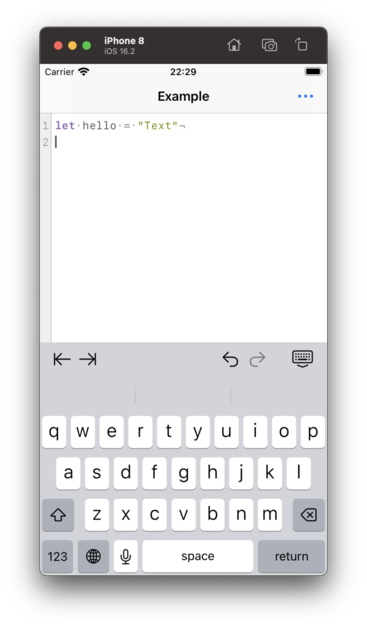
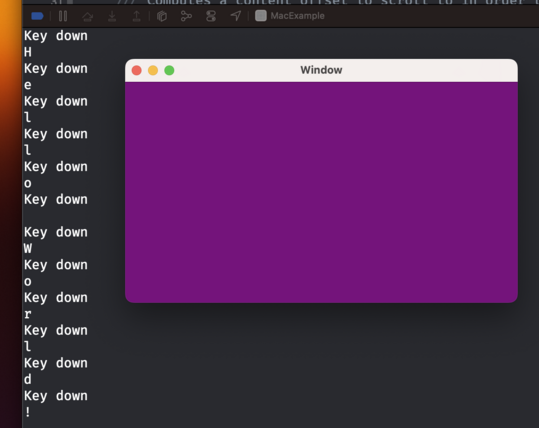
So I now have an NSWindow with an NSView that receives keystrokes. That's like step 0 in building a text editor, right?

There's such a long way to go still before Runestone is rewritten in AppKit. I hope I'll eventually turn a corner where all my work from UIKit can be reused and I ✨magically✨ have an AppKit implementation.

Runestone just rendered its first text using AppKit. Baby steps, y'all.

The AppKit version of Runestone now supports scrolling the content.

This involves a bit more than just wrapping everything in an NSScrollView because Runestone only renders the lines within the viewport.

Baby steps, y'all.

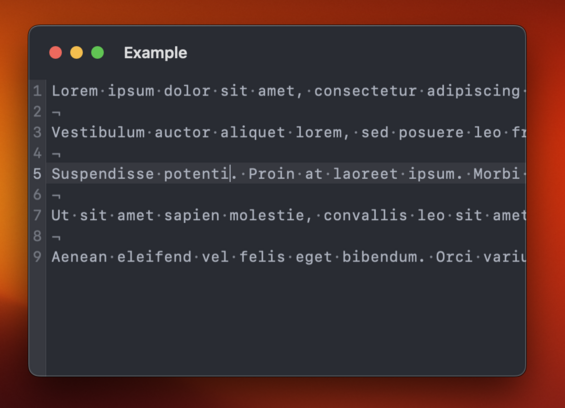
Time to add a caret that shows where characters will be inserted. I'm a little bummed that I have to implement this myself. We get that for free in UIKit.
Runestone for AppKit now has a caret. Baby steps, y'all.

I need to implement all moving within lines myself 😑

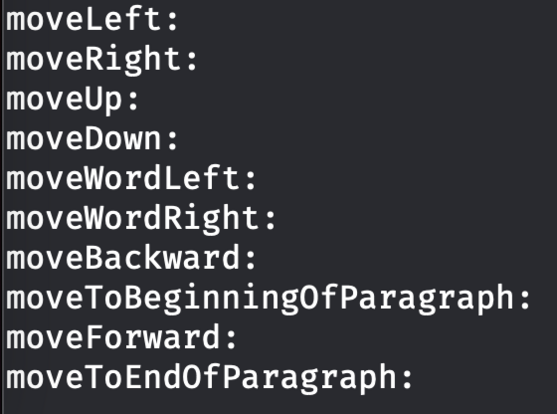
In the screenshot I'm logging the selectors that I don't handle but that AppKit expects me to handle. This is something we get (almost) for free in UIKit. Honestly, I really don't want to write this logic.

Got navigation with the arrow keys working in Runestone for AppKit.

I figured out how to reuse some of the code from the UIKit implementation so this turned out to be much easier than anticipated.

Next up is adding support for jumping between words with Option+Left/Right arrow keys.

Baby steps, y'all.

In order to move from word to word, UIKit relies on an implementation of UITextInputStringTokenizer. I managed to replicate UIKit's calls to my string tokenizer and reuse a lot of logic for moving between words. Baby steps, y'all.

While working on moving between words in Runestone for AppKit I found that the UIKit version had an incorrect behavior when moving between words followed by an emoji. The caret would always jump all the way to the end of the document which isn't correct, obviously. Fortunately, that was easy to fix and the fix works in both UIKit and AppKit.

And yes, it is supposed to jump all the way from the word "emoji" to the word "cool". That's how TextEdit does it too. Baby steps, y'all.

And now Runestone for AppKit supports moving to the line and document boundaries as well as clicking with the mouse to move to the closest location.

Maybe the next step is to support text selection. Or something more fun like line numbers.

Baby steps, y'all.

Fortunately, invisible characters, line height, kerning and theming works with no changes needed 😃

Line numbers and highlighting the selected line now works in Runestone for AppKit.

This one was a bit tricky because the view hierarchy is different between AppKit and UIKit and there's some important layering going on here to make it look the way I want it to.

On the other hand, disabling line wrapping worked without any changes 😃

Baby steps, y'all.

I quite like this look where the title bar is big and transparent ✨

Taking a break from this thread tonight*. I did a few minor things that aren’t worth showing off but I’ll prioritize playing with the Quest 2 and watching Slow Horses for the rest of the evening. I need a short break 🤗

* Since I’m posting this I guess I’m not really taking a break.

Just tested syntax highlighting in Runestone for AppKit for the first time. Was happy to discover that it just works 😃

Baby steps, y'all.

Mostly got text selection, copy, paste, and cut working in Runestone for AppKit today 😃

There are still a couple of bugs in the text selection that needs to be fixed but it's getting there.

Baby steps, y'all.

Still polishing the text selection in Runestone for AppKit. Getting all keyboard shortcuts working as expected is extremely tricky but I'm getting closer. However, I've just got text selection working with the mouse so that's something 😄

Baby steps, y'all.

In case you would like to start playing around with Runestone for AppKit, you can do so already now. It’s available in the GitHub repository: https://github.com/simonbs/Runestone/tree/mac

I’m still working on this, so bugs should be expected. Don’t waste too much time reporting issues. At this point I likely know they’re there but haven’t gotten around to fixing them yet 😊

And in case you are using Runestone in your project, remember that I have GitHub sponsors setup 🫶 https://github.com/sponsors/simonbs

GitHub - simonbs/Runestone at mac

📝 Performant plain text editor for iOS with syntax highlighting, line numbers, invisible characters and much more. - GitHub - simonbs/Runestone at mac

GitHub

Got double and triple clicking to select words and lines working in Runestone for AppKit 😃

Notice that it's even possible to double click an opening or closing bracket to select everything within the brackets 🤓

Baby steps, y'all.

Word selection was a prerequisite to support right-clicking to cut, copy, and paste and with word selection in place, it was trivial to the right-click menu 😃

Baby steps, y'all.

And now Runestone for AppKit supports undo and redo too 😃

Text selection, the right-click menu, and undo/redo are things I have missed while working on other features, so it is great to finally have those in place.

Baby steps, y'all.

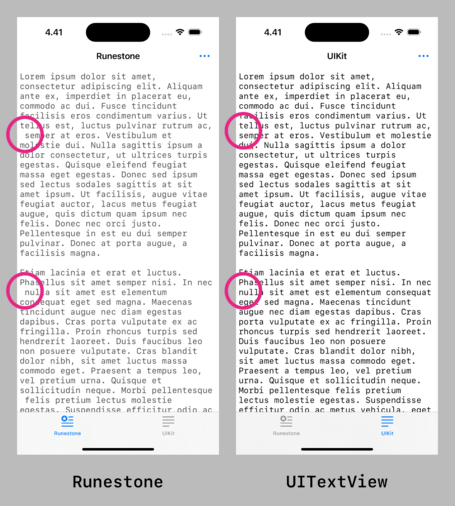
Hoping to fix this difference between Runestone and UITextView as part of bringing Runestone to the Mac.

TextKit, and as a result UITextView, will remove leading spaces one line fragments when wrapping lines. This ensures that line fragments align vertically.

It's going to be tricky though 🤔

This turned out to be much easier than I anticipated! 😃

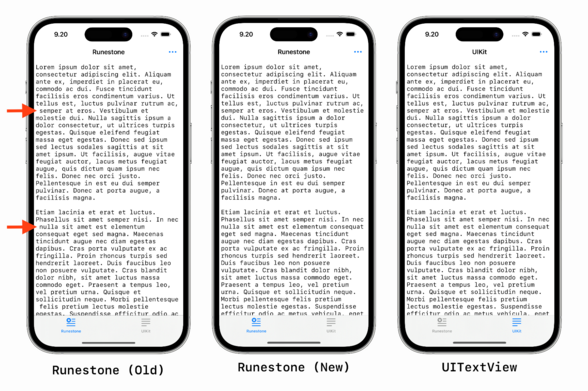
Runestone will now remove leading whitespace in line fragments to match the text layout of UITextView and NSTextView much closer.

This difference has been bothering me since the launch of Runestone so it feels great to finally have it addressed.

Here are the changes for anyone interested: https://github.com/simonbs/Runestone/pull/272

Hides leading whitespaces from line fragments by simonbs · Pull Request #272 · simonbs/Runestone

The changes in this PR hides the leading whitespace in line fragments to align with TextKit, i.e. UITextView and NSTextView. See the screenshot below for a comparison. The new caretLocation(forLine...

GitHub

Fixed a bug in Runestone for AppKit where it would reapply the syntax highlighting every time the window was resized, as such, causing the text to "blink”. 😃

Baby steps, y’all.

The AppKit version of Runestone is probably far enough that I can use it in Scriptable for Mac but now I have an itch to create tiny text editor app for Mac based on Runestone 😅
Quite surprised with how far I could get with Runestone for AppKit and a NSDocumentController in just an hour or so. This is practically a *super* simple text editor with line numbers, syntax highlighting, a page guide, and a bit more 😃
Part of me think Apple should ship something like this with macOS. Give TextEdit line numbers, syntax highlighting, and highlighting the current line. I could see that being useful to a large part of the developer community and make programming slightly more accessible to newcomers or at least pique young people’s interest.
Added support for creating new documents and saving documents to my little example project for testing Runestone for AppKit. It's starting to feel like TextEdit but with syntax highlighting and line numbers 😄
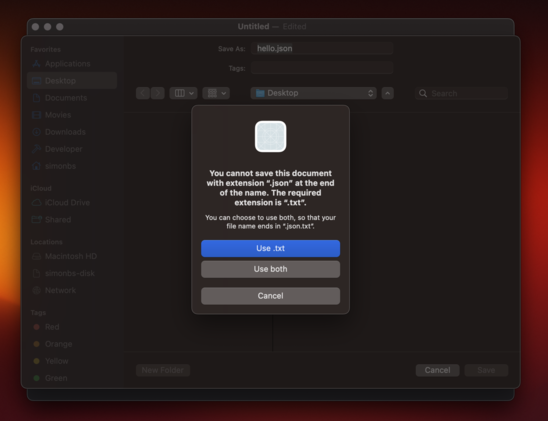
I wonder which part of NSDocument or NSDocumentController it is that is preventing me from saving files with the .json file extension 🤔
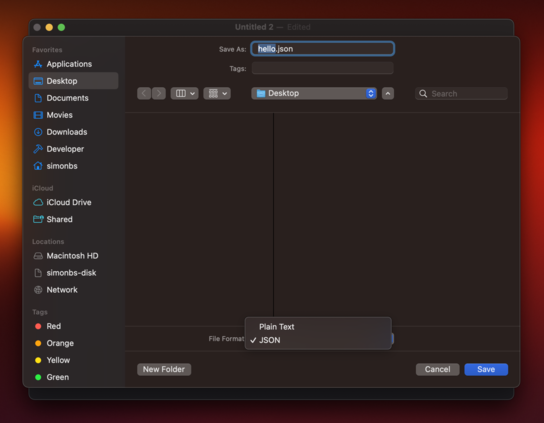
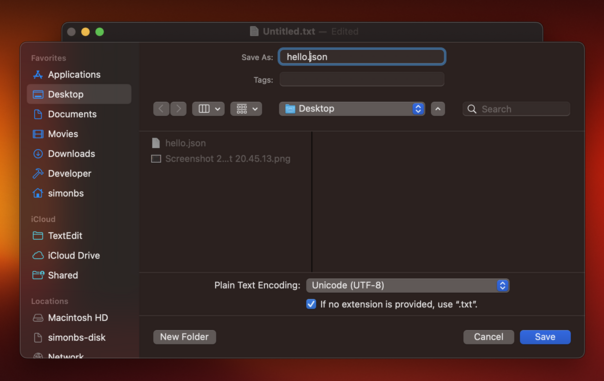
Returning [public.plain-text, public.json] in `writableTypes ` of my NSDocument subclass lets me save both plain text files and JSON files. This is not really want I want though. I want to allow any path extension, much like TextEdit does where it will just fallback to .txt if no extension is provided.
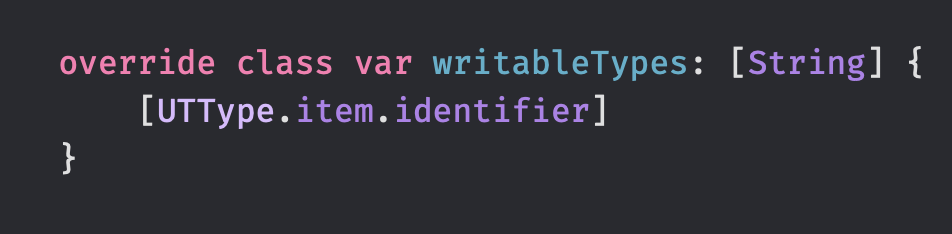
Returning [public.item] from writableTypes lets me save the document with any file extension. I guess this is fine 🤷‍♂️

Got window cascading working 😃

I was not able to get it working without using a storyboard which I'm not so happy about. Storyboards seem more common in the AppKit-world than in the iOS-world though.

Baby steps, y'all.

Happy to see that Runestone for AppKit has a pretty decent scroll performance 😃

This was a big focus point of mine when building Runestone for iOS and unsurprisingly, I can harvest the fruits when running Runestone on the Mac too.

This is a large JSON file with absurdly long lines and scrolling is fine but not perfect but I'm happy with it as a benchmark 😊

Baby steps, y'all.

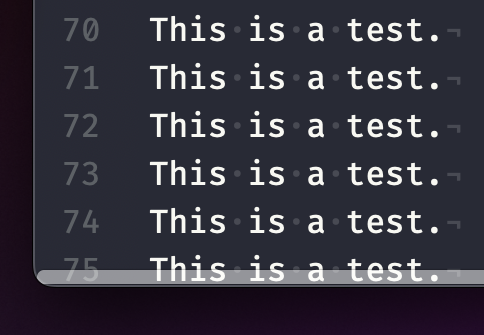
Need to figure out how I can avoid the line numbers becoming "clipped" when scrolling past edge on the left-hand side 🤔

I have previously worked around this by adding the line numbers on top of the NSScrollView but now I'd like the line numbers to be part of the scroll view's document view.

This one is tricky…

Ooohh... The trick is probably to use addFloatingSubview(_:for:) on NSScrollView 👀 https://developer.apple.com/documentation/appkit/nsscrollview/1403546-addfloatingsubview
Apple Developer Documentation

Adding the line numbers as a floating view to the NSScrollView works fine until the find/replace panel is presented. Why does it have to be so hard to work with scroll views in AppKit? 😭

In UIKit I just add the line numbers to my scroll view and manually offset them when the user scrolls to make them appear sticky. That *almost* works in AppKit but the UI will sometimes flicker and get clipped in a way I don't like 😔

Here's an example where I'm not using the scroll view's floating view. Instead the line numbers are embedded into the scrollable content and manually offset on the X-axis to make them appear sticky. Scrolling works fine and the find/replace bar works as expected but now I have to deal with UI glitches that I can't figure out why are occurring 😑
Several people have suggested that I use a NSRulerView for the line numbers. I wanted to avoid that as I'd like the horizontal scroller to be on top of the line numbers, similar to how Xcode and Nova behaves. That's not the default behavior of NSScrollView when adding a NSRulerview.

This thread is going to be a bit quite the next few days as I rework some of the internals of Runestone to make it easier to support both the AppKit and the UIKit implementation. These changes should make the implementation of line numbers and find/replace a bit prettier, hopefully.

Baby steps, y'all.

Part of me feels like refactoring my code is a waste of time because it works fine. Another part of me appreciate that I take the time to make the code easier to maintain.
@simonbs You're “wasting” time now to avoid getting stuck later. Better to use the time now that you got it, rather than taking on too much debt later and see no end in sight.
@simonbs I don't think I ever regret refactoring things. And if I don't, there's the friction of working with hard to maintain code and the guilt of “I really should have fixed this before now”.
@simonbs refactoring is also a kind of reflection or mediation on your code and I believe is directed learning that will improve the next line of code you write.
@simonbs I like saving refactoring for days I don't want to think hard, just want to touch code and have tv on in the background
@galtenberg Honestly, refactoring is when I do the most thinking. This is hard work.

As I move code out of large types in Runestone, I struggle to find proper names for those types. Here are a few examples.

- What's the name of the type coordinating a text change? TextEditService? TextEditController? TextEditor?
- The type laying out line fragments? LineFragmentLayouter? LineFragmentLayoutManager? LineFragmentLayoutController?
- The type managing the content size of the scroll view? ContentSizeManager? ContentSizeService?

I'm spending way to much time on this 😑

Refactoring my code to make it less it easier to maintain in the long wrong and I feel like I have forgotten how to write code. I'm like

"What's the best way to get notified when this object changes? 🫤💫”

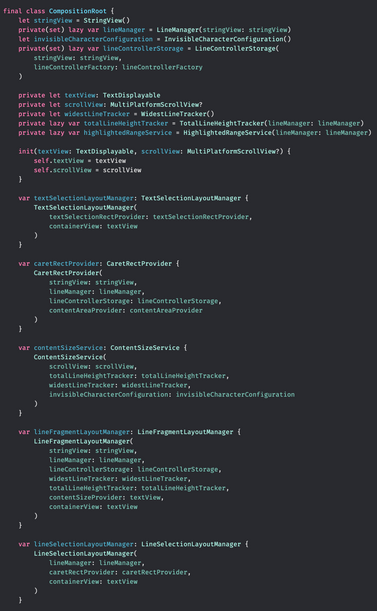
Making some progress on bringing the Composition Root pattern to the Runestone framework 😃

On one hand it's stressing me out a bit that I'm spending so much time refactoring Runestone's code but on the other hand, I think I'll appreciate this effort for several years going forward.

Today I made a small breakthrough in the clean up of the Runestone codebase. It feels so good and it's such a relief 😃😌

The past week I have written very little code on Runestone because I have been trying to figure out how I want to structure the code, each component's dependencies, and the communication between them. Today I realized that the question was right in front of me the entire time: Combine.

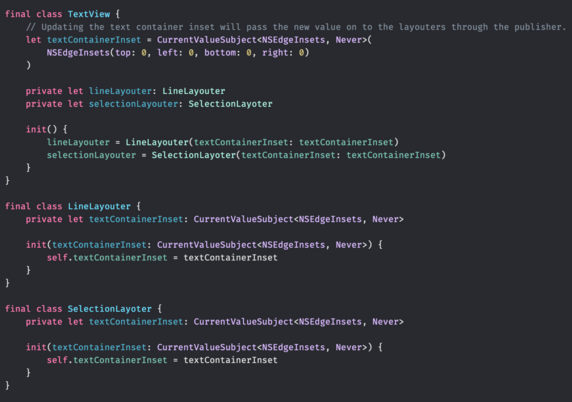
Now I have quite a few CurrentValueSubjects in Runestone's codebase and that leads to a whole lot of `foo.value` calls. It looks so ugly that it makes me consider if I am doing something wrong. CurrentValueSubject is a pretty decent way of distributing shared state though, right? 😕

Refactoring large parts of Runestone to isolate logic and make it communicate using Combine. This morning I got cursor movement working again and it feels like a tiny milestone 😄

Baby steps, y'all.

@simonbs It sounds like @Published might be more appropriate for your use case. You can subscribe to @Published to receive their new values, and in other places you can read current values simply accessing the property.

Note that @Published fires on willSet though so the value you'd receive in your sink call will not be the same as accessing the property directly from within your sink.

@donnywals I'm unsure if @Published is actually the way to go in this case.

I'm using the CurrentValueSubject to pass state to nested object as shown in this code snippet. I don't know how I would achieve that with @Published.

I *think* that @Published firing on willSet is also a problem for me but I could probably work around that.

@simonbs @donnywals as well as @Published is main thrad only, I try to abstain from using it whenever I can (but would be nice to create a property wrapper for CurrentValueSubject that behaves like @Published)
@lvalenta @simonbs @donnywals @Published is not restricted to the main thread and is not annotated with @MainActor. The constraint is that @Published properties on an ObservedObject cannot be updated off the main thread if that object is an @ObservableObject or @StateObject of a view. That requirement comes from SwiftUI – don’t invoke objectWillChange on a view-observed object off the main thread – and not @Published.
@simonbs @donnywals That's a perfect use case for @Published PW. But keep in mind you should use it only with properties of the classes. Don’t use it inside structs.
@Mecid @donnywals Interesting! Do you know how I can best share the underlying publisher between classes?
@simonbs I think the problem lies elsewhere. The idea behind reactive programming is to not use .value or .output properties but rather subscribe to streams of data in non-imperative, signal-driven way. If you do things right, it is possible to never use .output and .value properties at all since everything is a stream. That’s a huge departure from traditional imperative programming but resolves the issue of an outdated state.
@simonbs yeah I have the same thing using RxSwift and I think that's just the price you pay for having to wrap your values

@kylebshr @simonbs if you squint, everything ends up being an async value, so yeah this is common.

It's so handy to be able to subscribe to changes _or_ get the current value synchronously though!

@simonbs since you mentioned using composition root in previous posts, do you have any specific approach to using Combine? Would you be using it only in composition root or spreading it thru all objects?
@kasprzykmichal I will use Combine in various places but I’ll also inject publishers through constructors to share state and communicate between types.
@simonbs thanks! I was thinking how would you approach this, since it seems that you have a lot of dependencies that need to communicate with each other.

@simonbs Hey, I’m recently having issues with Runestone crashing on me when I launch the app - especially when I want to open one of my MD text files using a Siri Shortcut - is there any way I can help you detect or report these crashes?

Especially in connection with my journaling shortcuts:

https://michael.team/journal22/

New Journaling and Planning Siri Shortcut to help you stay focused and productive!

After 6 years of consistent journaling on my iPad I have a special gift 🎁 for you: an updated, tweaked and polished new Siri Shortcut that will help you journal and plan your day just like me. Thanks to this Shortcut I journal consistently and also experience much more productive days than ever before. To boot, this Siri Shortcut is completely free and you can even tweak it to your liking and it doesn’t require any additional paid app. Just take it and let me know what you think:

Michael.team
@michael Hey. Are these files stored in a third-party file provider?
@simonbs Nope. iCloud /Shortcuts folder.
@michael Is it for Markdown files only? Does it happen consistently for the same Markdown files?

@simonbs It’s the same file - when you look at my Siri Shortcut for journaling, you see that I’m appending and later opening the same YEAR.md file and as the file grows, it starts crashing the app upon subsequent opens. The file is not really big, but somehow it crashes Runestone.

I’ve recorded a video for you:

@michael Is there any chance you can send me the file? I’d love to reproduce this with a file that’s known to cause the issue.

Since your shortcut is related to journaling, I guess there’s a lot of personal info in there and I totally understand if you can’t share it. Thought it wouldn’t hurt to ask though. In case it isn’t personal 😊

@simonbs It is very personal indeed.

I will try to go through that file and NOT make it personal and see if I can send you a file like this.

In the meantime you can try to reproduce it by using my Siri Shortcut: Journal Basic, to build a file like this:

https://michael.team/journal-basic/

Start journaling today with this simple (and free) Siri Shortcut!

Start regular journaling today! I’ve been journaling daily since 2016 and over the years I’ve tweaked my system. I posted my most advanced version of journaling workflow using Siri Shortcuts and iA Writer over a year ago. However, as I recently prepared a more basic Journaling Shortcut in Polish for my monthly column at the iMagazine, today I’m sharing with you all the English version of the basic Journaling Shortcut. It doesn’t require any additional app. Only Siri Shortcuts which comes with every iOS or macOS now. Just get the shortcut and start journaling today:

Michael.team
@michael Just tried the shortcut and logged a few entries. That did not cause the editor to crash. I’m guessing it’s some specific content in your file that Runestone isn’t happy with. Maybe the issue can be fixed by simply updating to the latest version of the Markdown parser 🤔
@simonbs just sent you a file that crashes Runestone via email. Hope it helps. I’m fearing the number of Headers or line breaks or something like this might be overwhelming for the editor. Or something else 🤔
@simonbs I’m writing a small example app where I try to use modern and clean patterns, and I’m finding both Combibe and async valuable, I’m using both for various things.
@jaanus Agreed. In Runestone I’m trying out CurrentValueSubject to manage shared state. I have a lot of that.

@simonbs @jaanus lovely! I enjoy both these APIs

Don't forget to look at Apple's AsyncAlgorithms package

https://github.com/apple/swift-async-algorithms/blob/main/Sources/AsyncAlgorithms/AsyncAlgorithms.docc/Guides/Channel.md

In particular check out AsyncChannel, which has similar powers to Subject

swift-async-algorithms/Sources/AsyncAlgorithms/AsyncAlgorithms.docc/Guides/Channel.md at main · apple/swift-async-algorithms

Async Algorithms for Swift. Contribute to apple/swift-async-algorithms development by creating an account on GitHub.

GitHub
@Alexbbrown @simonbs Just need to be aware that there is no multicast with async. Async channels, streams and sequences can only have one subscriber. Combine is many-to-many multicast, one publisher can have many subscribers.
@simonbs I’m sure you will! Here’s some encouragement to keep going!
@simonbs let’s have a beer instead, it feels like the same option here.
@DavidNielsen Not sure what that means but I'm always up for drinking a beer with people.

@simonbs There are only two hard things in Computer Science: cache invalidation and naming things.

-- Phil Karlton

@simonbs I like LineFragmentLayouter!

@simonbs

I don’t like vague verb(er|or) names, though some are ok in context.

TextChangeCoordinator (your words) might work if “text change” is narrowly defined.

The next two sound more like functions than objects or structs. They could have associated cache objects if needed, or smaller bookkeeping structs associated with them.

🤷🏽

@fcanas TextChangeCoordinator sounds good to me.

I think there's much more logic to the two others than what a single function can encompass. The trickiest part is that both need to be used by two independent code paths though. They need to be used by an iOS and a macOS UI component.

@simonbs as you know, it’s not easy. That first one serves a great example that explaining what something does often surfaces the right vocabulary for naming.

But it can also show where you might cut down sizes further to simpler namable objects. Or it can surface a potential refactor.

Sometimes you’re just stuck with a second-rate name. At that point, in-line documentation goes a long way.

@simonbs It may feel like you are spending too much time in it as it’s just a name, right? But naming is pretty important down the line.

Adding a comment explaining the type has helped me before. Sometimes it helps me came up with a better name good enough that I can remove the comment itself. Also, passing the comment to ChatGPT and ask it for names works pretty well.

@simonbs I’d say time well spent. This is often overlooked and will be well worth it down the line

@simonbs When the temptation arises to call something a manager, coordinator etc, it might be a sign that some useful abstractions are waiting to be reified, such as TextChange, LineFragmentLayout, ContentSizeConstraint, along with functions that work with these reified concepts that I typically define as static members to those types.

Many times I find I can get away with defining and using initialisers for said types, which further reduces the naming burden.

@simonbs line number in AppKit with NSTextViews are, well, not trivial but okay-ish to implement as an MVP, but also very tricky to get right for complex documents. And I'm not sure about horizontal scrolling 🤔

You're probably not even using NSTextViews in the AppKit port, are you?

I believe @krzyzanowskim got this to work to his """satisfaction""" (if working around all the AppKit quirks is ever satisfactory)

@ctietze @krzyzanowskim Yeah, I'm not using NSTextView. Marcin is using a NSRulerView. There are two downsides to the ruler that make me hesitant to adopt it:

- The horizontal scroller of the scroll view doesn't go over the NSRulerView, it starts in front of the ruler. I'd like the scroller to be on top of the ruler, similar to Xcode and Nova.
- It'll be tricky to keep the API of the AppKit version close to the one my UIKit version

That said, I may end up just going with a ruler 🤷‍♂️

@simonbs @krzyzanowskim Yeah the ruler view seems to be the thing they recommended in (Dan Schimpf and Aki Inoue (2010): Advanced Cocoa Text Tips and Tricks, Apple.)

https://docs.huihoo.com/apple/wwdc/2010/session_114__advanced_cocoa_text_tips__tricks.pdf

@ctietze @krzyzanowskim It really does seem to be what everyone suggests and uses. I wonder if the Nova text editor is using a NSRulerView, and if it is, how it shows the horizontal scroller on top of the line numbers as shown in the screenshot. For some reason, I really like this behavior. Xcode and Nova does it. Maybe I like it because they are the text editors I use the most.

@simonbs It looks very tidy, yeah.

I wonder if you could hide the NSScroller at the bottom and add another one, floating, in a higher Z level