Me porting Runestone from UIKit to AppKit.

Yay! Runestone now works with... *Checks notes*... UIKit?? 🤨

In order to prepare for AppKit support, I had to rip the internals of Runestone apart and put it together again. For the first time in 36 hours, Runestone now works with UIKit again.
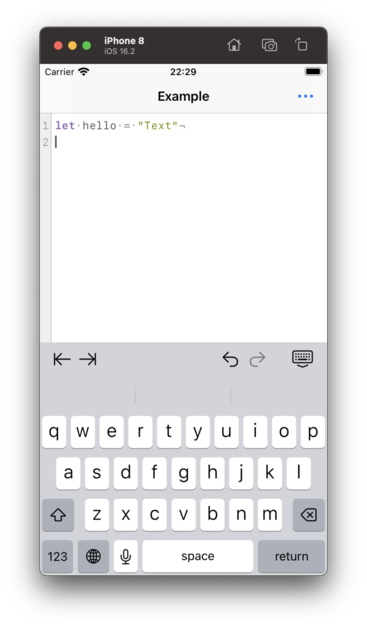
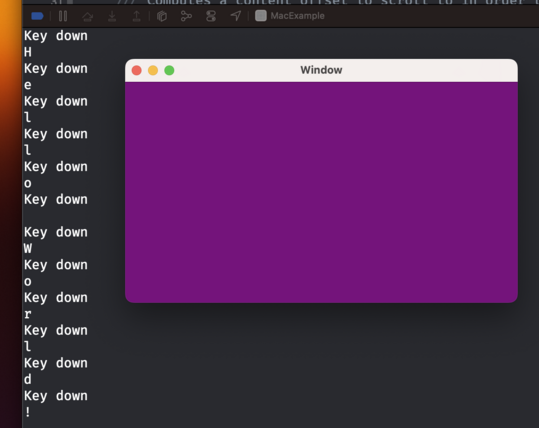
So I now have an NSWindow with an NSView that receives keystrokes. That's like step 0 in building a text editor, right?

There's such a long way to go still before Runestone is rewritten in AppKit. I hope I'll eventually turn a corner where all my work from UIKit can be reused and I ✨magically✨ have an AppKit implementation.

Runestone just rendered its first text using AppKit. Baby steps, y'all.

The AppKit version of Runestone now supports scrolling the content.

This involves a bit more than just wrapping everything in an NSScrollView because Runestone only renders the lines within the viewport.

Baby steps, y'all.

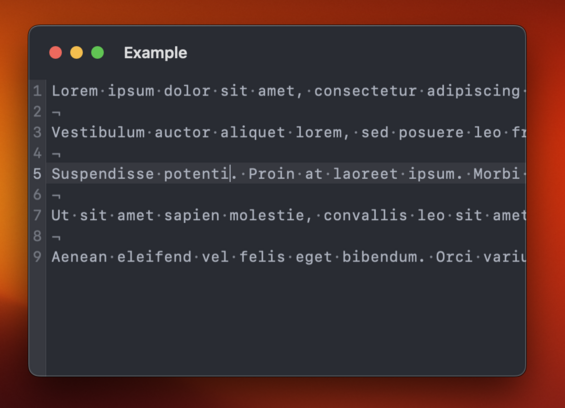
Time to add a caret that shows where characters will be inserted. I'm a little bummed that I have to implement this myself. We get that for free in UIKit.
Runestone for AppKit now has a caret. Baby steps, y'all.

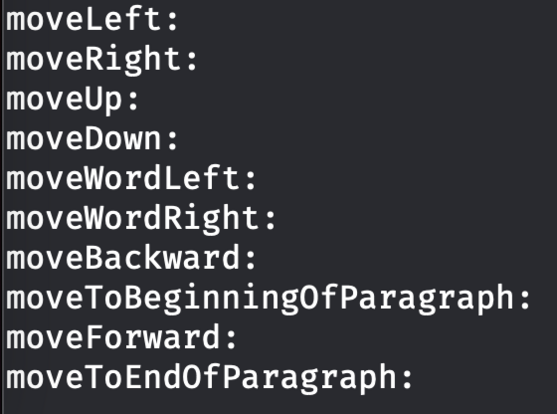
I need to implement all moving within lines myself 😑

In the screenshot I'm logging the selectors that I don't handle but that AppKit expects me to handle. This is something we get (almost) for free in UIKit. Honestly, I really don't want to write this logic.

Got navigation with the arrow keys working in Runestone for AppKit.

I figured out how to reuse some of the code from the UIKit implementation so this turned out to be much easier than anticipated.

Next up is adding support for jumping between words with Option+Left/Right arrow keys.

Baby steps, y'all.

In order to move from word to word, UIKit relies on an implementation of UITextInputStringTokenizer. I managed to replicate UIKit's calls to my string tokenizer and reuse a lot of logic for moving between words. Baby steps, y'all.

While working on moving between words in Runestone for AppKit I found that the UIKit version had an incorrect behavior when moving between words followed by an emoji. The caret would always jump all the way to the end of the document which isn't correct, obviously. Fortunately, that was easy to fix and the fix works in both UIKit and AppKit.

And yes, it is supposed to jump all the way from the word "emoji" to the word "cool". That's how TextEdit does it too. Baby steps, y'all.

And now Runestone for AppKit supports moving to the line and document boundaries as well as clicking with the mouse to move to the closest location.

Maybe the next step is to support text selection. Or something more fun like line numbers.

Baby steps, y'all.

Fortunately, invisible characters, line height, kerning and theming works with no changes needed 😃

Line numbers and highlighting the selected line now works in Runestone for AppKit.

This one was a bit tricky because the view hierarchy is different between AppKit and UIKit and there's some important layering going on here to make it look the way I want it to.

On the other hand, disabling line wrapping worked without any changes 😃

Baby steps, y'all.

I quite like this look where the title bar is big and transparent ✨

Taking a break from this thread tonight*. I did a few minor things that aren’t worth showing off but I’ll prioritize playing with the Quest 2 and watching Slow Horses for the rest of the evening. I need a short break 🤗

* Since I’m posting this I guess I’m not really taking a break.

Just tested syntax highlighting in Runestone for AppKit for the first time. Was happy to discover that it just works 😃

Baby steps, y'all.

Mostly got text selection, copy, paste, and cut working in Runestone for AppKit today 😃

There are still a couple of bugs in the text selection that needs to be fixed but it's getting there.

Baby steps, y'all.

Still polishing the text selection in Runestone for AppKit. Getting all keyboard shortcuts working as expected is extremely tricky but I'm getting closer. However, I've just got text selection working with the mouse so that's something 😄

Baby steps, y'all.

In case you would like to start playing around with Runestone for AppKit, you can do so already now. It’s available in the GitHub repository: https://github.com/simonbs/Runestone/tree/mac

I’m still working on this, so bugs should be expected. Don’t waste too much time reporting issues. At this point I likely know they’re there but haven’t gotten around to fixing them yet 😊

And in case you are using Runestone in your project, remember that I have GitHub sponsors setup 🫶 https://github.com/sponsors/simonbs

GitHub - simonbs/Runestone at mac

📝 Performant plain text editor for iOS with syntax highlighting, line numbers, invisible characters and much more. - GitHub - simonbs/Runestone at mac

GitHub

Got double and triple clicking to select words and lines working in Runestone for AppKit 😃

Notice that it's even possible to double click an opening or closing bracket to select everything within the brackets 🤓

Baby steps, y'all.

Word selection was a prerequisite to support right-clicking to cut, copy, and paste and with word selection in place, it was trivial to the right-click menu 😃

Baby steps, y'all.

And now Runestone for AppKit supports undo and redo too 😃

Text selection, the right-click menu, and undo/redo are things I have missed while working on other features, so it is great to finally have those in place.

Baby steps, y'all.

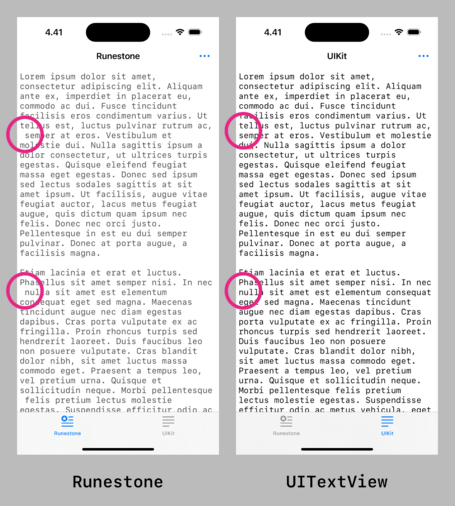
Hoping to fix this difference between Runestone and UITextView as part of bringing Runestone to the Mac.

TextKit, and as a result UITextView, will remove leading spaces one line fragments when wrapping lines. This ensures that line fragments align vertically.

It's going to be tricky though 🤔

This turned out to be much easier than I anticipated! 😃

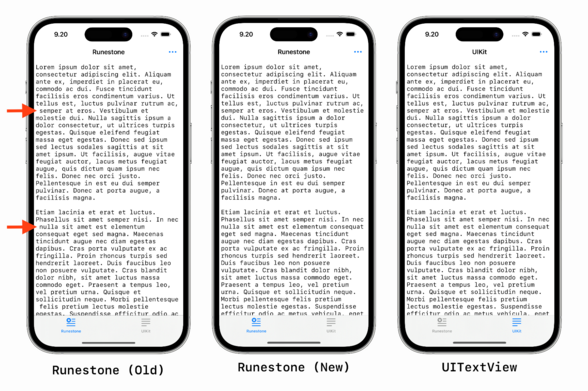
Runestone will now remove leading whitespace in line fragments to match the text layout of UITextView and NSTextView much closer.

This difference has been bothering me since the launch of Runestone so it feels great to finally have it addressed.

Here are the changes for anyone interested: https://github.com/simonbs/Runestone/pull/272

Hides leading whitespaces from line fragments by simonbs · Pull Request #272 · simonbs/Runestone

The changes in this PR hides the leading whitespace in line fragments to align with TextKit, i.e. UITextView and NSTextView. See the screenshot below for a comparison. The new caretLocation(forLine...

GitHub

Fixed a bug in Runestone for AppKit where it would reapply the syntax highlighting every time the window was resized, as such, causing the text to "blink”. 😃

Baby steps, y’all.

The AppKit version of Runestone is probably far enough that I can use it in Scriptable for Mac but now I have an itch to create tiny text editor app for Mac based on Runestone 😅
Quite surprised with how far I could get with Runestone for AppKit and a NSDocumentController in just an hour or so. This is practically a *super* simple text editor with line numbers, syntax highlighting, a page guide, and a bit more 😃
Part of me think Apple should ship something like this with macOS. Give TextEdit line numbers, syntax highlighting, and highlighting the current line. I could see that being useful to a large part of the developer community and make programming slightly more accessible to newcomers or at least pique young people’s interest.
Added support for creating new documents and saving documents to my little example project for testing Runestone for AppKit. It's starting to feel like TextEdit but with syntax highlighting and line numbers 😄
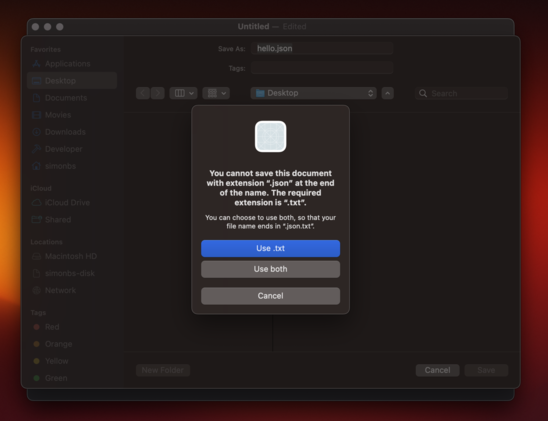
I wonder which part of NSDocument or NSDocumentController it is that is preventing me from saving files with the .json file extension 🤔
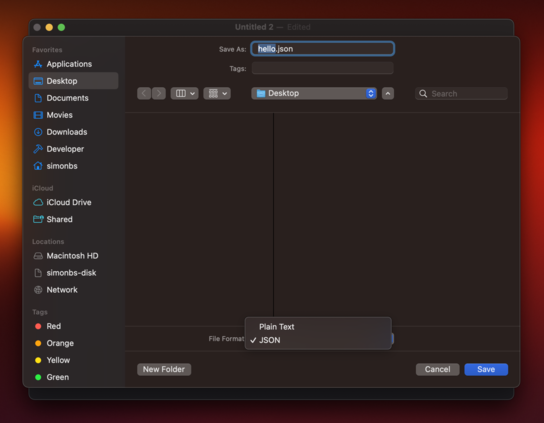
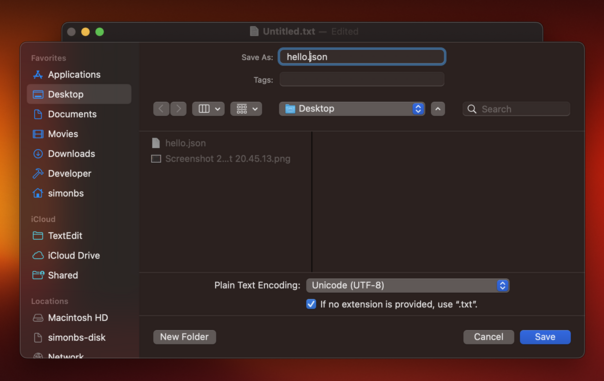
Returning [public.plain-text, public.json] in `writableTypes ` of my NSDocument subclass lets me save both plain text files and JSON files. This is not really want I want though. I want to allow any path extension, much like TextEdit does where it will just fallback to .txt if no extension is provided.
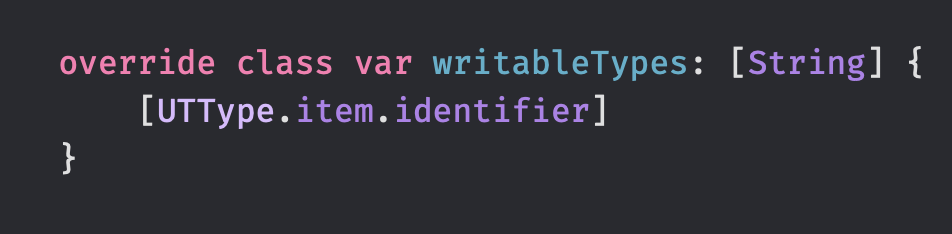
Returning [public.item] from writableTypes lets me save the document with any file extension. I guess this is fine 🤷‍♂️

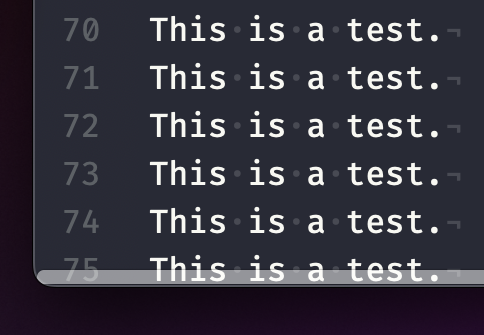
Got window cascading working 😃

I was not able to get it working without using a storyboard which I'm not so happy about. Storyboards seem more common in the AppKit-world than in the iOS-world though.

Baby steps, y'all.

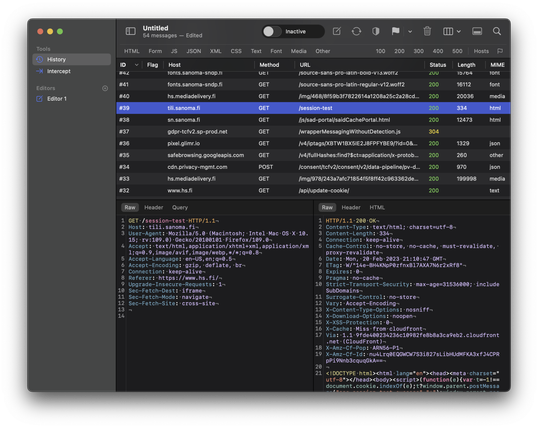
Happy to see that Runestone for AppKit has a pretty decent scroll performance 😃

This was a big focus point of mine when building Runestone for iOS and unsurprisingly, I can harvest the fruits when running Runestone on the Mac too.

This is a large JSON file with absurdly long lines and scrolling is fine but not perfect but I'm happy with it as a benchmark 😊

Baby steps, y'all.

Need to figure out how I can avoid the line numbers becoming "clipped" when scrolling past edge on the left-hand side 🤔

I have previously worked around this by adding the line numbers on top of the NSScrollView but now I'd like the line numbers to be part of the scroll view's document view.

This one is tricky…

Ooohh... The trick is probably to use addFloatingSubview(_:for:) on NSScrollView 👀 https://developer.apple.com/documentation/appkit/nsscrollview/1403546-addfloatingsubview
Apple Developer Documentation

Adding the line numbers as a floating view to the NSScrollView works fine until the find/replace panel is presented. Why does it have to be so hard to work with scroll views in AppKit? 😭

In UIKit I just add the line numbers to my scroll view and manually offset them when the user scrolls to make them appear sticky. That *almost* works in AppKit but the UI will sometimes flicker and get clipped in a way I don't like 😔

Here's an example where I'm not using the scroll view's floating view. Instead the line numbers are embedded into the scrollable content and manually offset on the X-axis to make them appear sticky. Scrolling works fine and the find/replace bar works as expected but now I have to deal with UI glitches that I can't figure out why are occurring 😑

@simonbs line number in AppKit with NSTextViews are, well, not trivial but okay-ish to implement as an MVP, but also very tricky to get right for complex documents. And I'm not sure about horizontal scrolling 🤔

You're probably not even using NSTextViews in the AppKit port, are you?

I believe @krzyzanowskim got this to work to his """satisfaction""" (if working around all the AppKit quirks is ever satisfactory)

@ctietze @krzyzanowskim Yeah, I'm not using NSTextView. Marcin is using a NSRulerView. There are two downsides to the ruler that make me hesitant to adopt it:

- The horizontal scroller of the scroll view doesn't go over the NSRulerView, it starts in front of the ruler. I'd like the scroller to be on top of the ruler, similar to Xcode and Nova.
- It'll be tricky to keep the API of the AppKit version close to the one my UIKit version

That said, I may end up just going with a ruler 🤷‍♂️

@simonbs @krzyzanowskim Yeah the ruler view seems to be the thing they recommended in (Dan Schimpf and Aki Inoue (2010): Advanced Cocoa Text Tips and Tricks, Apple.)

https://docs.huihoo.com/apple/wwdc/2010/session_114__advanced_cocoa_text_tips__tricks.pdf

@ctietze @krzyzanowskim It really does seem to be what everyone suggests and uses. I wonder if the Nova text editor is using a NSRulerView, and if it is, how it shows the horizontal scroller on top of the line numbers as shown in the screenshot. For some reason, I really like this behavior. Xcode and Nova does it. Maybe I like it because they are the text editors I use the most.
@simonbs now, we all wanna now if it did the trick 🫣
@deanatoire It seems to do the trick but then caused other issues that I think I’ve worked around now though 😄
@simonbs it’s « baby steps y’all » then! 🤘🏻
@simonbs If it helps, the traditional way to implement this is as a ruler view for the NSScrollView. (You can set your own rulerViewClass, and enable the vertical ruler while leaving the horizontal ruler disabled.)
@kcase That's interesting! Will make sure to check it out. Thanks!
@simonbs I wonder if this can this be fixed with z-indexing?
@ciscoserrano I played around with it but it doesn't seem to make a difference. I _think_ the NSClipView of NSScrolView is clipping the content.

@simonbs that sounds right to me. Hmmm scroll views in swift have a property called bounce.

If bouce is set to false it should prevent you from being able to scroll past the edge of the screen at all.

Have you tried that?

@simonbs Other than being a perfectionist, why do you consider this an issue? Most people aren't going to attempt to scroll that much past the left are they? If they do, the clipped line numbers aren't going to affect the functionality, correct?
All of the text editors I use on the Mac don't even left me over-scroll to the left like that. What am I missing here?
@platkus I want it to be perfect.
@simonbs OK, I get that. But why does it over-scroll to the left like that to begin with? I’ve never seen that on any of my text editors on the Mac.
@platkus It seems common for text editors that let you disable line wrapping. Both Xcode and Nova does this.
@simonbs Hmm, OK. Thanks for the info. I just tried it in Xcode and now I see what you are saying. I had to make the width of my editor window small enough so that scrolling was required. It doesn't do it in Xcode if the window is wide enough such that no horizontal scrolling is needed. Which on my 27" display, horizontal scrolling is rarely needed so I never noticed this before.
Here's to the pursuit of perfection! 👍
@simonbs this would make a great Mac app 😄 for editing my absurdly long JSON files.
@simonbs It doesn't crash like VSCode. Looks like a big win to me.
@simonbs Was worried about highlighting performance at first, then remembered I was doing debug builds all along 🙉 With release builds, this 600 kB JavaScript response gets rendered very fast!
@pasi Awesome! Make sure to use the latest changes on the Mac branch too. I fixed a few performance issues 10 hours ago or so.
@simonbs I think I did pull the latest code from your mac branch. It’s starting to look quite good 🙂
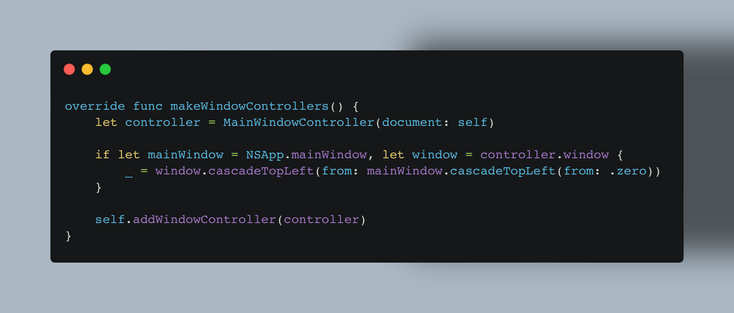
@simonbs Proxygen Mac app has this in its NSDocument subclass. Seems to work 🤷‍♂️
@pasi Thanks! Will try that! I thought it would be enough to set the shouldCascadeWindows boolean but you seem to be doing it manually. I’m okay with doing the same though if it means I can get rid of my storyboard.
@simonbs I don’t have a single storyboard file in my Mac app, which I'm proud of. I'm still struggling with building menus programmatically, but so far I've got everything working in code.
@simonbs Whats in peter.html? 🤔
@petergam The HTML of a website that a client asked me to test Runestone with once because Runestone had a bug. I've kept the dump around so I can test with it occasionally.
@simonbs would isNativeType -> Bool change anything? I’m saying that not knowing a thing about NSDocument 🤪
@deanatoire I played around with it and it doesn’t seem to change anything regarding this.
@simonbs Take a look at the Exported Document Types in the project's Info pane.
@simonbs I can imagine many reasons why you’d have even more users for this app than Runestone on iOS. If you released this, that is 🙂
@pasi I’m still debating if I want to release the app or not. Currently leaning towards not releasing it. I’m mostly building it to find bugs in Runestone for AppKit and exploring the document model on macOS for the fun of it.
@simonbs I pretty much never use my iPhone or iPad for text editing, outside of quick Notes edits. On the Mac, I have around ten TextEdit documents (saved and unsaved) open all the time. Both work and private Mac. I can’t be the only one. To me Runestone seems a win compared to TextEdit in a lot of ways.
@simonbs out of interest, why are you leaning towards *not* releasing it?
@drmrbrewer I’m unsure if I want to undertake this as my next project to build and maintain. I have other things I’d like to build too.
@simonbs sure. Seems like Runestone Text Editor for iOS is a runaway success, and I can’t see it being any different for Mac… if anything more so. I’d give my first born to see it released.
@simonbs I'm honestly shocked there is nothing between TextEdit and Xcode that ships with macOS.
@simonbs This is it. Not sure why apple is not implementing this.
@simonbs oh now _this_ is looking good! 👌🏻
@simonbs we all know you’re gonna do it at this point 😂😂🤣

@simonbs Do it! Something above TextEdit but below VS Code, BBEdit or something like that.

Just text editing + syntax highlighting, nothing more 👍

@simonbs do it! BTW I dipped my toes in building a custom tree-sitter grammar thanks to the Runestone framework, it’s super fun 😀